

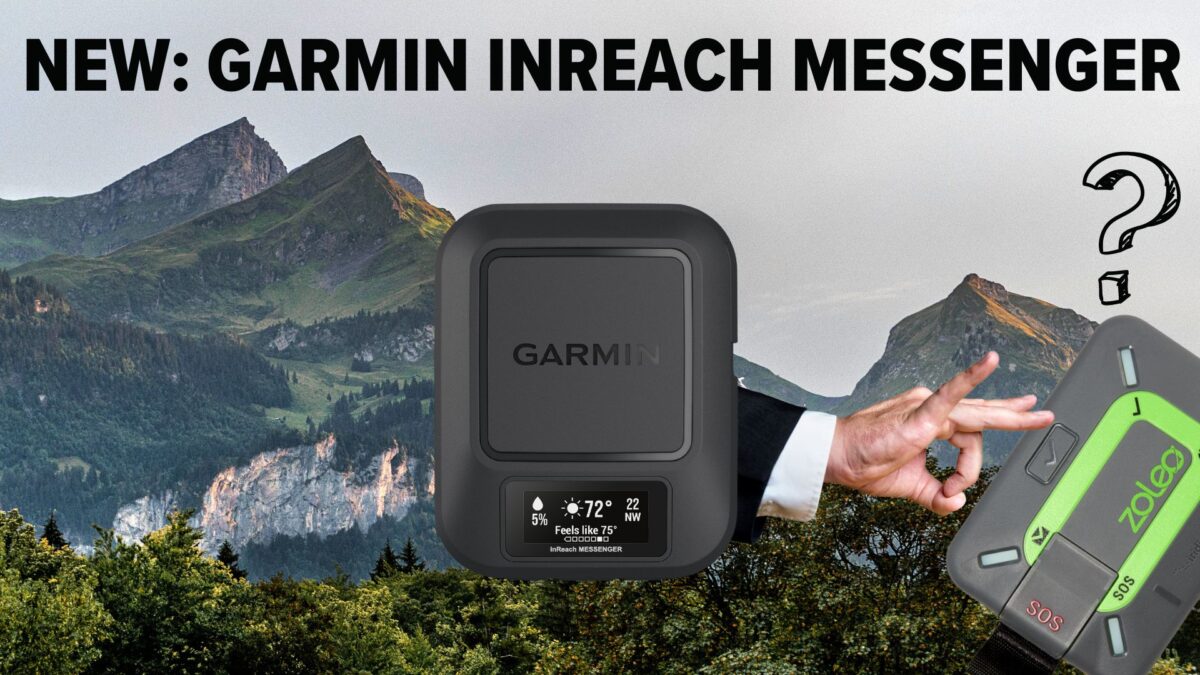

Introduction: Garmin inReach Messenger vs. Zoleo Satellite Communicator
The Garmin inReach Messenger and Garmin inReach Messenger Plus are 2-way global satellite messengers that offers location sharing and SOS capabilities. The Garmin inReach Messenger Plus also provides photo and voice memo sharing capability. Either can be used as a standalone device or paired with your smartphone via the Garmin Messenger app. The inReach Messenger weighs 4.0 ounces and has an MSRP of $300, and the inReach Messenger Plus weighs 4.1 ounce and has an MSRP of $500. This article focuses on the Garmin inReach Messenger. For more information about the Garmin inReach Messenger Plus, see this article.
This article was originally published on September 27, 2022 and updated with new information on September 30, 2022 and September 18, 2024.
Table of Contents
Overview
Like the Zoleo Satellite Communicator and the Somewear Global Hotspot, the Garmin inReach Messenger offers seamless messaging across different types of networks (cellular/WiFi and satellite) and selects the most readily-available network without interrupting message conversations.
Unlike the Zoleo or Somewear products, however, the Garmin inReach Messenger offers the following unique features:
- An on-device display allows the user to view incoming messages and send both preset and custom messages (via screen keyboard), along with other alerts and visual cues.
- Group messaging conversations are maintained for all sent and received messages.
- Weather forecasts can be requested and viewed without a paired smartphone.
- TracBack (Garmin’s breadcrumb tracking program) is usable with or without a paired smartphone.
- Reverse charging via USB-C to preserve the operation of a low-battery phone.

Learn More About Satellite Messaging Devices
See our updated Satellite Messenger Gear Guide to learn more about the Garmin inReach Messenger and its competitors.
Garmin inReach Messenger features
The unique features of the Garmin inReach Messenger include its on-device display, group messaging conversations, TracBack, and reverse charging.
On-device display
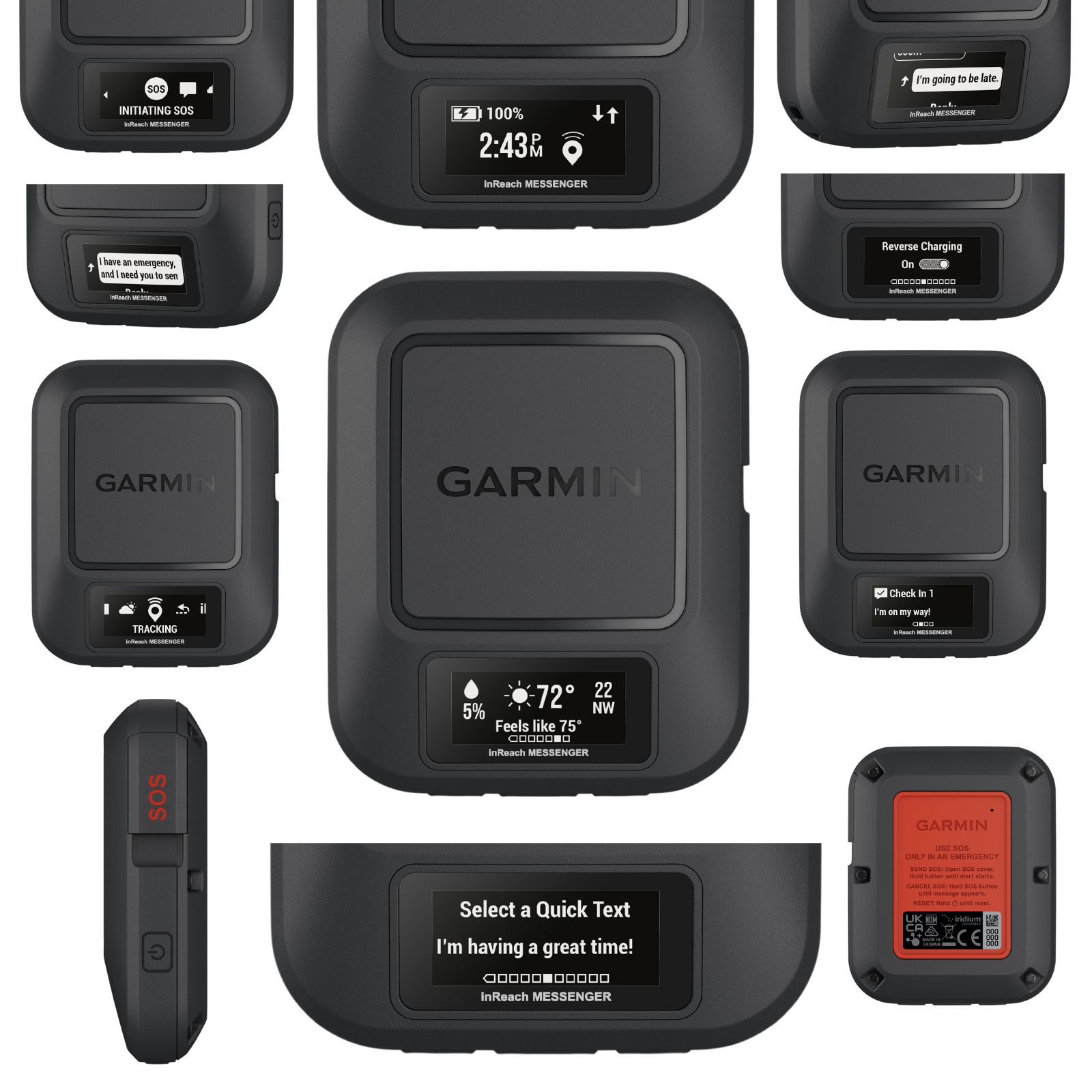
The Garmin inReach Messenger features a simple on-device display screen that offers notable feedback and functionality that can’t be accessed on the Zoleo Satellite Communicator or Somewear Global Hotspot without pairing them to a Smartphone:
- reading incoming messages;
- composing and reading outgoing messages (preset or custom) and monitoring their sending/sent status;
- battery capacity remaining and reverse charging status;
- time of day;
- SOS status and incoming message monitoring;
- the ability to select from and send from a variety of different (preset) Quick Text messages;
- requesting and reviewing weather forecasts.
Group messaging conversations
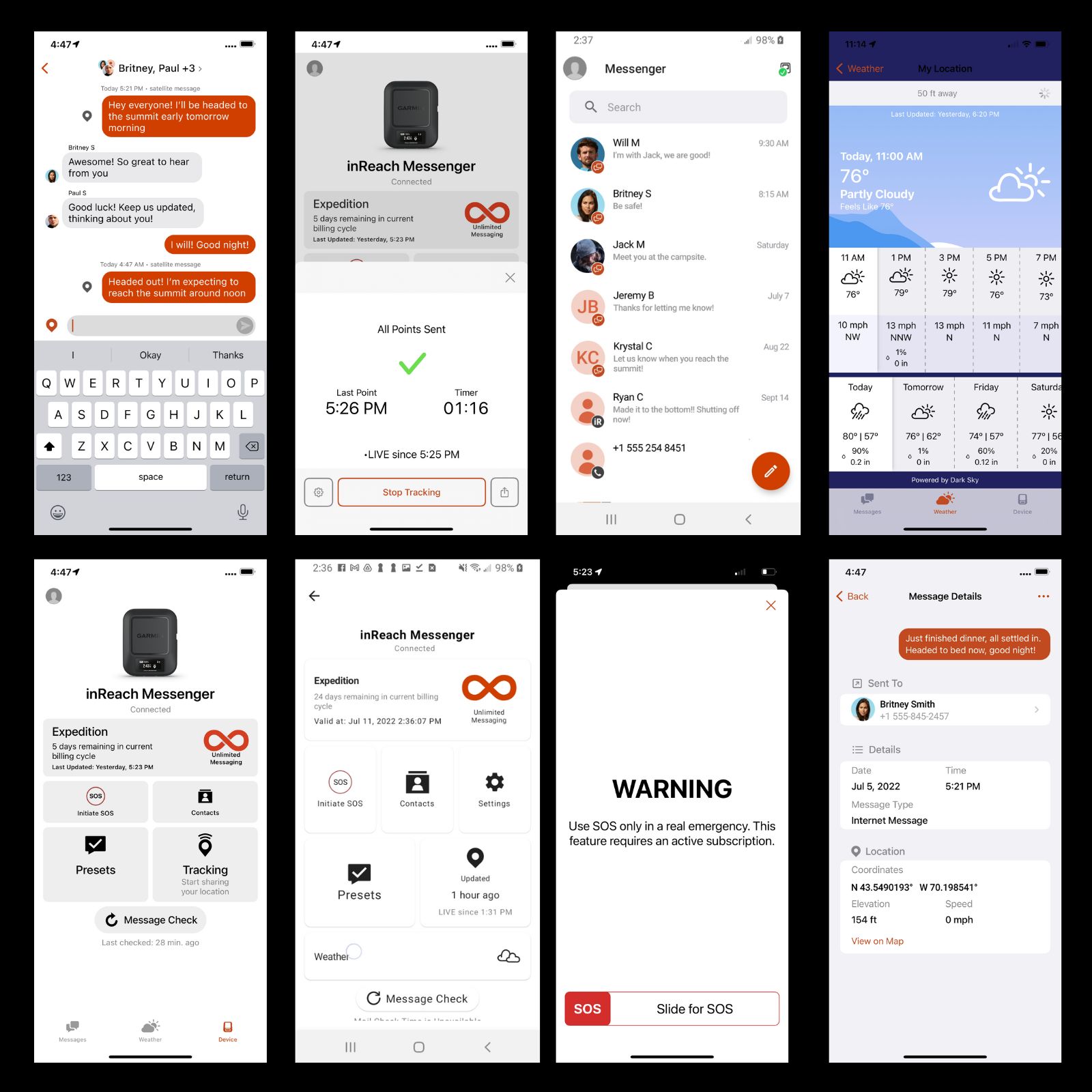
Most satellite messaging devices can send messages to groups (“broadcast” messaging), but when one group member replies, the reply is delivered only to the sender.
The Garmin inReach Messenger is the first satellite messaging device that can both send and receive messages among a group of people while maintaining the group during the entire conversation – similar to how group messaging works in most smartphone applications.
TracBack
TracBack is Garmin’s breadcrumb application. If you turn on TracBack on a TracBack-compatible inReach or GPS device, the unit tracks your route via waypoint breadcrumbs that it saves in its memory. Then, if you’d like to follow the exact route backward, you simply activate TracBack’s reversal, and the device will guide you back to your origination point following the same route.
TracBack can be a useful feature for not getting lost during nighttime bathroom forays into the dark woods, mushroom or berry or elk hunters following signs on the ground rather than paying attention to where they’re traveling, or negotiating through (and back) thick vegetation via game trails and brush-free corridors.
It’s not surprising that the Garmin inReach Messenger provides TracBack. That it allows it to be used without a paired smartphone is welcome.
Reverse charging
Even though the Garmin inReach Messenger is a capable device on its own when not paired to a smartphone, the smartphone is still required to access custom on-the-fly messaging. However, as many of us Garmin inReach Mini users will testify, the moment our smartphone dies is the moment that “typing” custom messages on the Mini becomes awkward enough to elicit enormous frustration. This is particularly problematic if you don’t have access to a portable battery charger, or in the case of an accident, your phone charger is inaccessible.
The Garmin inReach Messenger provides reverse-charging capability. That means if your phone dies or the battery is extremely low, you can use the Garmin inReach Messenger in reverse charging mode to keep your phone charged at a low level. This could be of great importance while communicating during an SOS event.
FAQs (Updated 30.Sep.2022)
Does the Garmin inReach Messenger have a dedicated phone number?
A dedicated phone number on a satellite device makes it easier for anyone with a cell phone and SMS capability to send a text message to the device.
The Garmin inReach Messenger does not have a dedicated phone number. Here’s why (response from Garmin):
The inReach Messenger does not have a dedicated phone number. We have found significant challenges with SMS messaging, things like sending a message with a map link or delivering to a country with a restrictive cell carrier. We’ve found that many of our international customers are using internet driven apps like Whatsapp or Facebook Messenger instead of SMS anyway. We chose to focus our efforts on our Garmin Messenger app and delivering a rich messaging experience where participants can see things like delivery confirmation, read/unread state, and even if a friend or family member has joined the Messenger app community. This gives us the freedom to do things like send a message location or create a group message and know that we control the experience from within our own app.
Keep in mind that we do still support the other methods of communicating with someone who doesn’t want to install the Messenger app, you can send them a message using their SMS number or their email address. You can also send them your MapShare link which has the ability for a visitor to send a message to the inReach device owner. We feel that the Garmin Messenger app is a good solution for close friends and family who want the rich messaging experience and we feel that the original SMS/email/MapShare solution is a reasonable solution for those who don’t want the app.
How will the inReach Mini 2 integrate with the Garmin Messenger (when that support is released) and Garmin Explore apps?
Response from Garmin:
Please note that the inReach Mini 2 will be compatible with the Garmin Messenger app when we release our firmware update, however the first generation inReach Mini will not be compatible. The first generation Mini was launched in 2018 and has some hardware limitations that prevent us from bringing it forward to new apps like the Explore app and the Messenger app. The inReach Mini still works as designed with the Earthmate app for messaging, tracking, safety, planning and navigating, it’s just not able to take advantage of the internet messaging features found in the Garmin Messenger app.
As you’ve seen, the inReach Messenger device does not support any planning or navigation features and is not compatible with the Explore app. Our inReach devices like the inReach Mini 2 will use both apps for their different specialties – the Messenger app for messaging, tracking, and safety, the Explore app for planning, navigating, and reviewing activities. The two apps will be seamlessly linked so that the user doesn’t have to exit one app to go to the other, they will just choose the Messages tab in the Explore app to have the Garmin Messenger app open with the Messages tab displayed. The same thing will happen if someone using the Garmin Messenger app views details on a message and chooses to view the location on the map, the Explore app will open to show that detail.
How do people using the inReach Mini (or Mini 2) initiate contact with people using inReach Messengers in the backcountry? How about vice versa?
Response from Garmin:
inReach users will be able to message back and forth between all inReach devices, the same way they can now. Users with an inReach Messenger and Garmin Messenger app will be able to enter the inReach address for an older inReach device owner like an inReach Explorer+ and have it routed correctly. That same user can send their own inReach message to the inReach Messenger user and it will route to that owner’s Garmin Messenger app automatically. We are working very hard to support our new inReach Messenger and Garmin Messenger app users, as well as our existing users who might have older inReach devices. We want to make sure that everyone can communicate with each other and that we are continuing to advance the inReach ecosystem with exciting new features like internet messaging and group messaging.
Is the messenger app required for “friends and family” who don’t have an inReach or can they use their native phone texting app? Or does the messenger app provide added features/functions that one’s native SMS app won’t have?
Response from Garmin:
Messenger app is not required for “friends and family” who don’t have an inReach. A benefit for non-inReach users to use the free Messenger app is participation in group messaging. If an individual (who isn’t using Messenger app) is put in a group chat by the inReach user in the Messenger app, they will only receive responses from the inReach user, not other participants of the group.
Final Comments
Until now, internet debaters have been drawn to the (mostly strawman) discussion of the Garmin inReach Mini vs. the Zoleo Satellite Communicator. However, these two devices have notably different use cases and purposes. One (the Zoleo) is primarily a network-independent messaging device requiring a paired smartphone, and the other (the inReach Mini) is a satellite-only messaging, tracking, and navigation device that doesn’t require a paired smartphone to access its complete feature set.
The Garmin inReach Messenger, however, changes the decision calculus for hikers who are primarily interested in messaging features. With network-independent seamless messaging, the inReach Messenger is a direct answer to the Zoleo Satellite Communicator. With its on-device display, the ability to send custom messages, group messaging conversations, TracBack, reverse charging, and increased battery life, the Garmin inReach Messenger may now be the feature-defining product within the category of seamless satellite/cellular/WiFi messaging devices.
If you are interested in photo and voice memo sharing, see the Garmin inReach Messenger Plus.
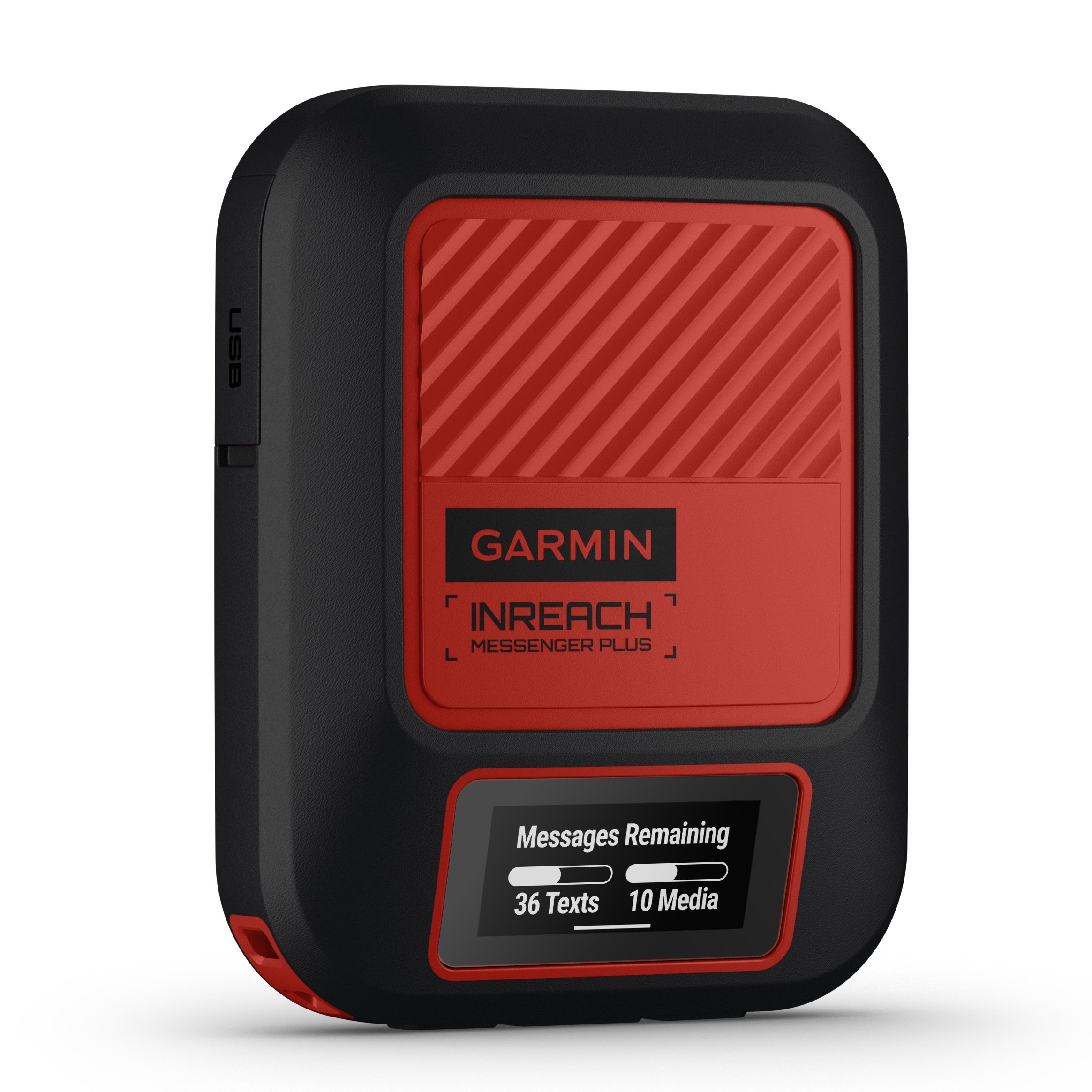
The Garmin inReach Messenger Plus is currently the only satellite messaging device on the market that can transmit photos and audio messages (voice memos) via satellite.
- can transmit photos and voice memos
- reverse-charging capability
- integrates with both Garmin Messenger (messaging) and Garmin Explore (navigation) smartphone apps
Related
- Member Q&A: How to manage electronics in the backcountry
- Online Course: How to use the Garmin inReach
- Commentary: Can the Apple iPhone 14 replace your Garmin inReach?
- Interview: Discussing the Garmin inReach Mini 2 with Garmin’s Chip Noble
- Skills: How to use the Garmin inReach Mini without a Smartphone
DISCLOSURE (Updated April 9, 2024)
- Product mentions in this article are made by the author with no compensation in return. In addition, Backpacking Light does not accept compensation or donated/discounted products in exchange for product mentions or placements in editorial coverage.
- Some (but not all) of the links in this review may be affiliate links. If you click on one of these links and visit one of our affiliate partners (usually a retailer site), and subsequently place an order with that retailer, we receive a commission on your entire order, which varies between 3% and 15% of the purchase price. Affiliate commissions represent less than 15% of Backpacking Light's gross revenue. More than 70% of our revenue comes from Membership Fees. So if you'd really like to support our work, don't buy gear you don't need - support our consumer advocacy work and become a Member instead.
- Learn more about affiliate commissions, influencer marketing, and our consumer advocacy work by reading our article Stop wasting money on gear.


Discussion
Become a member to post in the forums.
For sake of sharing, sports digital device reviewer DC Rainmaker has an insightful take on Messenger. I wont post a link but the site is easy to find.
Would love to see Garmin give a timeline for when the Messenger App functionality will be available.
Sorry did not understand, is the Messenger App already compattible with InReach Mini 2 or a new firmware update will be coming?
The Messenger App is not current compatible with the InReach Mini 2. DC Rainmaker mentioned in his video that a forthcoming firmware update will add this functionality. I haven’t seen a ETA for the new functionality.
@Richard Russell
Sending a Message through the inReach MapShare
IMPORTANT
In order to send a message to an inReach through a MapShare page, the owner of the inReach account must have enabled MapShare for the inReach device and set the options of the MapShare so visitors are able to message the device.
Visit the MapShare page for the inReach device to be messaged.
Select the inReach device to be messaged.
Click Message.
In the Send Message window enter your e-mail address or phone number and message.
Click Send.
I really wish Garmin would offer some kind of trade-in program. My InReach SE+ is still going strong, but it’s aging and I’m very interested in upgrading to the Garmin inReach Messenger. Just a few bucks from a trade in would make the price tag of the Messenger more palatable.
The messenger app now works with both the Garmin mini 2 and the Garmin Messenger:)
Hey All,
Garmin and Zoleo made many changes to their devices and plans over the last year or two and many reviews online are out of date. I pulled together a comparison here , FWIW
So I’ve been using the Messenger this season hitch free except I can’t find an adapter that lets me charge my iphone from the Garmin using the reverse charging feature.
I tried this Anker USBC-A adapter and a similar one from a Samsung phone with the intent of plugging in my standard lightning charge cable, but with no luck.
Trying to avoid carrying another cable. Anyone find an adapter that works?
Sounds like what you want is a USB C to Lightning cable. Anker makes them.
Jeff, thanks, but hoping to find an adapter to keep the cable mess down
It’s been my experience that USB A to “anything” cables charge much more slowly than USB C cables. I’d suggest you look into a USB C to USB C cable and then a USB C to Lightning adapter.
My Anker 10k charger is USBA out so I need USBA->Lightning (charge iphone), USBA->USBC (charge Garmin), USBC->Lightning (reverse charge iphone from Garmin).
If I can’t find an adapter, the best bet for the smallest carry might be the 3 foot USBC->Lightning Anker you recommended, and then this. $50 in new cables, yuch
Its surprising Garmin doesn’t have turn key recommendations. Edit: I emailed Garmin to ask their recommendation for an adapter and will report back.
If Anker 10k power banks cost $20, and the cables cost $20, then one approach would be to get a new power bank. That way you would only need one cable. Doesn’t save you any money, but you’ll have one less cable and a spare power bank (or a hand-me-down gift).
A few photos that are hopefully illustrative of power output from different USB connectors.
This is an XTAR PB2S battery bank connected to a Google Pixel 6a. The PB2S comes empty, and you insert your own 18650 or 21700 cells. What’s nice about it though is the readout which tells you how many volts and amps it’s delivering when charging, or that it’s accepting when being charged.
As you can see, with a USBA cable, it’s only delivering 5.7 watts to my phone. With a USB-C cable, it’s delivering 11.4 watts, so twice the power. Twice the power means roughly half the charging time, although I’ve noticed sometimes the Pixel 6 charges in a sort of battery maintenance mode which is purposely slow to condition the battery. According to USB.org, the most recent PowerDelivery 3.1 standard for USB-C can deliver up to 240 watts. Probably not useful for phones, but keep in mind that USB-C is the standard charging port for laptops now, too.
From what I can find on Google, USB-A won’t ever support more than about 5w. It’s a dead end standard only kept around for backward compatibility. That’s why I try to remind my family members to stop getting USB-A cables and move to USB-C so that charging their iPads and phones doesn’t take forever.
It makes sense for hikers too. If you’re sitting at Red’s Meadow trying to charge up your phone or power bank off of a shared power strip, you want to charge and move on as quickly as possible. Invest in a good USB-C charger like the Anker Nano II and a USB-C to USB-C or a USB-C to Lightning cable.
Same with the power banks. If your existing power bank is only USB-A, it’s probably pretty old and it may be time to upgrade.
Another thing I like about the XTAR PB2S is that if the batteries “wear out” I can just replace them without having to throw away the electronics. And if I need more capacity that provided by two 21700 cells in the bank, I can carry a 2nd set of cells (or even a third), safely stored in the little plastic case that they come shipped in, and swap them out as they get depleted in the field. That gives me a lot more flexibility than having one big 20K battery bank, or a small bank for weekend trips plus a large bank for longer ones.

Jeff, that charger is a neat idea but I checked the Powercore 10000 and it claims 2.4A (12W) max discharge rate which they confirmed here. Maybe it depends on cable as well?
Bill, I checked and no Ankers in Canada < $50 had anything but USB A out
David,
According to this chart I found (and the specs of the PowerCore 1000), yeah, your battery bank supports the original 2014 PowerIQ 12W output, but seemingly only with certified USB-A to MicroUSB or USB-A to Lightning cables.
It doesn’t support the higher output PowerIQ 2 or PowerIQ 3, nor does it support Power Delivery. Power Delivery is a different standard. And there seems to be a THIRD standard called Qualcomm QuickCharge (or QC for short). The whole field of “quick charge” standards over USB is super confusing.
My Xtar power bank documentation claims to support PD 3.0 and QC3.0, but only up to a maximum of 18W both for input and for output.
Most phones will indicate somewhere on the screen whether they are “charging” or “fast charging” but beyond that, it’s impossible to tell just how much power is being delivered without an inline USB power meter and a bunch of experimenting.
It’s a good topic of discussion. Similar to Stephen S’s excellent articles on garment breathability and such, I think it would be really informative (but also expensive) to get a decent USB Power Meter, different cables, chargers, power banks, and phones, and see how various combinations work together. Maybe there’s already some good articles like that out there somewhere.
My impression, based on seeing my family use these things, is that most people don’t pay enough attention to know the difference, and are often stuck slow charging their devices and waiting up to 6+ hours for a full charge.
Jeff, that XTAR is a very cute battery bank. Will it work with a single cell, or does it require both?
Jeff, the usable efficiency drops with faster charging because the higher current increases resistive losses. For example, my battery efficiency is 65% when slow discharging (I measured it), the test I linked to using 12W only got 51%. For me the difference is enough that if achieving only 51%, I would have to carry a second battery on a long trip I have planned in Sept. Its a bit like gas cannisters and stoves, sometimes a heavier but more fuel efficient stove is the over all lighter solution if it means being able to carry a lighter cannister. It obviously depends on trip duration. For my Sept trip, slower discharging means less weight but for section or through hiking, it’s more important to use fast discharging for less wait (groan)
Rapid head nodding in agreement here, most people don’t pay any attention to any of this and an article on it would be great
Edit: incharge6 supposedly supports 15W and all the ends match up. This just might work
Bill,
Seems to work fine with 1 cell!
Very cool. I see that XTAR also sells single-cell variants. There is a lot to like about these chargers. Thanks for the tip!
Bill,
You’re welcome. One piece of advice on purchasing batteries:
18650’s and perhaps even 21700 cells come in unprotected and protected variants. The protected ones are often identified by a “button top” whereas the non-protected ones are flat. I’ve used some protected 18650’s that shut themselves down when the XTAR tried to quick-charge my phone. Removing them from the battery bank and waiting a few minutes allowed them to “reset”. I’m not sure what sort of magic happens inside that button top.
The same thing has happened when using protected 18650’s in my Zebralight H600 and setting it to maximum output.
Anyways, keep that in mind. I buy my batteries from https://www.imrbatteries.com/
It seems my current cache of 21700 cells are rated to 4000maH. Perhaps I should upgrade to some rated at 5000maH capacity.
Has anyone been able to get the reverse charge feature to work from the Garmin Messenger to charge an iphone?
I’ve tried 3 usbc->A adapters now with a standard lightning charge cable. None worked, but they all worked from the USBC port of my Chromebook.
I’ve been talking with Garmin Support for a few days but they haven’t been able to tell me anything about the reverse charging.
I don’t own one, but did you enable reverse charging in the menu?

Thanks again Jeff, but yes, of course. Both from the app and the device itself
Become a member to post in the forums.