


Pack Ski Attachment, inReach SE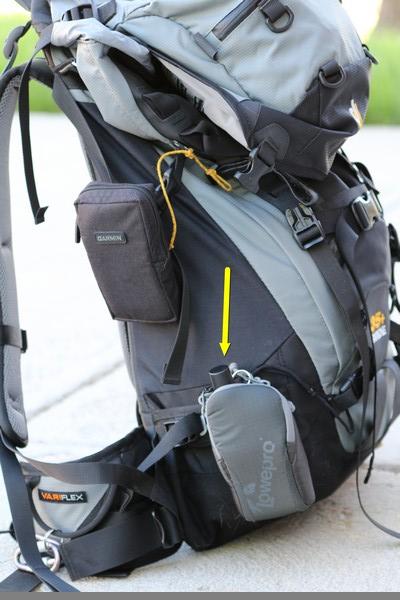
Topic
Become a member to post in the forums.
Pack Ski Attachment, inReach SE
This may be obvious. I've been amusing myself by pairing the SE with an iPod Touch. This draws down the SE's battery faster than when it is not transferring a whole bunch of GPS data over Bluetooth. It's great for drawing a detailed track on, say, a high res USGS topo and viewing that track on the quite wonderful display of the new iPod Touch (5th gen).
Most of the time, a continuous track is not strictly needed, and the iTouch (or other display device) can be left either off or at home. When not needed for a paired device, the SE's Bluetooth should be turned off too to hoard the battery. For that matter, you could just turn off the SE when not needed. However, if the SE is tracking when some unhappy event disables you, having it show your current location and unresponsiveness when pinged may be of great help to you or your heirs, assigns, or successors.
My unit just arrived — so far so good!
So aside from sync apparently (and amazingly?!?) still not working (though slowly entering email addresses will at least keep me occupied during some upcoming long airport lines), the only problem I’m having is with MapShare.
I created a tinyurl so that my key contacts can have an easy address to send me a message (replying to the first message I sent to my myself) and another tinyurl to view my MapShare page.
When I view MapShare from within my account, it looks like it should:
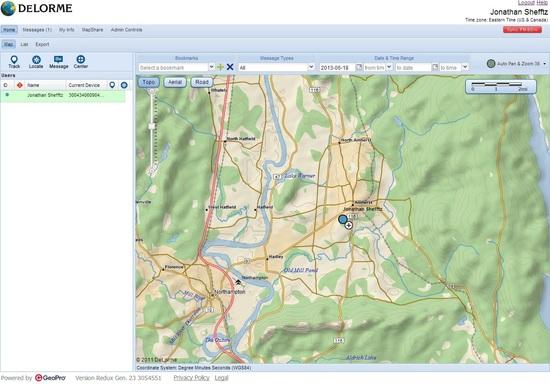
But when I (or one of my contacts) views the link I sent to my contacts, at first it starts to load that view, but then just before it's about to fully load, it shifts away from the local map based upon my location, and instead displays a world map, with all the buttons inoperable:
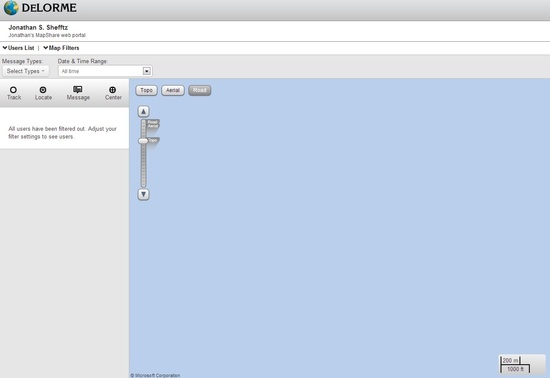
As shown in the screen capture, clicking the User List displays:
"All users have been filtered out. Adjust your filter settings to see users."
I have allowed essentially everything from within my account, and don't even have a password for the page. I've searched the DeLorme technical database and user forums, but can't find anything about this problem? (I have, however, found other people with the same problem: when I search on likely terms, I reach other users' MapShare pages, some of which display the same message and lack of content.)
Yes, Jonathan, I too have found the DeLorme web sites balky, at best. But, strangely, my message recipients haven't complained. I think the worst aspects of the SE are not the SE itself and its functioning, which seem fine, but are the DeLorme web sites the user and the user's contacts consult to see track points plotted. The map is slow to respond and sometimes does not do what it should.
However, these problems are not fatal to the major function of the SE: text communication both ordinary and emergent, with geo-coordinates. So, still not a five star product, but with some work on DeLorme's part, it could be.
Shortly after Jonathan posted his note, I tried my web map page to see how it was doing and none of the web map services would draw (just a blank frame came up).
I suspect that Delorme has been so busy pushing their new product out the door (before it was ready) that they haven't even considered ramping up their web services to handle the new load. I've had a lot of experience managing web mapping services and I know that managing load on a web map can be a significant challenge. I also think Delorme's web mapping technology is pretty crude by today's standards.
I have to agree with Jim, when I evaluate the inReach SE, I'm actually evaluating three distinct products… their web map, their Earthmate app, and the inreach SE. I really like the new device (inReach SE) and it has worked well for me (5*). The few times I've used the Earthmate app I've not been extremely impressed but it does the job (3.5*). The Delorme Web Map is the real low point in my opinion and could use a complete overhaul (2*). It feels/looks like a web map from 5-10 years ago. I do like their base mapping however, so they have that going for them.
I also find their website really bad as well but that might be due to the fact that I'm in Canada (I don't know if the USA clients will have the same issue). Their entire website is completely disjointed and appears to run on two distinct sites.
When I log on to my account it puts me on a simple web page and then informs me that I can log on to the "admin site" if I want. If I click the link to the admin site, I have to log in again and I get a completely different interface that manages my setup options etc. I'm not sure if this is because Delorme Canada manages my account and Delorme USA manages my device but I suspect that might be it. I'd be interested in hearing comments from customers in the USA (and elsewhere)… do you get a disjointed website that requires two logins?
Yes, Mike, my experience is just like yours. Thanks for troubling to detail it. I also agree with your ratings of the three associated products. Since I would want to weight the importance of each product, with the SE heaviest and the web site lightest, I'll stay with four stars overall, until further developments, since the primary functions are handled pretty well.
The thing that most bugs me about the Earthmate app is its total incompetence with Preset messages. It's not crucially important, but the lack of access to them from Earthmate is just stupid. I get the feeling that the Explore, Share, and Admin web sites and Earthmate were cobbled up one summer by a couple of interns who didn't like each other and never talked. Nobody at DeLorme could understand their work, so maintenance and improvement were neglected.
There, I feel better now.
While pairing my inReach SE to an iPhone (successfully), the inReach locked up. Backlight continuously on, clock froze, couldn't move cursor, off key didn't work, cursor rocker pad keys didn't move cursor. What to do?
Simply pull the batteries….Oh, they aren't user replaceable, be sure to carry a phillips screwdriver with you.
Solution: press 3 keys, "X" + down cursor + check key simultaneously (f/w download). When prompted to continue, say no, and close down and restart unit with check key.
This would be a fun one in the field :-) Oh the joys of technology that mostly works.
When that happens with my SE, I put 120VAC on the rear contacts. It's sort of like electroshock treatment or, maybe, defibrillation. Whatever.
"I get the feeling that the Explore, Share, and Admin web sites and Earthmate were cobbled up one summer by a couple of interns who didn't like each other and never talked. Nobody at DeLorme could understand their work, so maintenance and improvement were neglected."
Hah, love it!
Although I think the MapShare interns were poorly paid and hence resentfully and actively sabotaged the website. Possibly ditto for current Customer "Service" staff.
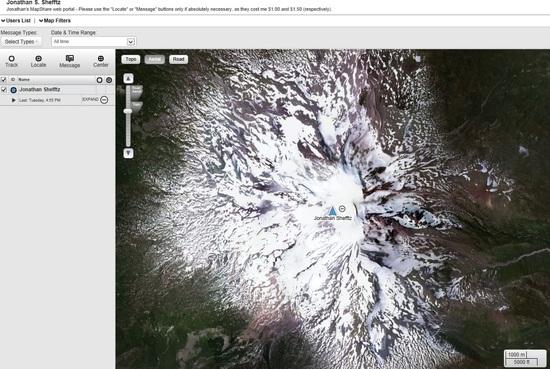
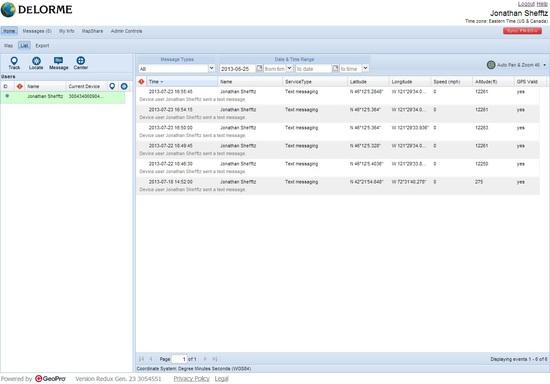
Here's an update in the form of a reply I just sent, along with screen captures showing my six-message list yet sparse MapShare view:
*****
Thank you for getting back to me.
Unfortunately though, from Friday afternoon to Thursday evening is a rather long lag time for a reply to such a straightforward inquiry.
More importantly, your explanation (i.e., MapShare previously displayed nothing b/c of no data and hence essentially nothing to display) is entirely incorrect.
If you had looked at the url I had provided to your own forum, you would have seen (and can still see) that I did indeed have data to display back then, and it was indeed previously displayed when accessing MapShare via my own account. But nothing appeared at the public site. (Note that my MapShare is now password-protected: "[****]" which apparently is case-specific, although if you type it in lower-case, instead of displaying some sort of error message, the page just keeps starting over.)
Now the public MapShare does display a single message. But it still doesn't display the initial message from last week at the public site. Even worse, when accessing MapShare via my own account, that initial message no longer appears. Still worse, I have sent a total of six messages from my SE, yet only one appears in MapShare. (And yes, I'm allowing "All time" and have "Messages" checked.)
I was about to write that at least the SE is working well. However, the Messages icon now displays only seven of my total of eight message (whether sent or received). The Data Use icon correctly displays a total of eight messages. And the "lost" message (which was my very first message) is still displayed in my Enterprise account, and was previously visible under my SE Message icon.
Thank you in advance for looking into these very serious problems,
Jonathan
*****
Depending on which email addresses I select, I'm maxing out on four to six recipients for my messages. Anyone else figure out whether it's a certain number of characters across all the selected email addresses or …?
If you jam your SE inside your laptop case during a two-day Midwestern business meeting (in advance of a PNW ski mountaineering trip), be careful that the "check" button isn't pressing up against something.
On the second day, I heard a strange chirp from my briefcase. Whoops, warning that the battery was down to 25%! (I suspect it dropped that much from ~90% only a little over 24 hours earlier because it was in a building with blocked GPS reception, so it kept struggling to get a signal.)
So far, that would be my only complaint regarding the hardware.
My two other complaints with the SE (as opposed to the website, and the Earthmate app) are (as previously posted) the disappearance of my very first message from the Messages icon (though still registered in the History and Data Use icons) and the confusing limitation on the number of recipients. Seems like those can be fixed with a future firmware update.
"I suspect it dropped that much from ~90% only a little over 24 hours earlier because it was in a building with blocked GPS reception, so it kept struggling to get a signal."
Unlike some cell phones, GPS receivers don't do anything different during blocked GPS reception, and they don't struggle.
–B.G.–
Okay, so much for the theory of the blocked GPS signal.
Back-up theory: given the way I had the SE jammed in my laptop case, I suspect one or more buttons were constantly or at least frequently being pressed, thereby keeping the screen on (which was set at 100%) much or even all of the time.
(BTW, the screen has excellent brightness when maxed out. Even with glacier glasses and brilliant sunshine from reflective snow, I could still read the screen.)
Okay, now I get it … so near the top left displays the date/time of whatever my most recent transmission was, regardless of type.
On the map, the little text-box icon will display any specifically MapShare messages that I sent.
These specifically MapShare can be sent either from:
– The Social icon, which allows messages to be sent to any combination of MapShare, Twitter, and Facebook. If I’m understanding this correctly, you can’t notify anyone from the field this way. Beforehand, you can send out the MapShare link, but it won’t update anyone upon a post to MapShare. The Social icon does have the option though of eight different Quick Text messages … no, not the three Quick Text messages that you can edit on-line (yet which still aren’t available on the SE b/c of lack of sync so far) but instead these can’t be edited beforehand, yet can be edited once selected.
– The Preset Messages, if you have previously checked off the MapShare box. (And from within the Enterprise Account, you can also include Twitter and Facebook for recipients of Preset Messages.) Given that Preset Messages have no limit on the number of recipients (unlike regular Messages at the moment, b/c the lack of sync means that the email addresses use up much of the character allotment), this lends yet another advantage to Preset Messages for “I’m okay, just checking in” transmissions.
Missing is the ability to add MapShare as yet another recipient to a list in the regular Message function. This inability is really puzzling. Why not just allow “MapShare” to be added to the contacts list?
I also now realize why my very first message had disappeared from the SE’s message list: kind of like gmail, identical Preset Messages are “stacked” on top of one another. So my message list when scrolling has only one entry for “Preset 1" yet when I select it, I see both messages. I suspect that other messages with identical recipients might be this same way, and I didn’t notice it b/c all my other messages have included slightly different recipient lists.
Overall, the SE is a great product on its own. The small shortcomings with the device will be easy to fix with a future firmware update. The websites need some major work, but the SE's basic functionality is fine even with all the website dysfunction. I'm very glad I bought it, despite the confusion sleuthing through all this.
[Rebooted my computer after power failure today:
Dead rose from graves, strange signs glowed in the sky, duplicate post mysteriously appeared in this thread]

my Inreach got here today so went about following instructions to activate.
It has been setting outside pointed straight perfectly open view to sky.
50 minutes- still saying "waiting for confirmation"
anyone else have long activation times?
or did I do something wrong?
You have been chosen, Kevin. Your destiny is with DeLorme. Contact HQ immediately.
Well it seems that you have to wait on an Email from Delorme. Not the one telling you thanks for buying a service plan. But a separate one which took a while, like 16 hours to arrive.
Once the second email hit it activated in about 5 minutes.
It seems to work very nicely and texts go out and back with no trouble.
Composing test takes some getting use to. But it's fit and function are good.
"But a separate one which took a while, like 16 hours to arrive."
Is that a satellite connection, or is that Pony Express?
–B.G.–
A new inReach SE Firmware Update (2.1) is available and the sync features works now!
Finally starting to make this device and web interface user friendly.
Roger
update took about 2 minutes and now we have contact sync!
very nice indeed.
Just discovered that the first month fee is prorated from the date of activation through the 6th of the month. (Thereafter, the billing cycle is the 7th of the month through the 6th of the following month.)
Your message allocation is also prorated. So let's say, in an extreme example, you activate on the 5th of the month. Under the Safety Plan, you might think you have 10 messages. Actually, you would have only one or two (depending on rounding up or truncating). Fortunately, my excessive overage fee is going to be credited toward my next invoice.
Last night I updated the firmware on my inReach SE (went reasonably smoothly), synced (for the first time!), and poked around on the unit looking for changes.
I accidentally pushed the "Send" button on default Preset message #1 "Starting my trip." The message didn't go through, because I was in the house, and I couldn't find a way to cancel it. Thought, "Oh well, next time I go outside with it, the message will go through, no harm."
I put the inReach SE back on the charger, turned on (like always), and forgot about it.
About 20 hours later, I got the "Starting my trip" message on my cell phone, while I was at work, and nobody else at home. Huh?
When I got home, the inReach was still sitting where I left it. On the first floor of a two-story house, on a table 6 inches below and 6 inches inside a 4×4 foot window, which looks through trees at a taller house 20 feet away, with a couple small patches of northern sky showing.
I guess an Iridium satellite finally flew through one of those patches of sky, and the inReach SE was able to send the message.
I'm more confident that if I push the SOS button, the message will go out eventually, even without big patches of sky visible.
— Rex
That is encouraging news, Rex. Did you check the coords on the message? Are they more or less what you would expect them to be?
My SE doesn't get a GPS lock when in the middle of my house, but that is not so surprising since it is underground. However, my Bad Elf GPS Pro 2200 does . . . with six or eight satellites. It must be detecting signals ricocheting around the house from the windows and skylight. Position accuracy and stability improve when the Elf is outside.
SE Battery Use
With Bluetooth disabled, my rule of thumb for a ten minute trackpoint interval is one percent of battery capacity per hour. That extrapolates to 100 hours, which is what DeLorme claims, I think. By going to fewer trackpoints and by turning the SE off at night, trips of at least one week could be eked out, while leaving a reserve for important and/or emergency text communications. Light communication when backpacking light!
Firmware Update and Synching
No probs.
Become a member to post in the forums.
 How to Plan with Decision GatesKeep going, change your route, or turn back? Watch how decision gates help structure these choices in our YouTube video.
 © Beartooth Media Group Inc.
 Loading...