Topic

DeLorme inReach SE announced, ships mid to late April

  • This topic is empty.
Viewing 25 posts - 76 through 100 (of 359 total)
PostedJun 25, 2013 at 3:08 pm

After a lot of messing around with messages, I will try to clarify the different kinds of messages. SOS messages are a separate category with which I have no experience and want to keep it that way. I hope SOS messages don't take a lot of practice to get them to work.

Plain ol' messages are sent to any recipients with arbitrary text which you compose on the spot. You can send them from the SE standalone or from Earthmate on a paired device. They are charged against your plan.

Quick Text messages are pre-composed on the inReach or a paired device, can be edited on the spot, and are sent to any recipients. You can have any number of these. You can send them from the SE standalone or from Earthmate on a paired device. They are charged against your plan.

Preset messages must be composed on the Share website and they each include a list of one or more recipients. You get exactly three of these. Neither their text nor their recipients are available to you on the inReach nor via Earthmate. In fact, you cannot even send them via Earthmate on a paired device. They can only be sent from the SE directly where they are known only as Preset message 1, 2, and 3. Try to remember what they say and who they go to! You could cheat and carry a slip of paper with reminders, or you could keep an electronic copy on your paired device, if you have one with you. There are two ways to send the Preset messages from the SE. You can hold the X key on the SE for several seconds to see a screen with the choice of the three messages, or you can click the Preset icon on the home screen. These three messages are free and unlimited on all plans but the safety plan. In the safety plan there is no advantage in using preset messages other than convenience.

There is a fourth type of message, which instead of the user's current location includes a different location, a reference point. It also includes arbitrary user text.
Mike W BPL Member
PostedJun 25, 2013 at 11:55 pm

I see that GPScity.com is listing the inReach SE as "available" (not back order), so it does seem like Delorme has finally caught up and gotten some units onto the shelves!

EDIT: It's also available on MEC's website as well (for those of you in Canada that might be looking for one)

PostedJun 29, 2013 at 8:11 pm

I've added yet another update to the SE review, this time about a lightweight external recharger that works for the SE and with a one gram adapter works for the iPod. If you are not using a paired device or are pairing an android device, leave that big heavy adapter behind.

http://www.backpackinglight.com/cgi-bin/backpackinglight/reviews/display_reviews?forum_thread_id=78521&cat=First%20Aid%20and%20Survival%20Gear%20%26%20Accessories&cid=58

Rex Sanders BPL Member
PostedJun 29, 2013 at 11:06 pm

Just for comparison:

Goal Zero Switch 8 Recharger with internal Lithium-ion batteries
90 grams (".09 Kg" from specs)
2200 milliamp hours ("2.2 Ah" from specs)
$40 retail

Energizer PP-3AAMC charger with three Energizer Ultimate Lithium AA batteries
90 grams (Jim's weight)
8500 milliamp hours (approximate, eyeballing Energizer charts, times 3)
$30 retail – $20 retail for charger, about $10 retail for the batteries

The Energizer is the same weight, almost 4 times more energy, replaceable batteries, not rechargeable, and more expensive after the first two sets of batteries.

Interesting tradeoffs.

— Rex

PostedJun 30, 2013 at 5:52 am

Rex,

I expect that the three AAs in the Energizer charger are in series, at least in effect, to get the voltage required, so multiplying the current by three is likely wrong. The charger comes with a set of Li AAs, so no extra charge for the first set, which implies the charger itself costs about $10. Another point of comparison is whether you can replace cells. When any Li-ion charger is discharged, it is dead weight until it's recharged, just like the SE. When a AA powered charger is discharged, you can replace its cells. For the Energizer, the cells weigh 45 g or 1.5 oz.. For an extended time in the wilderness, it seems to me that the cost of a set or two of Li AAs is static in the budget.

PostedJul 3, 2013 at 11:03 pm

From the Wikipedia Iridium article, the time needed to up or download an SBD packet ranges from six to twenty-two seconds.

The inReach's text messages are Iridium SBD packets. That's how long you have to have a line of sight connection with an Iridium satellite.

Bob Gross BPL Member
PostedJul 4, 2013 at 12:00 am

It would be interesting to know how long each Iridium satellite is overhead a user on the ground. A few minutes maybe?

–B.G.–

PostedJul 4, 2013 at 1:16 pm

Rough calculation suggests an Iridium satellite which crosses the zenith would take about eleven minutes or so, horizon to horizon. A satellite while crossing the viewer's zenith would appear to sweep about 12º in 22 seconds. These are back-of-envelope estimates.

They orbit at an altitude of 483 miles, and their orbital period is about 100 minutes.

http://www.n2yo.com/satellites/?c=15

NoCO-Jim BPL Member
PostedJul 11, 2013 at 4:55 pm

Is sync'g avail yet?….."Using virtual keyboard to enter phone numbers, addresses, and messages, gets old fast."

PostedJul 14, 2013 at 2:42 pm

FYI for anyone in Canada who is looking for one of the MEC is starting to get them in. Just picked up one from them today at the store in Toronto. They have two others there. Also heard that they have about 300 units currently being shipped to their warehouse

PostedJul 14, 2013 at 4:37 pm

Seems like my brother is getting me one of these for my JMT trip. So…any idea on battery life yet? It says ~100 hours on one set of batteries if I send crumbs every 10 mins.

I'm really, really bad at math.

How many batteries should I take for a 3-week trip? And would that be average usage? I've never had one of these before…my thought is that I'd send an ok message every few days, leave a nice trail for my family so they don't worry…..

Nick Gatel BPL Member
PostedJul 14, 2013 at 4:59 pm

Don't worry about battery life, numbers just make our heads swim. By a Suntatics sCharger.

I apologize, I couldn't resist.

If you turn on the 10 minute thing, it will last about 4 days. If you turned it off at night for 12 hours, probably around 8 days. It might last 3 weeks if you turned the device on for 4 hours per day.

Bob Gross BPL Member
PostedJul 14, 2013 at 5:08 pm

Wouldn't it be sufficient to turn it on only a couple of times per day? I mean, that would save a lot of battery power.

Wouldn't it be nice if it was programmable to turn itself on during the day and off at night? Some users would be forgetful about turning it on and off so much.

–B.G.–

PostedJul 14, 2013 at 5:21 pm

Jennifer,
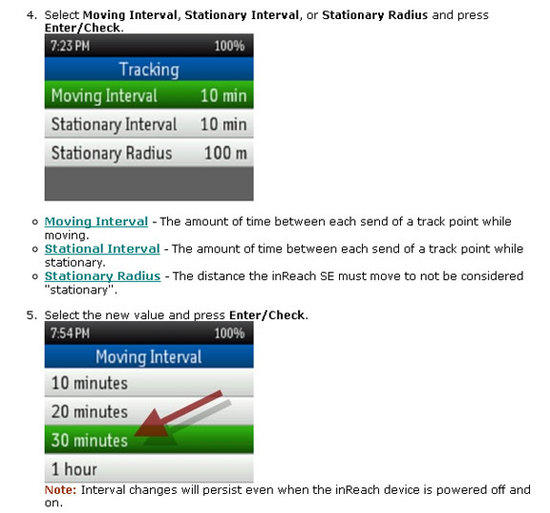
You could change your tracking interval to 30 or 60 minutes –

Tracking

That would be enough to keep you located while on the trail. Add an OK at your evening camp, followed by an AM departure OK and you would be covered. And turn it off at night.

Mike W BPL Member
PostedJul 14, 2013 at 6:57 pm

>> It says ~100 hours on one set of batteries <<

Unfortunately, the batteries are built in so you have to charge them (you can't replace them). It charges via USB so a small battery pack that uses disposable batteries would work well if you carried light weight lithium batteries to power your battery pack.

On the other hand, if you are not too concerned with leaving a bread crumb trail of your trip (for safety reasons), then you can just send an occasional message and that will extend the battery life considerably. The track points and messages are really the same thing (just a way-point), so unless you feel the need to spam your location to your family and friends (or as mentioned, want to use it as a safety feature), you are better off just sending an occasional text/email to save on battery drain. Keeping Bluetooth turned off and the screen back-light off also saves on the battery drain.

That said, I find it almost impossible to read the display without the back-light on. I have about 12 hours of tracking on mine (at a 10 minute track interval) and have sent a hand full of messages, and have used Bluetooth for one hike (few hours) and have left the display turned up fairly bright. The unit is at 80%, so I definitely won't get 100 hours out of the charge with this type of usage.

PostedJul 14, 2013 at 7:02 pm

Bob that's what I was thinking. Not sure how the crumb thing works in that situation; I suppose a few blips a day is probably pretty good, especially on a trail like the JMT.

Mark Verber BPL Member
PostedJul 14, 2013 at 7:20 pm

I picked up a InReach SE to give the family piece of mind.

As others have commented, with tracking turned on (for me it was every 10 minutes) the unit was down to 75% after a day. Leaving the unit on to receive messages but with tracking turned off seemed to drain the batteries around 1/2 as quickly. After half a day of use in this mode I was down to 70% power. Leaving off and turning on at a couple of intervals during the day would preserve the batteries more I am sure.

BTW: I had no problem activating the unit. Did it in the front yard which has some trees but mostly clear view of the sky. I will note that for people who are using to instant delivery of short messages, that there is an adjustment. The unit is somewhat opportunistic in when it sends and checks for messages. So if you are trying to do a two-way interaction expect 10-20 minutes between cycles rather than the few seconds in say a cell phone based SMS system.

Kudos to the "I am recharging" display on the InReach. Shows a bar chart of how much pwer, a % of how much power, and an estimate in minutes of how long until recharging would be completed.

As to recharging in the field. There are plenty of Li-Ion USB charge packs on the market and a number of USB chargers that take 2-4 AA batteries. I have worked on a couple of projects (but didn't backpack with) the GoalZero Nomad 7 + their 4 AA battery charger / USB power pack. This system worked well so long as the batteries didn't overheat while charging (e.g. keep the battery charger tucked someone that doesn't bake in the sun. I have also had a good experience with the Waka Waka Power+.

–Mark

Mike W BPL Member
PostedJul 14, 2013 at 8:32 pm

>> So if you are trying to do a two-way interaction expect 10-20 minutes between cycles… <<

I'm not sure if I understand what you are referring to here but you can set the "check" interval to as little as every 5 minutes (under setup) and the "check" icon will check for messages whenever you want to force a delivery.

The downside is that if you check frequently, you are draining the battery.

Delorme is also going to offer a battery pack attachment that fits on the back of the inReach SE and takes disposable batteries. If it's not too heavy, it would be a nice accessory, since it will be made to fit the device (no cables).

Rex Sanders BPL Member
PostedJul 15, 2013 at 8:05 am

Took my InReach SE on a two-week road trip with occasional day hikes. Left it turned on all the time with 10 minute tracking, didn't send or receive any messages. The InReach was in a pack pocket under my fiberglass truck shell most of the time. Basically, I turned on tracking and forgot about it except for occasional status checks.

Battery charge lasted about 4-5 days.

Other notes:

– When the InReach SE detects no movement for a while, it automatically stops sending tracking points until you start moving again. I don't see any settings to affect this behavior.

– Somehow I found it too easy to accidentally turn OFF tracking repeatedly. Not sure how I did that, since you need to confirm by moving to a non-default selection.

– Charges OK from my truck's "accessory port" (aka cigarette lighter port), using a USB charger designed for iPhones, plus the InReach cable. Hooray for standardizing on USB charging!

– Tracked pretty well on day hikes under forest cover at 7,000 to 10,000 feet elevation at Grand Canyon NP (North Rim) and Great Basin NP, and on a bike ride through forests along the west short of Lake Tahoe.

– Also tracked well at highway speeds on various two-lane roads and Interstate highways.

– Missed a few points while wandering around cliff dwellings at Mesa Verde. With rock overhangs blocking most of the sky, not surprised.

– explore.delorme.com maps work OK on an iPad, but you need a fast Internet connection. BTW, Verizon has much better coverage than AT&T in remote parts of Arizona, New Mexico, Colorado, Utah and Nevada, but even Verizon has curious dead zones.

– I still think the cover for the USB port is too hard to put back on straight. But I'm sort of getting the hang of it.

Overall, I still like the InReach SE. Itching to take it into real wilderness.

— Rex

PostedJul 15, 2013 at 10:58 am

so for those of you who have an SE already how are you mounting it to your pack straps. Trying to figure out how i am going to do it with my Arc Blast and figured you guys might have some good ideas already on how to do this

Bob Gross BPL Member
PostedJul 15, 2013 at 11:36 am

Here is a little food for thought. There are three signals that you are dealing with. One is the GPS downlink, one is the sat phone uplink, and one is the sat phone downlink. Each of these signals will shoot right through thin nylon fabric without a problem. If you had some nylon with water pooled on the surface, then there might be a little impairment. So, if you had this device in a thin nylon stuff sack and then secured firmly to the top or back of a backpack, that ought to work fine.

–B.G.–

PostedJul 15, 2013 at 5:56 pm

I clip the SE to the haul strap of the pack. It hangs on the top of the pack. Seems to work fine that way, and it's easy to get to.

Rex Sanders BPL Member
PostedJul 15, 2013 at 9:14 pm

So far I've clipped mine inside a mesh pack pocket. Works OK.

Satellite signals will go through pack material and fiberglass, but not human bodies, food, or metal, so higher is better.

— Rex

Mike W BPL Member
PostedJul 16, 2013 at 12:03 am

I have added zip pockets to two of my frameless packs (MLD Burn and Newt) and the inReach fits nicely in the pocket with the antennae pointing skyward. This has worked very well. I also tried using the belt clip but the inReach missed a few track points when on my hip (I have done the same route with it in the pocket of my pack and it never missed a track point).

I don’t see much advantage in putting the inReach on a pack strap the way you might do with a GPS because there is really nothing to see. Turn on tracking and put it in your pack… at the end of your hike, you turn off tracking and maybe send a few messages while sitting around your camp. I haven’t had a need to look at my inReach while on the move.

Viewing 25 posts - 76 through 100 (of 359 total)
Loading...