Topic

DeLorme inReach SE announced, ships mid to late April

  • This topic is empty.
Viewing 25 posts - 51 through 75 (of 359 total)
Rex Sanders BPL Member
PostedJun 10, 2013 at 9:05 am

My long-standing rule with high-tech equipment is “don’t depend on promises.” I have not seen any hands-on reviews of the DeLorme inReach SE, and deliveries seem to trickling out. Based on specs only, the inReach SE might be the best device of it’s type. Other types include SPOT devices, satellite phones, and other two-way satellite texting devices.

If you are not in a hurry to buy something, wait a while to see some reviews. Or buy from a dealer with good return policies.

— Rex

Mike W BPL Member
PostedJun 10, 2013 at 5:11 pm

IF you are carrying a smart phone anyway, you could get the original Inreach for cheaper and it works very well and you don't have to wait to buy one. Waiting for the new device to be released has been a real pain, I was out on a trip on the weekend and we wanted to contact somebody back home (to change our itinerary) but we were off the grid and we had no satellite communication device to use… I guess I shouldn't have sold my original inReach until I received the new one (but thought it would be easier to sell "before" the new gadgets was widely released).

I've owned both the Spot Connect (one way messenger) and the inReach (original) that needed a smart phone. I'm on the wait list for the inReach SE but my supplier is saying it will be the end of June before I get one. My inReach worked way better than the Spot Connect IME and was worth the extra cost that you pay for the inReach plans.

I would have kept the original inReach if I always took a smart phone with me but since the only reason I took the smart phone was to use the inReach, the new inReach SE makes more sense for me to own (I don't want my phone with me). I did like replaceable batteries though, so the old inReach wins in that department.

The Spot Connect just didn't work well enough for me, so no point in carrying that device (others seem to think it's OK).

PostedJun 11, 2013 at 9:32 pm

So says DeLorme:

http://www.inreachdelorme.com/product-info/inreachse.php

I asked REI how's it going today. They said they have yet to receive their first SE, but expect bushels of them any day now.

How long can we keep our interest up? The whole SE thing may be just a tease.

And, why no reviews yet? (The one customer review on Amazon hardly counts. We need reviews from competent users.) Fred, how about it?

PostedJun 13, 2013 at 8:26 am

Maybe the dam has broken. REI shipped my SE last night. I am eager to test it and will report the results to BPL "real soon now".

PostedJun 14, 2013 at 11:03 am

This guy at

http://advrider.com/forums/showpost.php?p=21624908&postcount=15

obtained an SE, got it up and running without apparent trouble, and likes its tracking while motorcycling in heavily wooded areas. He found BT pairing to iOS devices easy, and he likes the topo map application. Sadly, he is silent on sending and receiving messages. And the big question of whether the current coords are shown on the SE's display remains unanswered. We care about this for using the SE alone with paper maps. When paired with a BT display device no big deal, since the current coords will be displayed there.

After the guy who got totally wedged for a weekend just registering the device (in the single Amazon review), this is encouraging.

I promise to do better. (delivery tomorrow!)

Mike W BPL Member
PostedJun 14, 2013 at 1:24 pm

Nice to hear some positive feedback. To-date, the only other user review of the inReach SE is here: (half way down the page)

Not such a glowing report.

I look forward to seeing your review!

PostedJun 15, 2013 at 4:20 pm

I just posted the first installment of my SE review

http://www.backpackinglight.com/cgi-bin/backpackinglight/reviews/display_reviews.html?bo=watch&forum_thread_id=78521

I wasn't sure whether to put it in the safety equipment or GPS category. Went with GPS. Sue me.

CORRECTION: it's in survival gear. Don't sue me.

The review is meant to be ongoing as I get further and further into the use of the SE. So far, so good. I rated it as a four since I've had no significant problems, but I don't know it well enough to give it a better rating. Cold weather performance can't be evaluated for a while — not in these latitudes, anyway.

Guy Trek BPL Member
PostedJun 16, 2013 at 8:06 am

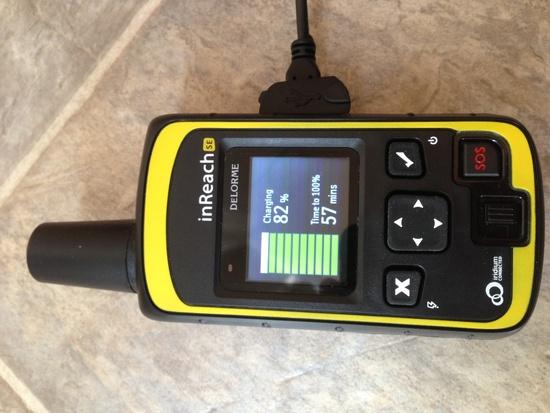
First look at this… The USB port on the side connects to the included cable very loosely. Would normally make me nervous that it is perhaps not getting quality charge time. However, check out this charging screen they have built. Very handy!

inReach SE charging

Rex Sanders BPL Member
PostedJun 16, 2013 at 10:00 am

Jim,

Thanks for posting your ongoing review.

Early reviewers describe serious problems with firmware updates and/or customer service. Do you have any experience with that?

— Rex

Mike W BPL Member
PostedJun 16, 2013 at 10:40 am

Jim, thanks for your review and the ongoing updates on your findings. Much appreciated by those of us that are still waiting to receive our devices.

Can you let us know if the "current position" coordinates (on the track point) can be displayed in UTM or is it only displayed in geographic coordinates. (Is this user configurable?)

Regarding the contact points under the belt clip… My understanding is that these are not only for a battery pack but mainly for dash mount applications such as boating and aviation. It 's important to remember that there is a huge industry outside of the backpacking community that is driving the design of this unit.

Regarding the service plans, I found that Delorme's "suspend" feature made my plan costs a bit cheaper. Over the winter months, I suspended my service which makes the device unusable, but it maintains my online account and only costs $4 per month.

Please keep the review updates coming!

PostedJun 16, 2013 at 2:12 pm

"Can you let us know if the "current position" coordinates (on the track point) can be displayed in UTM or is it only displayed in geographic coordinates. (Is this user configurable?)"

The choices for SE track point coord display are a number of variations on Lat/Long degrees plus USNG/MGRS. So far as I know, UTM and USNG/MGRS are pretty similar outside of the high latitudes. I have no experience with USNG/MGRS. The conversion may be trivial, or not.

UPDATE:

I just checked the UTM coords for a known location with the USNG/MGRS coords reported by the SE. The last five digits of both the easting and the northing are the same. The major rectangle (or whatever they call it) is the same in both. There are some differences in between, having to do with whether digits or alphabetic characters are used and their order. If you know your location within 100 km, it seems that you can safely use USNG/MGRS coords like UTM by just ignoring all but the last ten digits. The first five are the easting, and the second five are the northing (in meters, natch).

Thanks for telling about being able to suspend an inReach subscription for a nominal fee. This could make the subscription requirement less painful.

PostedJun 16, 2013 at 2:24 pm

"Early reviewers describe serious problems with firmware updates and/or customer service. Do you have any experience with that?"

No firmware update was required for my SE. I have not needed to consult customer service. Wheeee!

When DeLorme gets the synch fixed and I haven't found any fatal flaws, the SE is on track for an upgrade to a five rating. But for synchronization of contacts and prewritten messages, the SE has just been working. It sounds like some of the earliest units shipped had problems. Has this ever happened before?

terry tiedeman BPL Member
PostedJun 20, 2013 at 10:47 am

I just thought to say I am super happy so far with my SE. I have set it up at home and tested it and talked multiple times with tech support to get some questions answered and I have had a very positive experience. The sync should be up by the end of this week, so I was told, and the earthmate app is super easy to understand and use so far. I have downloaded the maps for an upcoming trip and checked them out and I am pleased. I like that I can send a general message to the map share page if I want to and all of the settings and prompts are pretty basic and easy to understand. I usually use google chrome but I had to use mozilla firefox to set up my account because I couldn't do it in chrome for some reason but now that I have a login and password I can access my account and explore page through chrome. I have had some friends who worked tech support and I have heard what a terrible job it is having people take out their frustration or anger on you all day long so I always try to be very kind and friendly over the phone and I have found them very clear in their answers and exceptionally easy to deal with. The 2 free months of service for registering in June is great as well. I did have to update the firmware when I first got the unit from REI in the mail last week but the update was easy and fairly quick. No Problems. I will be back from a 5 or 6 week backpacking trip sometime in august and I will post my experiences with this unit in the field upon my return.

Fred Eoff BPL Member
PostedJun 22, 2013 at 6:52 am

My apologies for being slow to add a review since it seems I was fortunate enough to get one of the first SE units. And this one will be short as I am pressed for time this morning.

I had no problems at all with initial registration and setup of the SE. Transition from my old account to new account was not so bad. I will say if you have an original Inreach the vastly preferable approach would be not to terminate service to the old unit prior to adding the new SE. The account transition would be much easier that way. I did not do that as I had sold the older unit and the new buyer was anxious to get it for a trip. But the DeLorme support group handled the transition for me very nicely.

I have only been out on one trip so far, 3 days and 2 nights into the Glacier Peak Wilderness area here in WA. In reviewing the map log after the trip, tracking was quite accurate. I did notice one tracking mark which was transmitted after stopping for the second night and before I shut down tracking which showed a drift maybe 100 yds from our actual location for some reason. But that was the only oddity as everything else was pretty much right on. Since I was interested in getting a feel for performance, I sent a few more than normal text messages from the unit with 100% success both send and reply.

All text messages were from the SE in standalone mode as my primary purpose in acquiring it was to eliminate the necessity of carrying my Android and pairing it for messages. In that regard this has been a complete success. The only nuisance so far is that I have not been able to get the send/receive aural tones to work. Could be user error in setting that up but I will work on that when time permits.

All in all….I am really pleased with the SE.

Rex Sanders BPL Member
PostedJun 24, 2013 at 11:17 pm

Bottom line: After some activation snafus, so far, so good.

Ordered from REI on May 18, delivered today June 24. Last update from REI said device would ship after July 6, maybe DeLorme is shipping faster now.

Web site was pretty easy to navigate. 31 pages of Terms and Conditions is ridiculous!

Instruction booklet impossible to follow literally, wants you to get IMEI and activation code *before* turning on the device, not possible. I get grumpy when the documentation obviously wasn’t tested before publication.

Could not activate device in my backyard, in a forested canyon with about 20% sky visible, despite multiple tries. Drove to a parking lot, activated in just under 5 minutes. I hope that tracking and messaging works OK in a forest, I do a lot of hiking in redwood forests.

Using virtual keyboard to enter phone numbers, addresses, and messages, gets old fast. Looking forward to setting up more contacts on the device, using pre-set messages, and learning virtual keyboard shortcuts.

Outbound messages went through to my cell phone in less than 30 seconds. Inbound messages from my cell phone took a few minutes.

Never got the “Welcome” test message from DeLorme, despite receiving a few messages from myself while in the parking lot.

Location on one message was within a few feet, judging from the satellite view. Linked map sucks on an iPhone, the map is a tiny corner of the screen, must enlarge and poke very carefully to change the view.

Device defaults to Eastern time, which was confusing at first. Had to go into Settings to set Pacific time. Out-of-box setup should have walked you through that.

Device seems smaller and lighter than I imagined. 196 grams on my scale, 190 grams according to DeLorme, but maybe they don’t include the belt clip. Cannot figure out how to remove the belt clip, which came pre-installed. I presume the IP67 rating is with the cover on the micro USB port, which is kind of fiddly and hard to put back on straight.

As others have noted, DeLorme web site says Syncing contacts and canned messages isn’t working yet, coming soon.

My device shipped with 2.0.2596018 firmware, which seems to have the updated features described here. Since others report problems with firmware updates, I’ll leave well enough alone for now.

Bob Gross BPL Member
PostedJun 24, 2013 at 11:32 pm

"Could not activate device in my backyard, in a forested canyon with about 20% sky visible, despite multiple tries."

Is there any way to predict how much sky view is necessary to expect a reliable connection? Also, if the sky view is broken up into little pieces, you get the so-called picket fence problem, and you may never get a reliable connection. The satellite is visible for only long enough to get part of the message done, and then it is blocked.

Assuming that you had a completely clear view of the sky, about how long do you think each satellite is overhead from horizon to horizon?

–B.G.–

Guy Trek BPL Member
PostedJun 25, 2013 at 4:39 am

Rex, to remove the belt clip just a) pinch the tabs together, and b) slide the clip up and out — note this is very very tight so I had to tap the clip on the edge of a table for it to break loose.

PostedJun 25, 2013 at 6:36 am

Thanks, Trek Guy. I wrestled with the belt clip unsuccessfully until I tried your method. Without the clip the SE weighs the stated 190 g.

Actually, I use the belt clip but didn't like the idea of not being able to remove it. I clip the SE to the haul loop on top of the pack, where it gets a good view of the sky and is out of the way.

Regarding Bob's concern for the "picket fence" problem, the time to send or receive a text message is extremely short, and a text message transmission does not require a signal of as high quality as voice does. These are the great strengths of short text over voice. Furthermore, text communications are opportunistic, not real time. I have not had any problem with messages or track points getting through forested areas in the southern Rockies. Redwood forests and narrow canyons may be more challenging.

Jerry Adams BPL Member
PostedJun 25, 2013 at 7:16 am

I used a belt clip on my GPS but it popped off a couple times so I quit using it.

Maybe there are better belt clips.

Rex Sanders BPL Member
PostedJun 25, 2013 at 7:44 am

With an unobstructed horizon, most LEO satellites like Iridium are visible 9 minutes on average. My backyard sky view is one patch of about 20% open sky. I attempted activation there for a total of about 40 minutes, with two restarts. Gave up after 15 minutes of "waiting for GPS fix" the first time. The next two times eventually got "Activation started, waiting for confirmation", and stalled before I gave up. On-screen status messages were mildly entertaining. After 5 minutes, something like "activation is taking extraordinarily long"; after 10 minutes, something like "activation is taking extraordinarily long, are you sure you are activated on explore.delorme.com?" I had no similar problems activating and using the Briartek Cerberlink in my backyard; maybe the satellites were in better positions.

In the parking lot, got to "Activation started…" quickly, took a couple minutes to complete after that. Maybe a big download in 160 byte packets? Red status LED was blinking in parking lot, never saw that in the backyard.

Startup problems can really affect user satisfaction; the inReach SE Amazon rating might rise from 2.5 stars to 4 stars without those problems.

— Rex

PostedJun 25, 2013 at 8:31 am

Trek Guy told how to remove the very tight belt clip. So I did. Now it comes off easily, too easily, as Jerry described.

I put a split ring on the lanyard attachment and now use a tiny carabiner to attach it to the pack. I'm happy again.

UPDATE

I decided I liked using the belt clip better, so fixed it. I took it off and wedged the prongs further outward and then put a drop of hot glue into the base of the enlarged slots then let the glue cool and harden. Now the belt clip stays attached until I use Trek Guy's edge of table trick.

Viewing 25 posts - 51 through 75 (of 359 total)
Loading...