Topic

Cellphone GPS as alternative

Viewing 25 posts - 1 through 25 (of 30 total)
Stinson 108 BPL Member
PostedNov 7, 2017 at 6:57 pm

Anybody using their cellphone as their only GPS source in the back country. I use a Garmin Oregon that needs replacing, the bottom of the screen is pixellated. One of my friends swears by his cellphone in Airplane mode and using Gaia software. Most newer phones have an actual GPS chip so they don’t need a cell tower or wi-fi to know where they are. If this is working for you, how about some details of how and what you are using.

Ben H. BPL Member
PostedNov 7, 2017 at 8:16 pm

Anyone have a line on where to find cheap iPhones – 5 or 6 ?

I’ve used Swappa and been happy with the results:

https://swappa.com/buy/iphones

My wife was once sent a locked/stolen phone, but she got her money back without much effort.


Ben C BPL Member
PostedNov 7, 2017 at 8:19 pm

Just download Gaia to your phone and see how it works for you.  It has worked great for me on Samsung.

David Thomas BPL Member
PostedNov 7, 2017 at 8:37 pm

While purpose-built Gamin hiking GPSs are more weather-resistant than a phone, an Otter Box can be great protection, IME.  I was on a boat that sunk in a distant part of Cook Inlet.  We got picked up, but our gear was on a salt-water beach for 3 days before the seas settled enough to go get it.  It’s been 5 years and I’m still using the same iPad I took along in an Otter Box, to use as a chart plotter.

For navigating roads, I’ve had great luck with maps.me, especially in foreign countries.  You download the maps while in wifi, ideally before leaving home.  You don’t need wifi or cell signals while on the road because you already have the data in your device and the phone’s GPS.  You can fit many states or countries in a phone at once, delete them once home, and reload them later.  And the level of detail impressed me – down to little alleys behind houses for garbage pick up and where the fountains are in city parks.  So I don’t use any cell data for navigation and if I’m in a mountainous area or on the Alcan without coverage for the usual mapping app, I can still search for businesses, get a routing to a destination, see my progress, and correct any wrong turns.  It’s saved my butt a number of times and made navigating Rome, Cuba and backroads of Costa Rica far more relaxed.

Ben C BPL Member
PostedNov 7, 2017 at 9:19 pm

I’ve noticed google maps lets you download for offline use now too.

Most new phones are plenty waterproof for normal backpacking use now too.  I’m not sure I’d want to sink one for 3 days in the Cook inlet, but for regular rain and little submersions, they are waterproof.

With new phone cameras getting so good, a phone is becoming such a good multi-use item to have.

PostedNov 7, 2017 at 9:45 pm

I was using Gaia on my iPad with a GPS receiver and it works very well.  Recently, I purchased an iPhone SE as a pre-paid phone for $150 (new).  Dropped my existing SIM card in it and it is working great.  The SE has a smaller screen but has a longer battery life than that larger display 6, 7 & 8.

David Thomas BPL Member
PostedNov 7, 2017 at 10:09 pm

Jon, a bit off-topic, but I’m intrigued by the prospect of a cheaper, old-style, new iPhone.  My daughter has my wife’s old iPhone and the battery life is down and sometimes the apps are a bit wonky.  I’ve debated doing a battery replacement, but a whole new phone is certainly easier.  Wife and daughter and son are all on the same AT&T calling/data plan. One of the reviews for it stated,

“I cracked my iPhone 7 plus so I called AT&T and verified I can use my current contract SIM card in this prepaid iPhone SE. They said yes it will work fine. Bought the iPhone SE on sale for $150 at Best Buy. Inserted my contract SIM card and the phone activated. Within an hour AT&T suspended my cell phone service. Called AT&T and they did not know if I owned the phone or if it was stolen. Explained I just bought it and they activated my service immediately.”

So it sounds like it would work even if I didn’t get an AT&T phone, but any pre-paid one.  Is a “pre-paid” phone, inherently an unlocked one?

PostedNov 7, 2017 at 10:13 pm

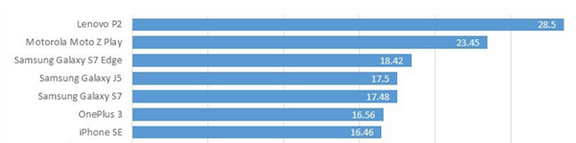
I forget where, but one of the recent reviews (NYTs or Wash Post probably) showed that out of all the models, including the new X and Plus models, the one with the longest battery life is the SE.

PostedNov 7, 2017 at 10:33 pm

David,

I did a bunch of research and everything indicated that this would work.  I bought my iPhone SE at Best Buys for $150 (for AT&T as that is my carrier).  I didn’t come with a SIM card and I was upgrading from an iPhone 4 so the card wouldn’t fit anyway.  i went to an AT&T store on got a new SIM card.  I had to go through AT&T wireless as I had a few start-up problems (software configuration problem on their end).  After a day and a half, everything worked fine.  I heard that you have to wait 6 months before AT&T will unlock a pre-paid phone.

My wife didn’t want to go through the hassle so we bought her a new iPhone SE for $350.

Since I was use to the iPhone 4, the screen size is not an issue for me.  I also like that the phone is small and is easy to pocket.  The big screens look massive to me.


BTW, I think that the battery is rated at 12 hr.  I do believe that it is best in class.

PostedNov 8, 2017 at 3:21 am

“Is a “pre-paid” phone, inherently an unlocked one?”

I think most prepaid phones are locked for a certain length of time, then can be unlocked. I know both AT&T and Verizon do this.

Other than that, Verizon doesn’t lock any 4G LTE phone at all, whether you buy it from them or from another store (Apple Store, Best Buy, etc.).

If you buy an iPhone from an AT&T store, it will be locked to AT&T’s network, but you can request an unlock code online – no phone call necessary.

If you buy a used iPhone off the net, you really need to be sure it’s unlocked before the seller ships it to you. Also, if you’re looking at an iPhone 5, I’d highly recommend only considering the SE. I think the other 5s will sooner rather than later hit end of life (as far as support, security upgrades and iOS is concerned).

Matthew / BPL Moderator
PostedNov 8, 2017 at 4:53 am

The SE is a really nice model. It feels great in the hand and pocket. It’s light on the wallet as well. My son has one and I would have purchased one for myself except it’s lack of water resistance. I have grown quite accustomed to not worrying about water getting on my iPhone 7.

Alex B BPL Member
PostedNov 8, 2017 at 10:38 pm

I’ve used gaia exclusively as my GPS.  I love it.  I can get so much more detailed resolution than I would with a stand alone GPS.  I have hiked and bike toured with it and never had any problems with it being accurate enough.  I use it on a iPhone 6 btw.

Ben C BPL Member
PostedNov 9, 2017 at 12:13 am

A quick google search seems to indicate that Apple products fall pretty low on the battery life comparisons.  You’ll find a dozen or more cheaper phones that last much longer.

Robert R BPL Member
PostedNov 10, 2017 at 3:45 am

Another option is the Avenza Maps app.  Create pdf maps in caltopo and use them directly through the app on your cell phone by uploading the pdf to dropbox and then transferring it to your phone.  Real easy and it works.

nunatak BPL Member
PostedNov 10, 2017 at 7:20 pm

Yes, imo phones are superior navigation devices compared to dedicated GPS units – except regarding battery life.

But this latter issue can be mitigated somewhat.

Track recording will drain a phone battery in a matter of hours, so forget about that.

Turn off cellular (GPS still works) and initiate battery saver mode.

With those three precautions I can get 4 days of navigation and camera/video use out of a iPhone 7plus. With a 10000mAh power pack  (6.5oz) I can charge the phone all up 3 times, and extend use to almost two weeks.

The larger screen on the 7plus (I updated from a 5) is awesome for map reading and overview planning. The massive storage allow me to have 2-300 USGS 7.5 quads on board at all times, and they are available for free with the apps I use.

The dual lens camera on the 7plus is so good I can leave dedicated photo equipment at home, saving several ounces and further charging complications.

So all that’s left is deciding on the app to use. I’m against paid subscription type utilities, so Gaia is out. For my use I have three apps that all provide unique functions and cost under $10 ea: Topo Nomad, Topo Maps, iHikeGPS. For all I can import GPX tracks such as those created in CalTopo.

Mina Loomis BPL Member
PostedJun 25, 2018 at 10:49 pm

“The dual lens camera on the 7plus is so good I can leave dedicated photo equipment at home, saving several ounces and further charging complications.”

I have an iPhone 6 and find that if I use the camera at all, the battery drains after a few pictures.

Just completed a trip using the unit for GPS/map of our route.  With airplane mode turned on and bluetooth turned off, the battery held pretty well for a couple of days on a warm-weather trip when used only for checking our position in relation to the published trail we were hiking.  As soon as I filled up my pocket camera memory card and started to use the phone to take pictures, battery plummeted.

How do you get your phone to work as a camera and retain battery long enough?

Miner BPL Member
PostedJun 29, 2018 at 1:14 am

Depends on how much you use it and where you are hiking.  I use my cell phone as a GPS using the Gaia app all the time.  However, for some trips where I anticipate very heavy usage I prefer my Garmin Etrex 30x which I find to be more reliable in areas with limited view of the sky, keeping my cell phone as a backup.

I can go about 5.5 days of heavy usage (though I do turn it off when I can) with the Garmin on a single set of 2xAA lithiums and a set of spare lithium AAs weigh very little (especially compared to a typical cell battery recharging pack).  I’ve also dunked my cell phone in a stream and sent it over a small waterfall into a 2ft deep pool in the last 3 years which would have sucked if I had really needed it as a GPS.  My Garmin GPS is a lot more waterproof.

PostedJun 29, 2018 at 2:18 am

This is by God why I’m a life member of this forum. Excellent info on the newest gear – some of the “gear” being software.

Mina Loomis BPL Member
PostedJun 29, 2018 at 2:49 pm

Well I am going to try the iPhone 6 as a GPS on our upcoming Colorado Trail hike.  Our plan has the longest stretch between charging opportunities at about 8 days.  I have a Goal Zero Flip 20 I can load up and bring.  Can turn the phone off at night.  I used to have a Garmin Dakota 20 but it started turning itself off or refusing to turn on even with brand new batteries so I sent it off to recycling.  The phone software seems a lot easier to use.  I don’t have time for any big learning curves at this point–leaving on our trip next week–but was able to get what I wanted from the phone last week on Eagle Rock Loop in Arkansas using phone GPS and Guthook map.  Also got Guthook map for CT loaded.  These trails shouldn’t be hard to follow but it does help to be able to fix position in relation to the trail if it gets ambiguous on the ground.  On ERL, happened a couple of times when the trail crossed old wagon tracks through the woods.  Last year when we were in Weminuche, up near Piedra Pass, we encountered two groups of other hikers (actually they were one group but they got separated into 2 subgroups and both made the same mistake) who were hiking a section of the CDT and got off on an informal trail that led past where we were camped, and I was able to show them on the paper map how to get back up to the CDT.  So clearly one can get off even a popular trail and need help getting back on track.

For the phone GPS use, I am not interested in things like tracking, recording statistics, etc.  So no need for battery use for that.  And I don’t want to fool with getting a new phone this summer.  Too much actual hiking to do instead.

I guess if the phone fails we’ll just have to do things the old fashioned way.  And maybe if we mess up someone will help like I was able to do for those folks in Weminuche last summer.

David Caudwell BPL Member
PostedJun 29, 2018 at 4:57 pm

As you have an iPhone 6 I would get the battery assessed at your nearest Apple store or cellphone repair shop. This model is notorious for sub-par batteries and you may be eligible for a free battery upgrade (if Apple are still offering that service?).

Viewing 25 posts - 1 through 25 (of 30 total)
Loading...