


"Buy now, turn on the meter later. You activate through https://explore.delorme.com when you are ready."
Too bad you can't purchase one pre-activated like a disposable cell phone.
–B.G.–
Topic
Become a member to post in the forums.
"Buy now, turn on the meter later. You activate through https://explore.delorme.com when you are ready."
Too bad you can't purchase one pre-activated like a disposable cell phone.
–B.G.–
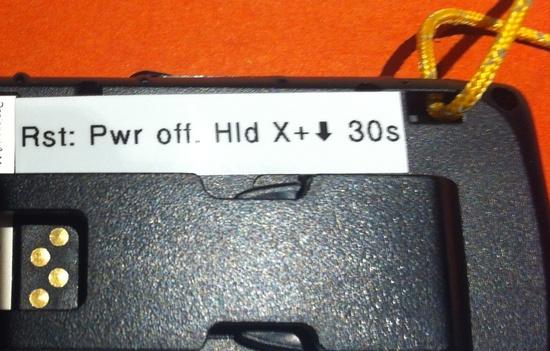
Just barely fits using a Brother P-touch labeler, Small text setting, and some abbreviation.
— Rex
You have to have a map with that specific piece of the grid system marked on it to have the slightest idea of the place where the coords refer.
Ah, you must have run across abbreviated coordinates. A full UTM or MGRS coordinate is relatively easy to place on the globe: the first part identifies one of 60 longitudinal zones (6 degrees wide) counting east from the IDL, and 20 zones between the polar regions (8 degrees tall; -80 to +84 degrees)*.
E.g. London sits at the eastern edge of zone 30U (fairly far North; only the very northernmost bits of the continental U.S. reach the U band). Most of the U.S. is largely in the S and T bands, which coincidentally divide very close to the Mason-Dixon line.
Another example is "11S 384409 4048901" for Mount Whitney: 11S says Nevada or SoCal, the northing says ~4049 klicks north of the equator, and the easting says about 115 km east of the zone center ().
*Yes, there are small quirks designed to ease use/reduce chance of error: no zones I or O, and an extra 4 degrees to zone X.
>> It goes against my nature to pay somebody $4 per month for nothing. <<
The $4 per month gets you your own web map, online storage of all your contacts, pre-composed messages, downloadable tracks and way-points and saves you paying the activation fee (if you cancel and then re-activate).
However, if none of that interests you then maybe you should stick with a PLB. There's no free ride.
"Ah, you must have run across abbreviated coordinates … "
I believe you made my case by describing the mental arithmetic and things you have to remember to get back to the almost universally familiar Lat/Long system. We talk about "high latitudes" not Zone U, &c.
Yes, if the ancient Grecians (as someone, I forget who, would have it) had invented UTM, things would be different, and we would be griping about the new-fangled Lat/Long system. How stupid! A degree of Longitude changes as you move north or south! And Latitude too, but not as much!
Personally, I prefer decimal degrees because base sixty arithmetic is harder than decimal arithmetic. But, strangely, for time I go with hours, minutes, and seconds, just like everyone else.
["Once the message is sent, the unit's tracking is locked on (you can't turn it off)."
Yes, but you can sure as hell kill the tracking signal from getting out. Stick it inside a cook pot with the lid on.]
Bob, you're just being irritable. The message in question is an SOS. Why would anyone, even you, want to stifle tracking when they want rescuing?
I realize that it would be difficult to push the button by accident. However, if a hiking partner grabbed it and pushed the button to play an awful joke, I would want to know how to shut it off.
–B.G.–
"However, if none of that interests you then maybe you should stick with a PLB."
I'm not aware that a PLB can do two-way text messages.
It is easier to store waypoints on a GPS receiver, then transfer those to any map once home again.
–B.G.–
>> It is easier to store waypoints on a GPS receiver, then transfer those to any map once home again <<
Ahhh, but that would mean you'd have to carry a GPS receiver! I can leave the extra weight (of the GPS) behind and I don't even have to plug my inReach into my computer to get the coordinates… I just click download and they are ready to go!
And if a buddy of mine hit the SOS button as a gag, it wouldn't be a false alarm… I'd make sure he needed assistance to get out… :)
Mike, I carry a tiny GPS receiver since I don't carry a smart phone. Besides, for the Inreach or for a GPS receiver, I would expect to power it up once per day or less.
I really don't see the sense in having all of these multiple electronic gadgets running all of the time and using battery power.
I'm out there to commune with nature, not to increase my Facebook likes.
–B.G.–
Pretty good review of the DeLorme inReach SE on “Field & Stream” http://www.fieldandstream.com/blogs/flytalk/2014/01/gear-review-delorme-inreach-se-2-way-satellite-communicator-gps
I was deeply impressed by how inReach performed.
It’s dustproof and waterproof to 1 meter (I actually dunked in in the river and let it soak for several minutes to test this).
I had a strong signal every time I tried the device, wherever I was.
Yet, for the sake of safety, peace of mind for you and others, and knowing you can reach out if and when you want to, wherever you are in the world, the inReach SE is well worth the money and I highly recommend it.
— Rex
I go on lots of solo backcountry ski outings in the high Rockies. My main item of safety gear is a brain experienced in these matters. This brain is backed up by the SE. After eight months of use, I have a good working relationship with the device. Setting out, I send a Preset message to some friends and relations who care about me, which says I'm setting out. On return, I send the second Preset message to the same people, which says I've returned. If I decide to do something about which I have any significant doubt (this is pretty rare), I send the third Preset message, which says I'm about to do something "interesting". All inReach messages automatically include geo-coords. If any of my minders question my welfare, they can ping me or send me a message. So far, this hasn't been necessary. They confirm, though, that they are getting all the messages I send.
Usually I turn on tracking. For a while, I was not using the tracking function, and I noticed that the times shown for the messages sent had the day of week and time of day but not the date. Then, when I sent a tracking point, the complete time information suddenly appeared for all the messages. Weird software glitch.
I have also been pairing the SE with an iPod Touch for mapping. I much prefer using Gaia over DeLorme's Earthmate. I download the USGS topos and aerial photos for the region I'm in. The display is super-good. This beats paper maps all to heck. There are drawbacks, however. The iPod needs to be kept reasonably warm, so I keep it in a pants pocket when not using it. Also, it's called iPod Touch because it has a touch screen, and that requires bare and warm fingers. In very cold weather a touch screen is not so wonderful. The SE's four-way rocker and buttons can be operated with gloves on. The SE has functioned fully in sub-zero weather while tethered in an upper pouch on my backpack.
A day's skiing usually draws down the SE's battery to 94%, and that's with Bluetooth pairing. The iPod doesn't show percent battery, but normally it looks like no more than ten percent or so is used. Battery use depends mostly on how long the display is on. I keep it fully bright because there's a lot of daylight out there in the snow.
Just saw this, the new "Freedom" plans:
James, very interesting. Is this good or bad?
–B.G.–
Bob,
Of course it depends on your individual usage pattern.
Here is my current minimum usage (4 month commitment):
4 months of Recreational Plan (Mid May to Mid September): 4 * $39.95 = $159.80
In the future the same would cost me $24.95 + 4 * $34.95 = $164.75
So the new plan would be slightly more expensive, if you use it exactly 4 months. If you use it for 5 months you break even. If you use it for six or seven you are better off. Starting at 8 months you are better off with the annual plan anyways.
The main advantage is that you can now suspend it anytime and don't need to wait for 4 months to suspend. For example this summer my wife and I will go with our daughters on a circumnavigation of the whole US via train. I think I will suspend the plan during that time. That will right away make it cheaper for me than in the past.
Best Regards,
Manfred
That's interesting, I didn't realize that InReach USA only offered yearly plans (until now).
InReach Canada doesn't have yearly plans, only month to month. In fact, InReach Canada actually has true "Pay as You Go" plans. It's not well advertised (I had it explained to me by one of their service reps). I can move up to any plan I like, use it for a week and then suspend it and I only pay a pro-rated charge for the week that I used it, I don't have to pay the monthly fee. So I suspend mine ($4/month) when not in use and when I need it, I sign up for the Expedition Plan and suspend it right after my trip and only pay a portion of the monthly charge. Let's hope it stays that way as it makes it quite economical.
The new Safety Plan has some interesting price changes:
Annual monthly cost: $11.95 was $9.95
Predefined messages – Unlimited, was $1.50 each over the bundled 10 messages
Messages $0.50 each, was $1.50 each over the bundled 10 messages
Tracking Points $0.10 each, was $0.25
Also, the old Seasonal plans have lots of rules about months, automatic reactivations, deactivation charges, and other stuff that confused and enraged customers. The new “activate when you need it” system is much simpler.
Notice the asterisks on their claims that “No Other Satellite Communicator Can Deliver This Message* – No Contract Required*”.
The Yellowbrick 3 does not require a contract.
— Rex
Just saw this, the new "Freedom" plans:

It's like deja vu all over again…..
I'm innocent!
I just got an Inreach SE and need to activate it in the next couple of weeks. It looks like the new $12 Safety Plan with unlimited predefined messages and $.50 overage is the one I want. Does anyone know what will happen with existing Annual Plans when the new plans roll out next month? I asked Delorme by email and they basically just repeated what's on the website: Seasonal Plans will turn into Freedom Plans. Still unclear about Annual Plans.
Edit: Here's what I got from Delorme when I asked for clarification:
"Actually with the Annual Safety Plan in place before the roll out of the Freedom Plans you would be grandfathered in and keep the price you were paying before the roll out of the Freedom Plan."
I've asked for a re-clarification as to whether I'll also be grandfathered in to the old features of the Annual Safety Plan.
Edit 2:
Looks like existing Annual Plans will turn into the new Annual Plans, but at the OLD PRICE!
"Even with the current plan you would still have unlimited preset messages just as the plans going forward. Those messages are ones that you compose and save to the SE before you leave for your trip, you are able to send those as frequently as you would like or need. The Freedom Plans are scheduled to be active by mid March until that time you would need to choose a plan that fits your needs for your trip. I cannot guarantee that the plans will be ready for your trip. Once you have a plan in place it is a very simple matter to make a change to your account and swap you to another plan. All of our seasonal plan will automatically be placed into Freedom Plans. I do not have a plan that will automatically swap you over to the Freedom Plan with the Safety Plan already in place. You will still get all of the benefits of the Freedom Plan when it becomes active, it is just your cost that would remain the same. "
Mine was doing fine syncing new contact information, but now seems to be not working…I'm on Apple and it says the safari can't use the link because the "address is not valid" now.
Hmmm, guess I will try again tomorrow.. So far everything else is working great! I've been able to use the InReach while hiking even in heavy cloud cover. Messages are very fast.
Same here Drusilla. I updated the inReach SE a couple of days ago, and now syncing is broken! :-(
And I was trying to update messages before my trip tomorrow, but it ain't gonna happen. I hate it when updates break stuff!
Edit to add: I'm also on a Mac.
If your sync on the Mac problem is the same as mine was, the fix below may help. With the update, synching is much better. You can see my Mac error message at the bottom.
Casey A. via sendgrid.info
Feb 19 (10 days ago)
to me
Hello Jim,
I apologize for the delay in response to your email. To correct this behavior you must delete the file it is referencing, however this is a hidden file. To access hidden files please follow the instructions below.
To view hidden folders:
Open the Terminal (located in /Applications/Utilities/)
At the command prompt type defaults write com.apple.finder AppleShowAllFiles -bool true
Press return to execute the command.
For the changes to take effect, either log out then log back in again, or relaunch Finder (this can be done from the Force Quit Window or by typing 'killall Finder' in a Terminal window).
Once you have enabled hidden folders to be viewed, browse to the file location referenced in the error you received and delete the file. This should allow you to Sync the device now without issue. Please let me know if you have any further trouble.
Regards,
Casey A
DeLorme Customer Care
Phone: (800) 511-2459 or Internationally at (207) 847-1165
Many answers can be found at our on-line knowledge base within the link below.
http://support.delorme.com
Was this message helpful? Yes It was OK No
On Thur, 13th Feb 2014 at 5:11 pm, Jim Milstein <6wayxing@gmail.com> wrote:
I saw that an update for the SE is available. Your site said I needed to install a new inReach Sync , which I did, and now I get this error message:
Error launching inReach Sync:
Unrecognized element: userSettings (/Users/6wayxing/.local/share/inReach Sync.exe_Url_50c81f98e9eb1a9c52a83b1d3d25f899835f665e/user.config line 6)
I have downloaded the inReach Syn pkg twice and installed it, with the same result.
Thanks Jim, I found the same fix earlier. Instead of mucking about in Terminal I downloaded a program called InVisible which allows you to turn on/off showing hidden files from a menu in the top menu bar. Works like a charm, and resets the Finder for you.
After deleting the file I've not had any problems synching the SE.
Become a member to post in the forums.
 Brynje Mesh BaselayersBrynje baselayers use open mesh construction to move moisture away from the skin, create insulating air pockets, and help regulate body temperature across changing conditions and activity levels.
 © Beartooth Media Group Inc.
 Loading...