


Thanks guys.
Topic
Become a member to post in the forums.
Thanks guys.
I just spoke to John at DeLorme Customer Support and he said that the old annual plans would be honored at the old rates and with their old terms. So, if you have the Safety Plan at $9.95/mo, it would continue at that rate, but you would not get unlimited Preset Messages. I love Preset Messages; therefore, I'm going to switch from the Recreation Plan (which has unlimited Preset Messages) to the new Safety Plan (which will have unlimited Preset Messages), as soon as it becomes available.
DeLorme does not know exactly when the new plans will be available, beyond saying "mid-March". When they are available, DeLorme will be coy about announcing their availability in order to work out the bugs, John said. Perhaps they have taken a lesson from the woes of the Obamacare Exchange web sites.
Just saw it on the Delorme web site.
The new terms for the Safety Plan make it very useful. The plan provides unlimited Preset Messages. Too bad they only allow three different ones; how about seven? Tracking points or pings are a dime each. Ten free-form messages in or out per month are included, additional messages half a buck.
Sign me up!
Error launching inReach Sync:
Unrecognized element: userSettings (/Users/6wayxing/.local/share/inReach Sync.exe_Url_50c81f98e9eb1a9c52a83b1d3d25f899835f665e/user.config line 6)
I recalled Jim's post after encountering the same problem. I figured out a different fix.
I found the file using Terminal and this command line:
open '/Users/rex/.local/share/inReach Sync.exe_Url_50c81f98e9eb1a9c52a83b1d3d25f234135f665e/user.config'
(Copy and paste the line from your error message, everyone's is unique)
For most people, this will open 'user.config' in TextEdit. It's a small XML file.
Removed line 6:
<userSettings />
and save the file.
I used TextWrangler (free download), but TextEdit works too.
The "Unrecognized element" bug means someone at DeLorme can't program their way out of a paper bag. The whole point of using XML is to be able to ignore unrecognized elements. Sheesh!
Just took another look at user.config post-sync: that same line 6 is back again.
So I tried syncing, same old error message shows up.
This seems to be a recurring bug. Be prepared to remove or edit that file for each sync until DeLorme fixes the problem.
Shortcut to remove the file instead of edit: Open Terminal, use copy and paste (or very careful typing), to do this:
rm '/Users/rex/.local/share/inReach Sync.exe_Url_50c81f98e9eb1a9c52a83b1d3d25f234135f665e/user.config'
— Rex

Rex,
Try just deleting the file instead of trying to edit it. I was able to sync mine after doing so, then went on a trip and put the SE back in a drawer when I got back. After reading your post, tried syncing just now to see if I'd have the problem reoccur, and it did not. It synched without issue.
So perhaps deleting the file takes care of the problem.
Doug
Doug,
Right you are. I was trying too hard, just removing the file enables future syncs to go smoothly.
Grumble.
— Rex
Grumble, grumble.
I not make the inreach sync work at all on Day One or Day Two.
On Day Two, I had it very deep in a redwood forest with very high canopy and very thick. I really could not see much sky. Needless to say, inreach could not get a GPS fix. That didn't surprise me too much. I don't think any normal GPS receiver would have worked in the same place. To get out from under the canopy, it would have been a couple of miles of hoofing it, so it was a good thing that I didn't need to send SOS or call in an air strike.
We will see what Delorme tech support has to say about the sync issue.
–B.G.–
"The new terms for the Safety Plan make it very useful. The plan provides unlimited Preset Messages."
Jim, how do you interpret those words?
One way would mean that you can send a thousand messages per month if they are all preset messages.
Another way would mean that you still get only ten free messages per month, and the ten can be either free-form or preset.
–B.G.–
For what it's worth, I sent a first test message to Delorme. It got the message immediately and responded.
On their web site, I looked at the map to see where it determined my position to be (in the lawn outside my place), and their arrow marked the spot. I estimated that my true position was about one meter to the west. I guess that is close enough for search and rescue purposes.
–B.G.–
>> I don't think any normal GPS receiver would have worked in the same place. <<
I've used my Garmin (Etrex 20) to try to confirm the accuracy of the tracks on my inReach and would agree… they are equally inaccurate :)
Edit: Bob, I'm glad to hear you have an inReach, I'll be interested to hear your comments long-term. (I'm still liking mine!)
"Jim, how do you interpret those words?
One way would mean that you can send a thousand messages per month if they are all preset messages.
Another way would mean that you still get only ten free messages per month, and the ten can be either free-form or preset."
Your second interpretation is the current policy. The first interpretation is the new policy. Since I send almost exclusively Preset Messages, the new policy pleases me. With the new policy, Presets function as free manual tracking points.
Dropping the cost of free-form messages (in or out) from $1.50 to $0.50 also pleases me. These changes are well worth the two dollar a month increase.
Earthmate is nearly useless except for composing messages. DeLorme should start over with Earthmate. Same goes for their Explore and Share web pages. Otherwise, I love having and using the SE.
Regarding satellite communication under adverse conditions, I am surprised that the SE, deep inside my vehicle and inside my pack, gets good GPS position and can also communicate with the Ir satellites. In Colorado we just do not have forest canopies like the west coast, and besides all our old sub-alpine spruce forests are dead or dying! (I blame the Texans. Just as when something goes wrong with your computer the first thing you do is reboot, in Colorado when something goes wrong we blame the Texans.)
"Regarding satellite communication under adverse conditions, I am surprised that the SE, deep inside my vehicle and inside my pack, gets good GPS position and can also communicate with the Ir satellites."
I've been impressed as well. While snowshoeing on Lake Superior during a snow storm – completely cloud covered sky and snowing hard enough to limit our sight to about 100 yards, the SE kept on sending signals and receiving text messages. Sent and received text messages that night from inside my shelter (Ultamid, not an aluminized cuben version…. :-), and it tracked me well through the forest we snowshoed in the next day on top of the cliffs. I've been quite impressed so far.
"Your second interpretation is the current policy. The first interpretation is the new policy."
Jim, I think that you want to get confirmation of that.
–B.G.–
"Jim, I think that you want to get confirmation of that."
No need, really. And it's not really new policy depending on the plan you have.
I have the recreation plan, which means I get 40 text (free-form) messages per month, and unlimited free preset messages. The preset messages are not counted against my 40 regular messages. They're even divided out on my monthly summary on explore.delorme.com, so I see how many of each I've used.
A couple of points to remember – you can't edit preset messages on the device in the field (nor through the Earthmate app), nor can you change who the preset messages are sent to in the field. The preset messages, including who they are sent to, must be set up/typed on your computer and synched to your device. Currently, you can only change them, including the address field, on your computer.
You can send a preset message to a bunch of people (I don't know if there's a limit to the address list), and it still only counts as one preset message (though with unlimited messages it doesn't really matter, I guess).
If someone responds to you from a preset message, that goes against your free form message allotment (both incoming and outgoing free form messages count against your allotment).
Tracking information is sent with each preset message, and it doesn't count against your tracking allotment (if you don't have a plan with unlimited tracks).
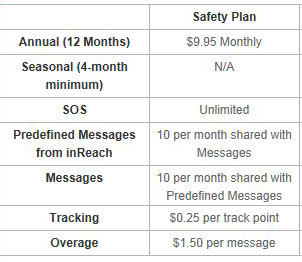
This is hard to misinterpret.
–B.G.–
"This is hard to misinterpret."
I agree. Not sure what your point is, though. Everything I said in my post above yours is correct as well. It all depends on the plan.
Everything Doug says is true. Well, everything in his previous note.
I, too, have the Recreation Plan, and I will downgrade to the Safety Plan on the stroke of March 25. Just talked to Scott at DeLorme Support and found that one need not wait forever on telephone hold to do this. You can email Support with your subscription order.
For those of us who like and use Preset Messages, it would be good to have more than three available. I asked Scott to regard this as a formal user suggestion. (I am very formal) He seemed to be making a note of it. It only takes two digital bits of information to specify which of three Preset Messages (even four!) you want via Ir sat system. The dispatch of a Preset Message takes place on the Intertubes and SMS, where the marginal cost is just about zero. To specify eight Presets only takes one bit more. How about it DeLorme? Just a tiny little bit more!
""This is hard to misinterpret.""
Ah, I see you're talking about the Safety Plan specifically. The chart on one page differs from the chart on the other. 'Tis a tad confusing for that plan.
"Ah, I see you're talking about the Safety Plan specifically. The chart on one page differs from the chart on the other. 'Tis a tad confusing for that plan."
I think that is part of the problem. Delorme writes stuff as if they know exactly what they mean, but that doesn't mean that the reader will understand the contradictions and confusions and changes.
Basically, I think we users are all trying to get the most service for our service dollar. To do that, you really need to know what the service rules are.
OTOH, Delorme is probably in the business of giving the most perceived service for the least amount of Iridium time. Since preset messages can transfer very quickly, they might be wanting to promote that.
–B.G.–
BG, I think grumpiness is getting in the way of reading comprehension. Wait! It's Rex who's grumpy.
Never mind.
I’m planning an 8-day trip without resupply, which is a few days longer than the internal battery on an inReach SE will last.
So I bought an Energizer Instant Charger PP-3AAMC, currently on sale at Best Buy for $10. $10 is not much more than the retail price of the three Energizer Ultimate Lithium AA batteries included with the charger. The charger with batteries is 89 grams on my scale.
I ran down the inReach SE internal battery to 0%, turned on the charger (a blue LED lights up), plugged the charger into the inReach SE, and waited.
You can push the on/off button on the inReach SE to see charge level and “Time to 100%” if the inReach SE is turned off.
Here’s what I saw:
Start – 0% charge, Time to 100%: 212 minutes
1 hour later – 44% charge, Time to 100%: 500 minutes
2 hours later – 44% charge, Time to 100%: 0 minutes
10 hours later – 49% charge. Blue LED on the charger is off.
When I pressed the power button on the charger, the blue LED came back on, and the inReach SE showed it was charging again.
My conclusions:
– Most of the charging happened in the first hour.
– The “Time to 100%” report is unreliable.
– You can get about 49% charge of the inReach SE out of one set of three Energizer Ultimate Lithium AA batteries (44 grams total) using this charger. Since I get about 5 days use from a 100% charged inReach SE, one set of batteries will add about 2-3 days.
I was hoping to get a full charge out of three batteries, which have a combined capacity of almost 9000 milliamp-hours. Either the inReach SE has a much bigger battery (and takes more power) than I expected, or the charger is very inefficient.
Not sure I can get 8 days with a fully charged inReach SE, charger, and one set of AA batteries.
Time to experiment with reducing power usage on the inReach SE to extend battery life.
— Rex
Interesting results, Rex. However, running the SE's battery down to zero is probably not good for it. Have you tried recharging normally since the Energizer experiment?
In the field, I would advise topping up the SE's battery nightly, a gentler approach.
Is it necessary to run the inReach SE day and night continuously? It seems that you could easily stretch the battery life by two by simply switching it off when you make camp in the evening and switching it back on in the morning.
I'm thinking that a 4-cell recharger would work more predictably than a 3-cell recharger.
–B.G.–
Jim writes:
However, running the SE's battery down to zero is probably not good for it. Have you tried recharging normally since the Energizer experiment?
The inReach SE never got all the way to 0% in real life. The unit shuts itself off at some minimum charge; you can power on, and after booting, it says it doesn't have very much charge left and shut itself down again. That tells me there is still some charge left in the battery. Lithium polymer batteries do OK will full discharge cycles, but I wouldn't leave it fully discharged for extended periods. I keep mine on the charger between trips.
I've recharged normally since the experiment, but don't have any experience with battery life since then.
In the field, I would advise topping up the SE's battery nightly, a gentler approach.
You are probably right, but I worry about not knowing how much juice I have left in the Energizer charger.
–B.G.– writes:
Is it necessary to run the inReach SE day and night continuously? It seems that you could easily stretch the battery life by two by simply switching it off when you make camp in the evening and switching it back on in the morning.
Turning off the inReach SE at night will stretch battery life, but not by a factor of two. The unit goes to sleep after detecting no movement for 4 hours or 100 meters, and a power-on boot cycle seems to use about 1% of charge. Lots of settings and practices to play with to extend battery life: Bluetooth off, extended tracking interval (or no tracking), reduced screen brightness, sounds off, good sky view, turning the unit off at night, etc.
— Rex
Rex, by turning it off at night, you would be shutting down the GPS receiver plus the "incoming text message checker" so that nobody can send you anything in the middle of the night.
I figure that I'm not going to do anything about it during the middle of the night, anyway, so I might as well shut it down. I would probably sleep better that way.
Incidentally, it seems as though Best Buy was sold out by the time I got there. I may just craft up my own charger out of an old micro USB connector and batteries. Maybe I could past a Duracell sticker on the outside for good measure.
–B.G.–
Become a member to post in the forums.
 New Gear with Aluula FabricsLighter, stronger, more abrasion-resistant, and highly water-resistant - explore ultralight backpacking gear made with ALUULA Graflyte fabrics. Engineered for exceptional strength, durability, and lightweight performance, ALUULA Graflyte helps reduce pack weight without sacrificing reliability, making it ideal for demanding backcountry adventures.
 © Beartooth Media Group Inc.
 Loading...