Firmware Update 2.3
Fixes:
•Updated Bluetooth functionality
•Various performance improvements
Topic
Become a member to post in the forums.
Firmware Update 2.3
Fixes:
•Updated Bluetooth functionality
•Various performance improvements
So here's something that might be of interest for those of you that are inReach users outside of the USA.
Most of the messages that I send from my inReach go to email addresses but on my most recent trip, I was chatting with my son via SMS on his iPhone (much more direct than email as there is no web page interaction required on the recipients end). He was surprised to find that he was charged a "long distance" fee on the text messages that he sent to my inReach from his iPhone (his plan has unlimited texting).
It seems that all text messages going to/from the inReach are routed through Delorme in the USA. So anybody that is outside of the USA that responds to a text message that is sent from an inReach may have to pay a service charge for long distance access (I'm not sure if all international carriers will do this but Roger's certainly charged my son here in Canada). Each message cost him $0.25 so I'll definitely be sending my messages via email from now on.
Just thought this might be of interest for other international users. I'd be interested in hearing if other international users have noticed this.
I spent the better part of the morning reading this entire post, as my McMurdo FastFind is nearing the end of its life. I have to say I found it immensely entertaining and informative, if not a bit painful at times following user exasperation. I sincerely appreciate the time taken by so many of you, Rex, Jim, and others, in sharing your experiences. I look forward to more updates. Thanks!
Took my inReach SE hiking Sunday afternoon fully charged, then left it on the table turned on but not plugged in, to see how long the battery would last. Still attempting to send 10-minute tracking messages, but it had no visibility to GPS or Iridium satellites.
Just got a ring and a message from the device .
10% Battery Warning
It is advised that you
recharge your inReach to
ensure enough power for
possible SOS use.
Nice feature. Awkward English.
That's about 5 hours of hiking and sending tracking messages, plus 29 hours of sitting with no satellite access, to get to 10% charge.
Worst case, you might run your fully charged battery down in a little over 30 hours if you keep the inReach SE shielded from satellites.
So don't do that!
— Rex
Interesting.
Now all we need is some kind of discount deal on satellite service.
–B.G.–

Now all we need is it to have a display that shows a topo map, records tracks and waypoints, like a standard GPS.
and I forget, does it have state of the art antenae and receiver?
(and throw in a camera while you're at it)
then you'de save carrying the weight of a GPS (and camera)
And a pony! Think how much more useful the SE would be with a pony. Not so much on ships of the air and sea, but otherwise!
"[…] on my most recent trip, I was chatting with my son via SMS on his iPhone (much more direct than email as there is no web page interaction required on the recipients end)"
Glad to hear that worked out well, but that doesn't always work:
http://forum.delorme.com/viewtopic.php?f=232&t=84395&start=10
Went to explore.delorme.com, used the map to discover the start-stop times of all my hikes, and downloaded the full KML file. One hour of editing later, I had an Excel spreadsheet of tracking date/times associated with each hike. I normally hike with 10-minute tracking turned on. After fixing some problems (see below), we have:
230 theoretical tracking points (time divided by 10 minutes)
222 tracking points received
8 tracking points missed
7 of those missed tracking points were from one Big Basin hike (details here, in dense forests and canyons.
Even on that hike:
34 theoretical tracking points
27 tracking points received
7 tracking points missed
Some of the other hikes had portions of dense forest with canyons, something special about Big Basin?
Problems: I dropped hikes under rock overhangs at Mesa Verde. I had some false alarms on several hikes with a cluster of missed tracking points. On further investigation, those were lunch stops or swim breaks. The inReach senses non-movement, and stops sending tracking points until you move again. I broke those hikes into before and after segments for the stats.
Overall, excellent performance under most conditions.
— Rex
I haven't installed it and tested it yet, but looks promising:
*****
DeLorme's latest inReach SE firmware update (2.4) delivers new functionality and improvements based on feedback from our customers like you!
New location page – Your GPS coordinates are now visible on-screen, making location sharing and reference to paper maps easier. Page also includes updated speed, course, elevation, and GPS accuracy details.
Updated preset messages page – You can now view details for each preset message to ensure that you're sending the correct information. You can also see the full recipient list and complete message by selecting the field and viewing details.
Sound update – We improved the notification tone and repeat options for alerts making it easier for you to hear notifications.
View inReach Address – You can now view the owner contact info and more easily share your address with other inReach users for device-to-device messaging.
". . . looks promising."
Yes, it does, and it's taking a really long time to install. I hope it finishes before I die. Can't wait to see geo-coords directly and other stuff, like complete preset message info. I like the preset messages a lot. Back in the old days (several months ago), it was just a choice of Message 1, 2, or 3. Now you will know what you are sending and to whom.
Still installing . . .
I haven't installed the update yet but am really pleased to hear they have added a "current location" screen.
I took part in the recent survey that Delorme sent out and also asked them to contact me for further input. I was surprised that they actually phoned me and we had a lengthy discussion regarding my perceived issues with the device and supporting app and web pages. Many of the issues I was complaining about were "user error" on my part and they were very helpful and explained some details I wasn't aware of. The rest of the issues I mentioned were recorded as possible future enhancements. Kudos to Delorme for listening!!
Edit: Link to what's been updated
http://dmail.delorme.com/HM?a=ENX7CqkUPj-E8SA9MKJFffnnGHxKLHum-PcStGb5lw8W0bBhOG5mpqVsje_HhdDfgVEH
"Still installing . . ."
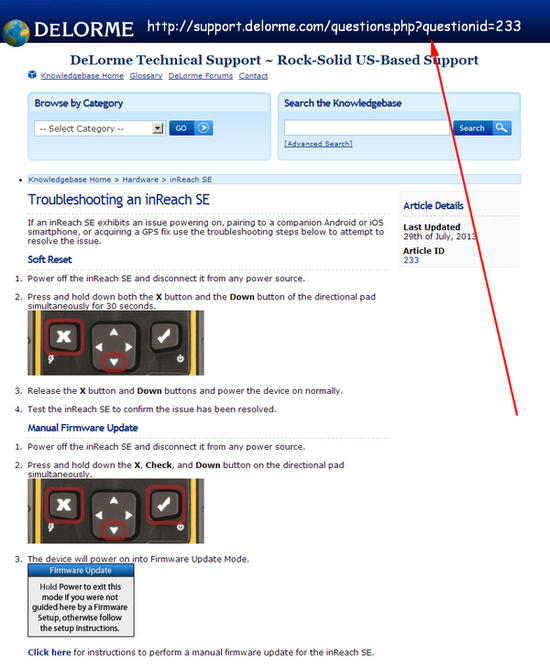
After waiting several years for the firmware update to complete, I aborted. Then the SE was apparently a brick. I called DeLorme Support (Scott) and got the magic chord of buttons to push to revivify my poor dead SE. It is XButton + DownArrow, and then, still holding those, CheckButton. The second try worked, though it said it didn't. It only took a few minutes, giving progress reports as it went. First attempt gave no progress reports, because there was no progress.
I'm going to verify that the SE still communicates with all those satellites, but it almost certainly will. The new changes are very welcome. I'll post if any problems arise.
Jim –
Thanks for posting the reset key sequence!! You saved me a lot of trouble by posting that. I had the same experience as you (update hung) and I was able to get it going by doing the reset. Not a good experience but thankfully, you had already broken the trail.
I tested the new coordinate display feature and it works very well. I like the fact that you can hit "send coordinates" directly from the coordinate display screen. It's a nice addition to the unit.
Is there any big downside to the firmware reset sequence?
Is there any user data that gets lost from it?
To put it another way, is there any good reason why DeLorme does not document this?
–B.G.–

"To put it another way, is there any good reason why DeLorme does not document this?"
It is documented, in the manual, under troubleshooting (the check button is the power button).
The key sequence Jim mentioned probably sets the unit back to the factory default setting but it also syncs your unit with your web account at the same time, so your settings and data are restored. There could be some data loss if you had updated something on the unit without doing a sync prior to the firmware upgrade hanging but you probably wouldn't lose much even in that instance.
As for why Delorme doesn't document the process… hard to say, but I suspect it's to prevent users from over-using the hard reset (which is always a bit of a risk). The unit has a "reset to factory default" option in the settings menu which is probably a safer bet if you can get to it. In my case (and Jim's) the unit appeared dead after the firmware upgrade hung, so I had nothing to lose by doing the hard reset.
Nothing new except:
We also posted dozens of social media messages; Facebook and Twitter fans were able to view our location on a map and ping us with real-time questions.
Oh. Joy.
— Rex
It's got some stuff about use in subzero weather. Scroll down!
Also, I complain about the outdated Earthmate app and grumble about the cranky DeLorme web sites (again). I think we all should. And here's DeLorme's complaint box, if you're so inclined:
Since they actually respond to their customers, I encourage everyone to pile on.
Both reset sequences are handy to memorize. I was on a solo hike in Indian Peaks wilderness this summer and 2 miles in the inReach locked up. It was connected to my phone via Bluetooth at the time. I unfortunately didn't know the reset sequence. When I got to the camp I tried a bunch of button combinations but apparently didn't hold any of them long enough. I'm picturing my wife looking at my track and thinking I'm hurt or worse and calling in a rescue. Fortunately I forgot my small pocket knife at home. Why is that fortunate?, because I noticed before setting out on the trail and grabbed a non-ultralight multi-tool from my truck. In my tent that night, by the light of my headlamp, I did surgery on the inReach using the small philips head screwdriver on the multi-tool. I removed the back cover and disconnected the battery. When I connected it back up everything was good to go. I was able to send a message to my wife (and other emergency contacts) that I was fine. Sure, I probably voided the warranty, but I was at least 3 miles from the nearest human that night and wanted the safety net. I avoided the bluetooth connection to my phone for the rest of the trip. Once home I was able to reproduce the problem, and the subsequently discovered soft-reset sequence worked. I contacted Delorme about the problem. I haven't been able to reproduce the problem with the last 2 firmware updates.
Whenever I have a piece of gear like that and then I see a critical piece of information like Jim posted, I print it all out in color, perhaps shrunken down to where it is just readable. Then I laminate it in plastic and tape it onto the backside of the gear, just so it will always be there in a crunch.
–B.G.–
I won a 50% off coupon so could land one of these for $160 shipped.
As a guy who will be doing some solo trips (and is new and inexperienced) would that be enough to make anyone here pull the trigger on this gadget?
Seems like the most recent firmware upgrades have addressed some of the more glaring problems.
It would be a no-brainer but I've been spending a lot of $$ getting geared up and starting to see the bottom of the expendable $$ bucket.
Well, I suppose anyone who spent $300 for an SE would be happy to have only spent $160.
However, humans have been hiking and camping and stuff for millions of years without SEs or even Spots. And, it weighs one hundred ninety-five grams! That's a lot of grams.
Don't forget the ten dollars or so to be paid monthly for an inReach Safety subscription. Maybe you should give that coupon to someone else.
Now that Delorme has added the "Location" option on the main menu I was finally able to test their GPS receiver. Before this option was added, I don't believe you could actually tell if you had a good GPS lock without sending a message via the Iridium Satellite network. The problem with sending your coordinates is that under tough conditions, you may not be able to connect with the Iridium birds and that would prevent you from seeing your GPS coordinates (because the track or message wouldn't be sent). Now that Delorme has allowed us to just ping the GPS satellites, the coordinate display doesn't rely on the Iridium satellites being visible.
This change has allowed me to test the GPS receiver and I'm happy to say it surpassed my expectations. I'm able to get a good satellite lock sitting inside the house at my computer (in my basement) and it provided quite an accurate set of coordinates (tested multiple times). This is pretty well equivalent to the results I would get with a High Sensitivity Garmin receiver, so this is good news!
Become a member to post in the forums.
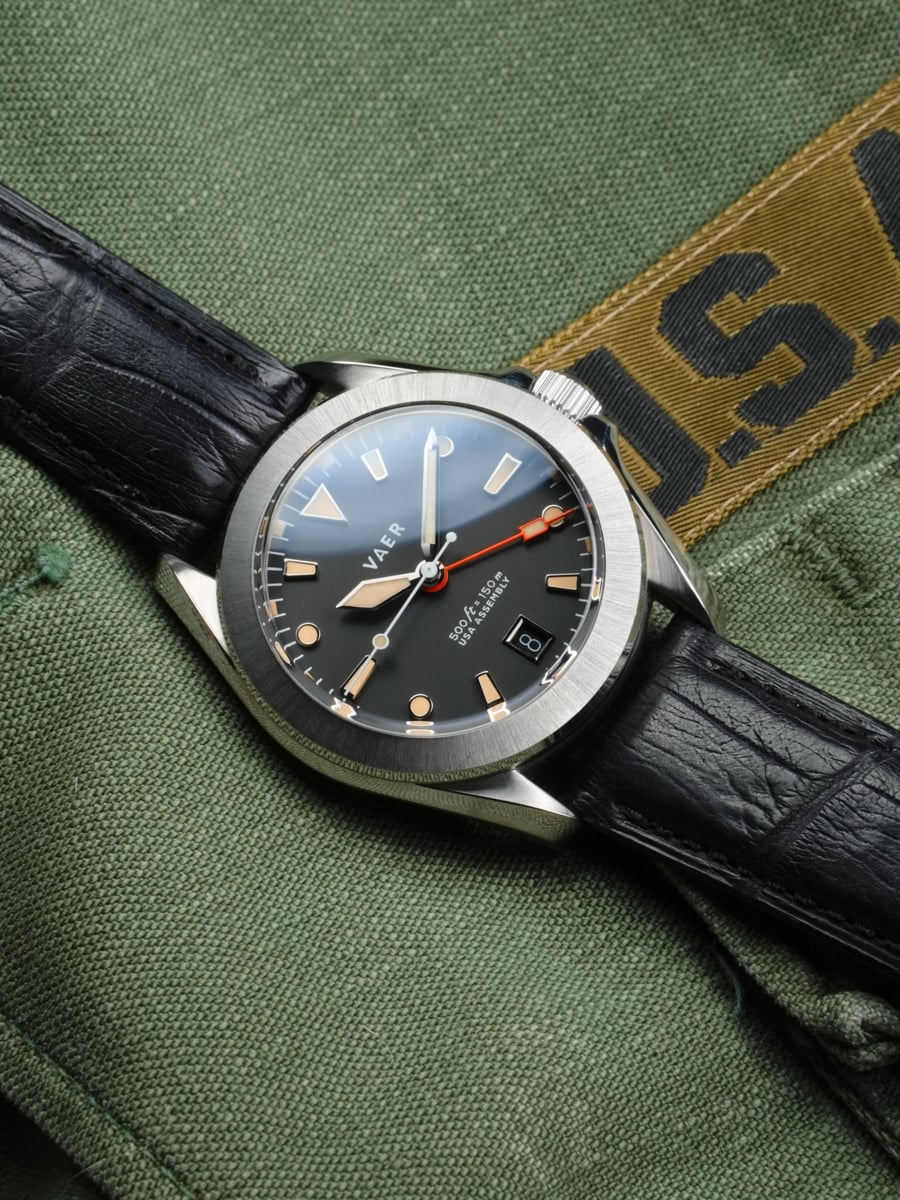 A Cult-Classic GMT Reimagined for Everyday WearInspired by the famously bezel-stripped Rolex GMT-Master worn by Marlon Brando in Apocalypse Now, the G2 Apocalypse turns a piece of 1970s film and watch history into a practical everyday GMT. Its restrained 39mm design pairs a Swiss Ronda quartz GMT movement with sapphire crystal, 150 meters of water resistance, strong BGW9 lume, and USA assembly. The result is an accurate, low-maintenance travel watch with a story collectors will immediately recognize.
 © Beartooth Media Group Inc.
 Loading...