


How do I paste some text into a new post or a reply? I get the “control v” message but don’t know how to use it.
Topic
Become a member to post in the forums.
 .
.
How do I paste some text into a new post or a reply? I get the “control v” message but don’t know how to use it.
Use the block quote key above ” paste your copy.
How do I paste some text into a new post or a reply? I get the “control v” message but don’t know how to use it.
You can also hit the block quote key again after pasting to be able to continue on but you’ll need to ad your own quotations, like this
“How do I paste some text into a new post or a reply? I get the “control v” message but don’t know how to use it.”
Hope that helps
Select the target text, usually by “click/hold and dragging” the cursor across it.
Press Control + C simultaneous to copy the text. Or go the Edit in the menu bar and select Copy.
Place and click the cursor where you want the text to appear, press Control + V, or use the Edit/Paste.
Edit: Clarification needed – you want to quote posted text, or you want to copy/insert some other existing text into your post?
I clicked on the block quote symbol.
I then right clicked my mouse and selected “paste”
Nothing pasted and I got the “control v” message again.
Hmmmm.
I think it wants you to use keyboard commands and not mouse right clicks.I get the same kind of messages in Google Docs and the image below always pops up to prompt me to use key board commands.
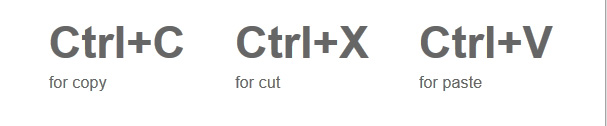
Depending how your mouse/trackpad is set up, you can use the “sedondary” click to Copy, and then Paste.
It sounds like your’s has that option.
Just in case you missed my first post above –
Edit: Clarification needed – you want to quote posted text, or you want to copy/insert some other existing text into your post?
Edit: Clarification needed – you want to quote posted text, or you want to copy/insert some other existing text into your post?
Did the above by right mouse key held down and scrolling along text. Then click right key, select copy.
Then go to new message window and click on the block quote key and then paste.
I never use keyboard commands.
“Edit: Clarification needed”
Above successfully pasted using Ctrlv.
Thanks for the help all.
These keyboard commands are new to me. Simple copy and paste with mouse worked for me on old BPL system.
I like to copy and paste part of previous posts to make it clear to the reader to what I’m responding.
I never use keyboard commands.
If you ever needed to use Photoshop you’d learn some in a screaming hurry! :^o
But for what we are talking about here, no.
Become a member to post in the forums.
 How to Plan with Decision GatesKeep going, change your route, or turn back? Watch how decision gates help structure these choices in our YouTube video.
 © Beartooth Media Group Inc.
 Loading...