Topic

Fenix 5x Review

Viewing 10 posts - 1 through 10 (of 10 total)
PostedDec 5, 2017 at 9:52 pm

Just finished a pretty beefy hiking-focused review of the Garmin Fenix 5x (and video) if anyone is interested. Overall, a very powerful asset to have with you on the trail, but really expensive. If you just need the functionality, there are cheaper options. But if you can afford it, it’s nice to have.

Garmin Fenix 5x Review on HikingGuy.com


Steve Collins BPL Member
PostedDec 6, 2017 at 4:28 am

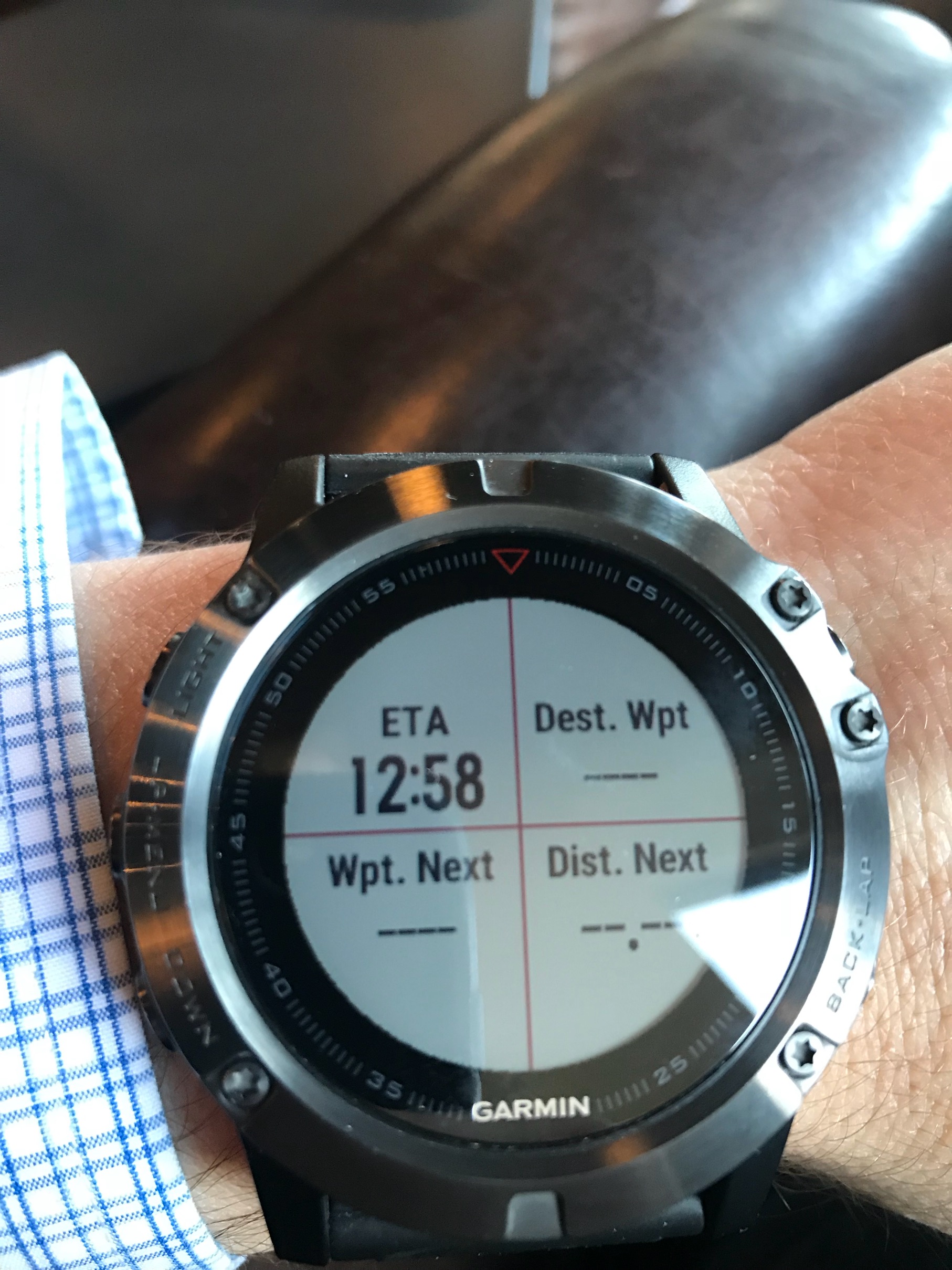
Really nice review!  I have a 5x and it is great in so many ways other than I can’t seem to build routes with waypoints and have the watch show distance to end and distance to waypoint. If I can figure that out it would be great.

thanks for sharing.

Nathan L BPL Member
PostedDec 6, 2017 at 4:43 pm

Cris,

Very nice review, I have a Fenix 5x and I love it even though I have probably only used about 10 – 15% of its functionality.  I have used it a few times so far on hiking and it works well although I have not used the topo maps, but your article explains it well now, so I will start using those.

For hiking I purchased Hiking App Professional  and I love this app, I can load any fields I want onto multiple screens and get my total mph, current mph, distance traveled as well as tons of other data I want that the Fenix can use.

I originally thought I was going to knock the watch on everything, but I got used to it, but I still knock it sometimes and have managed to slightly scratch the sapphire glass on a hike or some other place.  This was my first watch of this type I have ever purchased but I do not regret it at all.

I also wear it constantly, I feel naked without it now.

PostedDec 6, 2017 at 4:47 pm

@chicagomoose Thanks thanks – and unfortunately I don’t think the Fenix 5x can go waypoint to waypoint w/distance like the non-fitness Garmin units. I tried a few times to do it, and couldn’t make it happen either. It’s strange that Garmin has a different nav workflow for the handhelds and another one for the fitness units (like the Fenix), but what do I know?

Steve Collins BPL Member
PostedDec 6, 2017 at 4:57 pm

Cris –

There must be a way. I know there are a bunch of work around but I can’t seem to make it work. See attached pic showing the built in data fields when I choose to navigate a route.  So I know it must be in the route building somewhere how to make the 5x understand to calculate to the next waypoint.  Frustrating.

PostedDec 6, 2017 at 4:58 pm

@nathansl2003 – Yea, I feel like I’ve only scratched the surface as well. There’s so much going on with this watch. If you have any questions as you get into the topo maps, feel free to ask.

Haven’t checked out Hiking App Professional, but looks very cool, and 22k positive reviews. Sounds like a winner.

For wear and tear, if you look at mine closely in the pictures, some of the stainless is beat up and scratched on the edges, but nothing on the glass so far. I had the Fenix 3HR Sapphire for a while and it was the same. Wonder what scratched yours, would be good to know. Guessing it has to be something really hard like quartz.

PostedDec 6, 2017 at 5:00 pm

@chicagomoose – I’m going to play around with it this weekend and try to see what I can figure out. I think the problem is that the routes you create are courses, which are just a series of track points. If you did navigate to waypoint, I bet you’d have data in those fields. Lemee play around with it though.

Chris W BPL Member
PostedJun 28, 2020 at 9:08 am

I know I am late to be adding to this thread, but I may be in the market for a second hand Garmin Fenix watch. The 5 was recommended to me since the 6 is the newest model and some people are upgrading to the 6 and selling their 5’s. I’ve used a Garmin handheld for years and I am attracted by the smaller unit if it will fit my needs. I have primarily used my handheld  for tracking my adventures and then uploading the track to my CalTopo site for reference, but I’ve also plotted a few trips ahead of time. And I don’t have a phone, so my option is pretty much just a portable GPS of some kind in addition to my paper maps. Will the 5 allow me to use it as I have my handheld in the past?

Thanks

Chris

PostedJul 1, 2020 at 7:06 am

You should be able to use the F5 like your handheld, but just realize that the screen real estate is much smaller so it’s tougher to pan around and do on-the-fly navigation with it. But to get a position you’ll be fine.

Viewing 10 posts - 1 through 10 (of 10 total)
Loading...