Topic

Adsense ad is making forum unreadable

Viewing 19 posts - 1 through 19 (of 19 total)
Ben H. BPL Member
PostedMay 19, 2017 at 11:04 am

I have an issue with an Adsense ad making the forum unreadable.  The ad is for Kona Brewing Co. and when it comes up, the website automatically scrolls to the ad and does not let me read any posts at the top of the page.  If I scroll up it automatically scrolls back.  This is starting to get  pretty annoying.  My days on the forums may be numbered if this doesn’t improve.

Ben H. BPL Member
PostedMay 19, 2017 at 11:39 am

Update: I am only having problems on Chrome.  The issue disappears on Internet Explorer, though I don’t get the same ad on IE.  I am not sure if the ad (Kona Brewing Co.) alone is causing the problem or it is the ad + web interface.

JCH BPL Member
PostedMay 19, 2017 at 11:50 am

Ad/Content blockers are your friend, and not just to solve the problem you are reporting.

Ads are one the the key attack vectors for malware, ransomware, whatever-kind-of-ware you care to mention.  Ads also are notorious for implementing tracking and/or collecting data in hopes of identifying you to either serve you more ads, or worse to collect personal data to sell to others for profit.

If you are using a desktop browser consider installing an ad blocker…I use uBlock.  If you are using an iOS device, there are many content blockers to choose from…I use Purify. Android users most likely have many options as well.

With those two products installed I have not had any of the site usability problems people are reporting for this site.  This site certainly has it’s problems, but Ads don’t have to be one of them.

PostedMay 19, 2017 at 1:48 pm

Ben, I had that problem also, drove me to start baking biscuits :-) instead of trying to post.

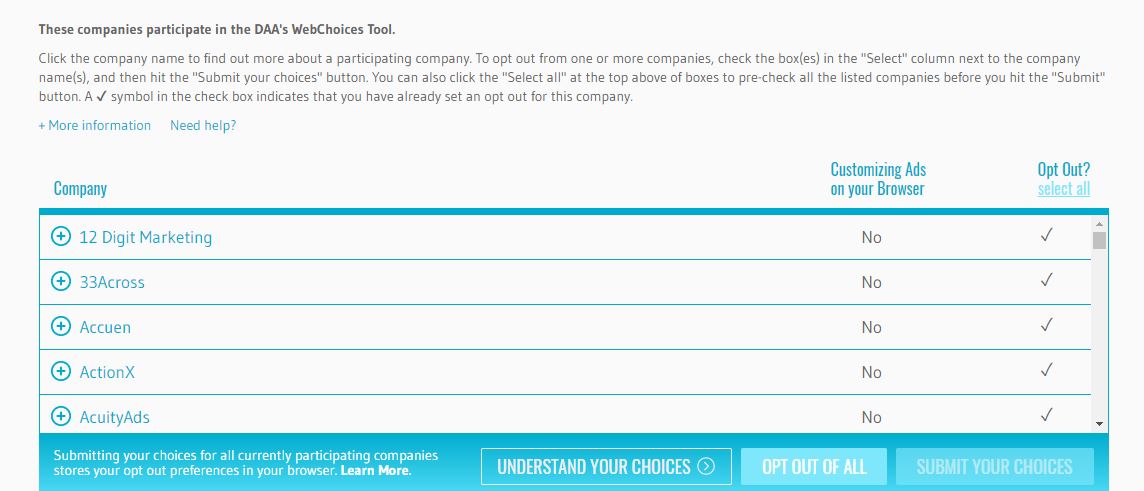
In the upper right hand corner of an ad you’ll see 2 little boxes with icons, pone is an X and the other is an arrow shape pointing to the right. Click on the arrow pointing right. Read the information about the personalized ads and and then follow some of the links till you get to a page that shows this:

Once you get to that page click to “opt out all” in the right hand corner.

I use google chrome also most of the time. Adds continue to appear but not the nuisance one that scrolling me back to the center where the ad was playing.

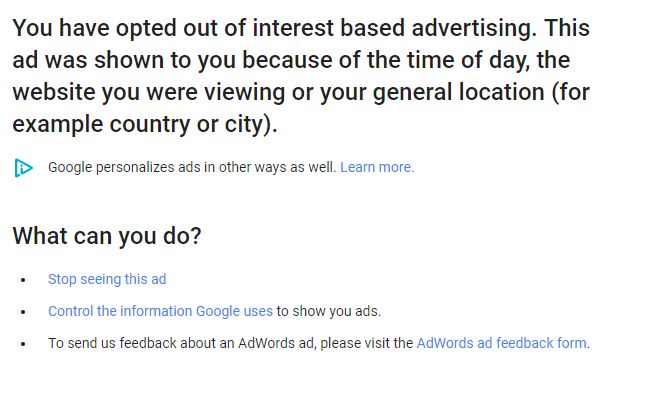
You may also see this page when viewing the add info:

PostedMay 19, 2017 at 2:18 pm

Forget what I said, download ublock, I just did and all ads are gone whoooobudddy. thank you JCH :-)

Ken Thompson BPL Member
PostedMay 19, 2017 at 2:26 pm

With my content blockers turned on this thread appears to be itself an ad, weird.

Ben H. BPL Member
PostedMay 19, 2017 at 2:35 pm

Thanks JCH and Dan.  I’m not a huge fan of ad blockers because they make the economics of the internet more difficult… also some of them are nothing more than extortion schemes.  I guess if the people running this site don’t propose a solution that is what I will have to do.  I could not find the options you show Dan.

JCH BPL Member
PostedMay 19, 2017 at 2:49 pm

Ben and Dan, you are welcome.

Ben pretty much said it all.  I don’t particularly like the idea of Ad/Content blockers, but some sites just don’t leave much choice.  If you have installed uBlock, please take a little time to learn about it’s settings.  It allows you to whitelist certain sites thus allowing one to honor a site’s choices about monetizing their online property *IF* they do so in an honest and respectful way.  Something I’m sad to say this site does not.

Not all ads/sites are bad, but when they are, content blockers are your best solution.

jscott Blocked
PostedMay 19, 2017 at 2:58 pm

The same ads are making this site unusable to me too-including typing this, the4 ad just keeps repeating and interrupts everything. The options given for eliminating the ads lead nowhere. Ad blocs can also block legitimate sign in activity on other sites. this is the worst!

JCH BPL Member
PostedMay 19, 2017 at 3:30 pm

Ad blocs can also block legitimate sign in activity on other sites

That is correct, which is why uBlock can be turned off with a single click and, as I said, sites can be whitelisted. There is no perfect solution. We much each select the trade-offs with which we are most comfortable.

PostedMay 19, 2017 at 4:23 pm

JCH thanks again :-) it’s so nice not to have the annoying ads.

Once you’ve downloaded ublock, lookin the upper right hand corner of your screen and you’ll see the little maroon collored icon with a number showing how many were blocked. Click on it and this little window pops up:


Ken Thompson BPL Member
PostedMay 19, 2017 at 4:26 pm

Adblock Plus

Firefox Focus

Been running both for a while here with no real issues on my end. This is the first time though that they think a whole thread is an ad.

Both free.


PostedMay 19, 2017 at 5:23 pm

This thread was necessary for those folks experiencing the problem with “chrome” I was one of them.

PostedMay 19, 2017 at 5:49 pm

Adblock should make your life a lot easier.  I’m also a Chrome user, and it sure has worked for me. 8-)

JCH BPL Member
PostedMay 19, 2017 at 6:20 pm

Dan, glad you are happy with uBlock. It is quite dramatic the difference it makes.

Adblock is a good product, with it’s own set of tradeoffs.  Glad it works for you Ken and Tom. The key takeaway is that there are many tools available (free and paid) to address obnoxious, productivity killing, and often dangerous ads. Please just take the time to read about them, how to configue and control them, and decide if you are comfortable with each’s tradeoffs.

I would be very surprised if some (certainly not all) of the problems so many people are having not being able to post weren’t in some way connected to the out of control ads on this site. It is often very hard to ascertain how all the bits and pieces of active content on a webpage will affect a particular user’s computer.

JCH BPL Member
PostedMay 19, 2017 at 6:31 pm

I’d like to point out two not obvious features of uBlock that I find VERY useful…in fact these are the main reasons I recommend it.

Looking at Dan’s sceenshot above you will notice the big blue “power button”.  If, after installing uBlock, you notice one of your familiar websites not working as it always has, simply click this to turn off uBlock…a “refresh” button will apear allowing you to conveniently refresh the page with just one more click. This often addresses the login issues that Jeffrey mentioned. Note that this disables uBlock for all sites you visit until you turn uBlock back on by clicking the power button again.

To whitelist a site, i.e., tell uBlock to always “turn off” when on that site (but not on other sites you visit), click the little gear icon in the uBlock header. The uBlock dashboard opens in a new browser window.  Click the “whitelist” tab and add the site to the list.

Finally, if you are feeling particularly adventurous you can peruse the other tabs on the dashboard, but honestly 99.8% of people will have no need to change any of those settings.

Hope this helps, and peaceful browsing :)

Ben H. BPL Member
PostedMay 19, 2017 at 7:31 pm

Thanks jch ! Ublock did the trick as advertised.

PostedMay 20, 2017 at 6:53 am

JCH completely made my year. :-) smooth sailing from here on out :-) little things mean a lot ;)

Viewing 19 posts - 1 through 19 (of 19 total)
Loading...