



What is a Portable Battery Charger?
Some backpackers use a portable battery charger (sometimes referred to here as a PBC) to keep other battery-powered devices running on longer trips. Portable battery chargers are also known as portable battery packs, battery banks, battery packs, portable chargers, portable power devices, portable power banks, power banks, or power packs.

It’s almost too easy to find tests and comparisons of portable battery chargers. But none that I read or watched focuses on the most important factors that backpackers should care about, including the lightest models for charging your phone or earbuds.
And portable battery charger makers do not consistently measure mAh (milliamp-hours), the most prominent number in product names and advertisements. Plus, mAh isn’t even a complete unit of energy!
What is the Best Portable Battery Charger for Backpacking?
It’s a common question, and not easy to answer. My goals for this article are:
- Give you enough background to understand portable battery chargers in a confusing world of mAh, USB-A, USB-C, PD, Wh, and other uncommon acronyms.
- Describe the factors important to backpackers – and the ones missing from virtually all other tests.
- Describe useful and inexpensive tests that you can run at home. And ideally, leave the PBC intact for return if it does not meet your needs. I used the Anker PowerCore 10000 in this round of tests.
Definitions
Here I loosely define terms for this article. Pedants beware!
Energy: Potential work. Electric energy can be measured in Watt-hours (Wh). The energy stored in a battery is like the gasoline (gas, petrol) sitting in a car’s tank.
Power: How fast a device spends energy; electric power is measured in Watts (W). The power of a battery is like an engine in a car. Some cars have large tanks (high energy) and small engines (low power); some have small tanks and large engines; most are in between. Batteries are similar. Also called power output.
PBC (Portable Battery Charger): An energy and power source with rechargeable batteries inside, used to recharge other devices using USB. Like jugs full of gasoline for refilling a car’s tank.
Device: Any battery-powered thing you carry while on a backpacking trip that needs recharging via USB.
AC charger: Something you plug into a 120 Volt (V) or 220 V AC (alternating current) outlet to recharge devices using USB charging cables. Some AC chargers can deliver more power than others; that doesn’t mean you will get all that power going into a particular device. AC chargers and portable battery chargers are like gasoline stations and gas jugs.
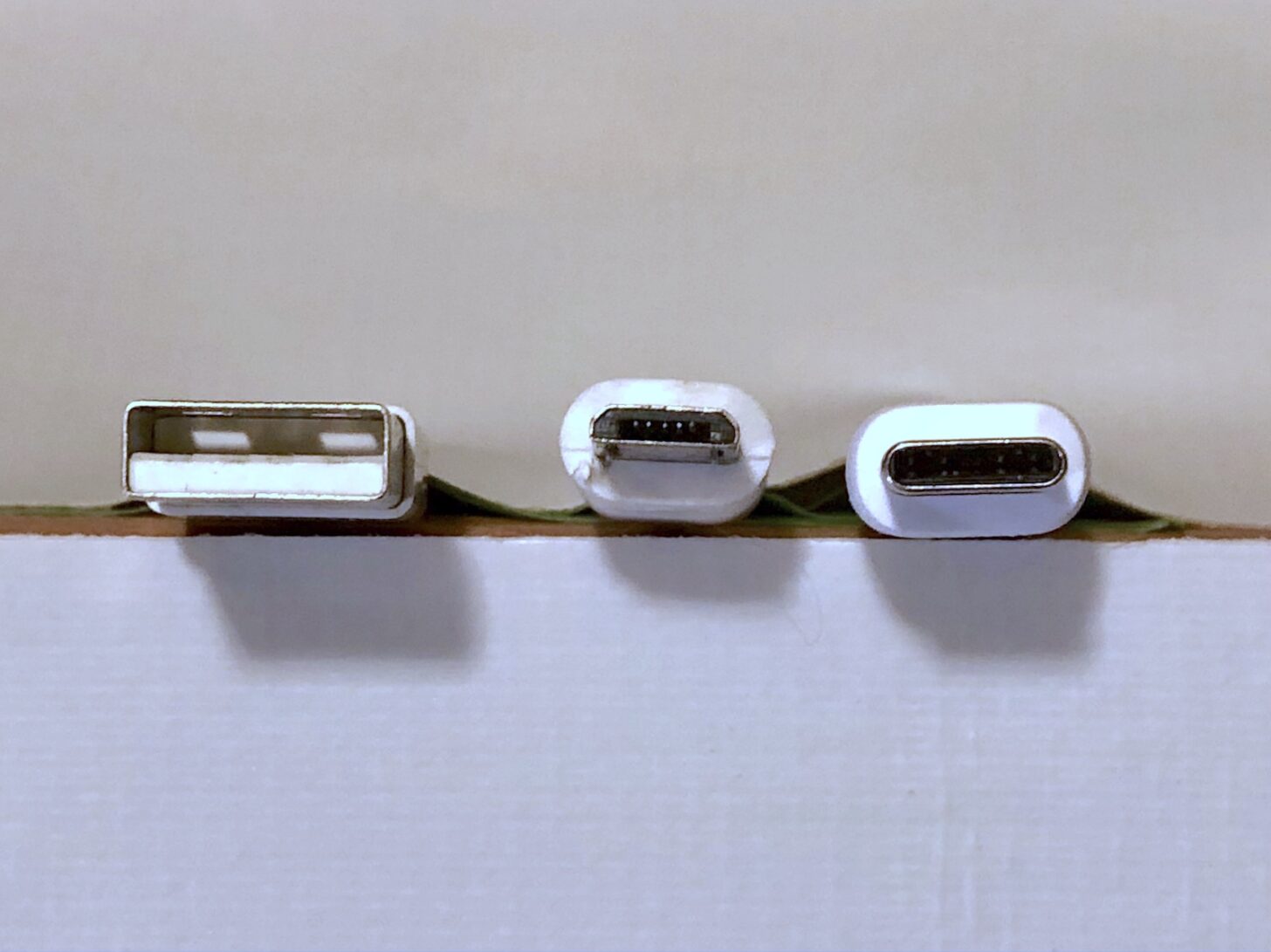
USB-A: The rectangular power and data connector found on computers and other devices for about 20 years. Often you must flip the connector over to fit into a socket. USB-A supports up to 18 W.
Micro USB: A compact version of USB-A, mostly found on smaller devices like headlamps, satellite communicators, and ultraviolet water sterilizers. Same connector flip problem as USB-A, and the same power range.
USB-C: A small oval power and data connector found on newer devices. Connectors fit into sockets either way. Can transmit power up to 240 W using several power schemes, including PD (Power Delivery).
USB 1, 2, 3 and many variations: Confusing standards mostly for the data speed of a USB connector, and not relevant for energy measurements.
PD: Power Delivery is a widely-supported but complex standard for delivering and consuming power up to 240 W through USB-C connectors. Note that an AC charger or PBC that can supply more power than a device will consume will not hurt the device, but it won’t recharge any faster, either.
Battery life: The “amount of time a device runs before it needs to be recharged,” according to Apple. Like the miles (kilometers) a car can drive before it runs out of gas.
Battery lifespan: The “amount of time a battery lasts until it needs to be replaced,” according to Apple. Everything wears out eventually.
Specified energy: The total energy stored inside a portable battery charger or device like a smartphone, according to the manufacturer. You can usually find the total Watt-hours (Wh) of energy on the device, in its manual or web page, or on independent test and repair sites. If that fails, you can multiply mAh by 0.0037 to get an approximation of specified Wh. Most 10,000 mAh PBCs I found claim to hold 36 to 38 Wh.
Delivered energy: The total measured energy in Watt-hours that a portable battery charger can send through a USB port. Delivered energy is what really matters for backpackers, but it’s almost always lower than the specified energy. Sometimes also referred to as battery capacity.
Energy density: The specified or delivered energy per unit weight for a portable battery charger. I use Watt-hours per kilogram (Wh/kg). Lightweight backpackers should prefer PBCs with higher energy density.
Consumed energy: The total measured energy any device takes in while recharging. This value is always higher than the specified energy or delivered energy.
Wasted energy: Energy used, but not useful. Examples include the difference between consumed and delivered energy; or the energy supplied by a PBC after the attached device is fully recharged.
Wrangling Units: Volts, Amps, Watts, mAh, and Watt-hours
(Adapted from Simple Gear Tests and USB Recharging, Backpacking Light.)
Some USB meters display Volts, Amps, and Watts during testing. Computing Watts is simple:
Note that all three units can change slightly while recharging.
Many portable battery chargers claim to have 10,000 mAh, but those units are incomplete. If you want to know how much energy is inside a device measured in mAh, you must know the Volts, too. PBC makers quietly measure mAh at the internal battery, typically 3.6 to 3.85 V.
Volts x mAh / 1,000 = Watt-hours
Because mAh are misleading, I use Watt-hours. For example, a 10,000 mAh PBC at 3.7 V internally holds 37 Wh.
But the USB delivery of those Watt-hours can fall short. That is why you should measure delivered energy.
Watts x hours = Watt-hours
In theory, a portable battery charger with a 36 Wh battery (about 10,000 mAh) needs 18 W to recharge in 2 hours (18 x 2 = 36). But in my experience, recharging is slower than that and slows down as batteries fill up, plus there are energy losses.
General Background on Portable Battery Packs for Backpacking
Battery management has become another important backpacking skill. If you are not an electrical engineer, you might get lost in a whirlwind of acronyms, jargon, and formulas. And the battery and device industry sometimes hides or obscures important information.
You will usually regret taking less energy than you really need. So don’t cut it too close. The hard part is not taking too much. Most of the existing advice boils down to “see what works for you.”
Energy Background
According to PowerBank20, the average portable battery charger is about 85% efficient at turning stored energy into delivered energy. And one smartphone they tested was about 80% efficient at turning consumed energy into stored energy. Add in other energy losses through cables and connectors, and it’s easy to waste more than 30% of stored PBC energy while recharging another device. But every PBC, USB cable, and device is different.
Recharging devices involves two voltage conversions: portable battery charger internal batteries at 3.7 V boosted to USB at 5 V to 20 V; then USB voltage reduced to device battery voltage. And some internal voltage converters are more efficient than others.
But efficiency doesn’t matter much if you measure how much energy a portable battery charger delivers, and how much energy your smartphone or other device consumes during recharging.
You cannot overcharge a properly designed device or portable battery charger. Manufacturers also design batteries for hundreds of recharges, until they gradually drop to about 70% of new capacity. Full discharge harms batteries, so internal electronics often hoard the last 5% to 10% of energy to extend battery lifespan.
Can a portable battery charger be taken on an airplane?
Because of explosion and fire risks, airline authorities limit flying with lithium-ion batteries by specified Watt-hours. Knowing that information can be critical before boarding a plane. At this time, TSA prohibits lithium-ion portable battery chargers in checked bags.
What’s the proper way to dispose of a portable battery charger?
Lithium-ion batteries are hazardous waste, so you cannot just throw devices into trash or recycling bins, or leave a dead one in the backcountry. You must follow local rules to dispose of them properly. Try to make your devices last a long time!
USB Background
The industry created too many kinds of USB connectors and names. I use common retail names: USB-A, Micro USB, and USB-C. Each connector supports a dizzying array of data and power schemes. Ignoring data, the common power schemes are: plain USB up to 18 W, the Apple scheme at 12 W, and PD up to 240 W. In my market research, most lightweight PD PBCs deliver 18 W.
The world of USB recharging is frustratingly complex. When you plug a device into a portable battery charger or an AC charger, each end negotiates the recharging speed in Watts.
Often, they maximize battery lifespan at the expense of speed. So a portable battery charger that claims it can charge at 18 W might charge an 18 W smartphone at 9 W, tapering down near the end. You have no control, and without a USB meter, you normally have no idea. You just wonder why recharging takes so long.
Delivery Background
USB-C fixed many of the problems with USB-A and Micro USB, but added new ones, like different cable power limits or maximum Watts. Choose high-quality cables from reputable sources, and try them before you head into the backcountry. Any decent cable should support the full 18 W delivered and consumed by lightweight portable battery chargers.
The good news is you can ignore most of these complexities by following a few rules.
- Look for USB-C PD ports that can deliver and consume 18 W or a little more. And 18 W is plenty for smartphones and other backpacking devices.
- Use high-quality PBCs, AC chargers, and USB cables from reputable brands. Do you really want to risk damaging a $1,000 smartphone to save $20 on a PBC?
- Use the shortest, thickest USB cables that work for you, both to save weight and to waste less energy.
- For thru-hiker town stops, a long cable is very handy for using a smartphone while recharging.
- When in doubt, use the USB cables and AC charger that came with the device.
Unfortunately, you probably need about as many cables as devices. For example, an iPhone needs a Lightning cable; the inReach Mini requires Micro USB; every smartwatch maker requires a unique cable; and in town, most portable battery chargers charge fastest through USB-C. Four devices, four cables, though some people like to play hide-and-seek with tiny adapters to reduce the count.
Maybe someday everything will use USB-C. The industry will probably come out with something new, improved, and incompatible before then.
Testing Overview
Here is a brief, non-technical explanation of the BatteryBench portable battery charger tests described in detail below.
 Basic Measurements: PBC weight and dimensions, plus evaluations of button and light usability, case design, and USB port quality.
Delivered Energy: How many Watt-hours can the portable battery charger deliver? Connect the fully-charged PBC through a meter to a load tester at 9 W. Run until the PBC is empty.
Smartphone Overnight: Does overnight smartphone recharging waste portable battery charger energy? Connect the fully-charged PBC to a fully charged and turned off smartphone for 10 hours. Then run the Delivered Energy test without recharging the PBC.
Member Exclusive
A Premium or Unlimited Membership* is required to view the rest of this article.
* A Basic Membership is required to view Member Q&A events


Discussion
Become a member to post in the forums.
Companion forum thread to: BatteryBench: A Protocol for Testing Portable Battery Chargers and Electronic Devices for Backpacking
Rex Sanders runs through an extensive protocol for testing portable battery chargers and electronic devices.
Great start Rex. I’m be interested to see how the Nitecore 10k bank performs too. I could probably send you one for a couple weeks to test if you want. PM me if so.
Another point I’ve noticed – I have a 2 or 3 year old S10+ and also a brand new S10E work phone. I realize the E has a smaller battery than the S and am taking that into account into my remarks. It seems to me (based on observation only, no testing behind this) that as a Li battery ages, it both looses capacity but also becomes harder to charge. The brand new phone (and my S10+ when it was new to ~1 year old) seem to take a charge easier and require less energy from the battery bank. Is there any scientific basis to that or is it just in my head? If there is a basis, one more factor to consider is how many cycles your receiving battery has on it. I guess your watt meter wouldnt really test this, it would just have to be something the user keeps in the back of their mind.
Marcus,
Nitecore NB10000 test results coming to an online publication near you soon(ish).
The chemistry of rechargeable Li-ion batteries is pretty complicated. From my limited understanding, every recharge gradually makes it harder for ions (and electrons) to move back and forth between anode (-) and cathode (+). Don’t know if that also slows down recharging.
Also, your smartphone charge controller might be working extra hard to extend battery lifespan for the aging battery, at the expense of time and wasted energy. That waste wouldn’t even register on an in-town utility bill, but might make a big difference recharging from a portable battery charger in the backcountry. Would be difficult to test in a reasonable timespan.
— Rex
“A Watt-hour here, a Watt-hour there, and pretty soon you’re talking real energy.”
Not said by Senator Everett M. Dirksen.
What a well-written and useful article this is Rex. I’m on my second reading. Having spent many years working in testing labs, I can appreciate the hard work you put into this. Thank you!
Rex, That was a mighty useful article. I decided to order my own FN48 meter and USB load so that I can test my devices. I have a couple of friends who will also want to test their devices.
Hey Rex, great article, which inspired me to order these gadgets in my never-ending quest to optimize absolutely everything in my pack. Plus waste time.
When I clicked on the link for the USB meter, the model you referred to is no longer available. However, a seemingly equivalent model “SE” is available on Amazon. This one does save mAh values and so is perhaps more convenient for measuring discharge capacities.
My USB meter doesn’t calculate watt hours. I’m tempted to buy one.
This is so much funner than working where they tell you how to do something in a way that can’t possibly work, and then complain that it’s not working and you have a bad attitude : )
Here’s the exact link I used to purchase the USB meter. “Only 17 left in stock – order soon.”
And the load tester. “Only 13 left in stock …” Lead photo shows two units; you only get one.
Sometimes strange things happen to Amazon links on BPL.
And after too many months working on test development and testing, I kinda sorta miss walking down to the basement to run tests. But I’m getting over it :-)
— Rex
Good article. Just yesterday I went back to check my USB cables using a similar power meter to see which was delivering more mA’s from my Anker brick to my iPhone. Turns out it’s the Anker cables at 1500 mA, where the the other cables are delivering 900 mA. That would be quite a bit of energy wasted in the cable resistance I suppose. I then ordered a new 3 ft Anker cable, so I don’t carry the 6 ft.
USB cable testing is on my radar, because a few others found big differences too. Almost a non-issue for recharging from wall chargers, so cables are rarely tested for energy loss.
Until then: short Anker cables seem to be very good.
— Rex
PS – The load tester I used has vanished from the market, and the Amazon link above points to something else. Given my bad experience with a different make & model, I won’t suggest anything else without personal testing.
I have 6 inch USB cables – a little lighter weight and less space. A USB C for my phone. Mini for some other devices.
I got some that have no cable – just a connector to plug into battery on one side, and to plug into device on the other side – essentially no cable. But it seemed like that might break something, weird torque on the connectors. Better to have a short cable as strain relief. They weigh less though.
Thank you for this.
I recommend the sensorpush HTP.xw for your temperature readings. A little bit pricey but the interface and use is excellent.
I’d also be interested in the round trip efficiency of battery packs, say for the case of a solar panel. Along that same vein, the ability to maintain charging despite brown outs or unstable power is also interesting to me. Also I’m curious about the difference between li-poly and regular li-ion cells in terms of cycles or output. Obviously the li-poly is much higher density.
As further interest to durability I’d be curious what the cell cut off voltages are (low/high). You can charge to 4.2V but that generally hurts cells so some manufactures limit to 4.17 or lower for longevity while others might use cheap cells with low cap but spice it up to 4.21 for some extra juice at the expensive of lifecycles.
also I think thermal imaging is interesting because it shows off inefficient circuits, wires, or otherwise poor designs that may not be obvious.
lots of angles this could be approached from but I think this is a great start!
edit:
I think this guy does excellent work in testing chargers and I find the graphs and the way he looks at cut off voltages interesting
https://lygte-info.dk/info/indexBatteriesAndChargers%20UK.html
Where would one suspect the resistance is coming from in USB cables? Is it the thinness of the wire? Or is it something to do with the connection itself? I’m using generic 6 inch USB for my Anker, so I would imagine even with thinner gauge wire, the distance wouldn’t be long enough to matter much would it?
I know DC energy drops significantly with distance from wire resistance, so would one only see those issues in longer cords?
And sorry for going a little off topic, but one interesting approach DJI (drone maker) has come up with is the ability to stack their batteries into a 2-in-1 unit that both charges the drone batteries as well as reversing the flow and able to charge other devices from the drone batteries. For people who do drone photography backpacking, they can then put all their energy weight into the drone batteries for the drone’s needs, and then anything else that needs topping off like phone and headlamp can be taken from them as needed. This is more weight efficient for someone doing a lot of drone work, as then the energy is already converted into the proper voltage for the drones and available directly for their operation. There is no energy loss associated with converting power from a power bank to the drone batteries, especially if there is a voltage delta between the two (3.6 vs 7.2 volts). I have a similar system I can use with my headlamp, but since the headlamp uses so little energy, it doesn’t save much weight as the energy from the headlamp cells is then no different than using a power bank. Would probably work better if I needed to use the headlamp at max output for long hours every night.
Based on what I’ve read so far, USB cable resistance (energy loss) can come from skinny/skimpy/low-quality wires hidden inside the cable; low-quality USB connectors; and overall cable length – shorter is always better for the same design.
That’s why I recommend shorter, thicker cables from reputable brands like Anker until I can do more testing. Cable energy loss testing is surprisingly rare; most reviewers are happy if it works with an AC charger, when you wouldn’t even notice the difference under most conditions. “Hmmm, wonder why the cable is smoking?” Crazy-high new Power Delivery (PD) wattages (240 W over USB-C!) could change that for a small subset of cables and use cases.
Soon you might be able to cook more easily with electricity while backpacking :-) Much safer in high-fire-danger areas, like almost everywhere in a few years.
— Rex
Very interesting article. And a well-structured set of tests. And I also enjoyed hearing you discuss this material on the recent podcast.
I have an iPhone that I charge overnight on backpack outings, so your iPhone advice was of specific interest. ‘So after an iPhone is fully recharged, you should unplug it to conserve PBC energy.’ I like to use my iPhone as a wakeup alarm, so I leave it running overnight. I was unsure if I would see any benefit by charging, then unplugging the phone.
As you noted, even if turned off the iPhone will turn back on when connected to the PBC. Do you have any sense of whether or not the ‘wastage’ is due to the iPhone overnight standby power consumption? I would guess that the iPhone derives all of its operating from the PBC, when plugged into the PBC. I would expect the somewhat higher voltage of the PCB to back bias the iPhone battery so it would not act as an energy source.
The short answer is I don’t know. Testing with a USB meter between a battery pack or AC charger, and an iPhone that was fully charged and turned on but sleeping, I saw unexplained jumps and drops in power consumption on the time scale of multiple seconds, even with Airplane mode turned on.
That’s what convinced me to make double sure the iPhone was completely turned off during the plugged-in overnight test – which still consumed a bunch of energy. I’d like to dig into this more, but it’s joined roughly 100 other tests on my to-do list.
My hunch is the iPhone conserves its internal battery by drawing power from the Lightning port instead. AFAIK there’s no way to turn that feature off except unplugging the PBC. The designers of the iPhone battery management system might have (correctly) assumed that 99% of recharges would be from relatively infinite energy sources like AC chargers or car chargers, whether through Lightning ports or wireless charging.
In an energy-consumption sense, whether a running iPhone uses PBC energy all night tonight, or first thing tomorrow night to recharge its internal battery might make almost no difference. You might want to start the day with a fully-charged iPhone for many reasons.
Using a low-power-consumption device as an alarm, like a watch, might be a good idea. My watch isn’t loud enough when my head is buried in down, but I generally don’t want an alarm while backpacking.
Our pocket-computers are wondrous inventions, but don’t precisely fit every possible use case – like backpackers recharging from PBCs where each watt-hour counts.
— Rex
Speaking of wireless charging … don’t while backpacking, unless you have no choice. Wireless charging almost always wastes more energy than wired.
Also don’t be tempted by PBCs with wireless charging built-in, thinking you’ll save a handful of grams by dropping a short cable. Adding wireless charging to a battery bank increases its weight more than that.
Haven’t done any testing yet – see my to-do list expanding near light speed :-(
— Rex
Rex, thanks for the quick reply. I would agree that for optimal power conservation, charge the phone then unplug the PBC and turn off the phone.
Samsung Galaxy S23 has some settings to preserve battery lifetime to address problems that Rex mentioned.
You go to “battery”, then “more battery settings”, then you can turn off fast charging and tell it to charge only to 85%. This should make the battery last longer.
If one was going on a trip where you might run out of battery in a survival situation, make sure and charge to 100%.
In order for a USB Type-C cable to be spec compliant, it must have Vbus end-to-end resistance of no more than 0.166Ω, and Gnd end-to-end resistance of no more than 0.0833Ω.
According to https://medium.com/@leung.benson/what-does-it-mean-when-a-usb-c-cable-is-rated-at-3a-52b4fd66385e
characterizing my s23, may as well post it, may be useful
running just gaia without taking a track I use 1% of my battery per hour. Gaia taking a track – 6%. Gaia taking track and listening to podcast on bluetooth – 7%.
It takes about 10WH out of my USB battery to charge the s23 50% which is enough for a day taking a track and listening to podcast. They spec the s23 battery at 5,000 mWH. At 3.6 Volts, that would be 18 WH. 50% of that would be 9WH which is close to my measured 10WH which is approximate and includes some inefficiency in charging it.
My 13,000 Anker USB battery weighs 8.8 ounces. It delivers 18 WH with 4 LEDs lit, 9 WH – 3 LEDs, 8 – 2, 5 – 1, and 1 WH with the 1 LED blinking. 41 WH total. That’s enough for 4 days. Plus, if I start with a fully charged phone I’ll get another day.
The USB battery is rated at 13,000 mWH. The battery is 3.6 Volts. Theoretically, it should deliver 46.8 WH. There’s some inefficiency, and I’ve used this for several years, so that’s pretty close to the 41WH I measured.
If I want to do more than 5 days, quit taking a gaia track.
There’s probably at least one arithmetic error.
Or, it would have been easier to just notice I drained my USB battery on my last trip of 5 days – the last day I quit taking gaia track and listening to podcast.
Anybody know where Rex went. He has not posted lately.
one more piece of data
the 13,000 mAh Anker is okay for 4 days of taking a track with Gaia and listening to podcast but more than that not enough
one solution is to not take a track with Gaia when the Anker starts getting low, but I like taking a track because I like seeing the distance traveled
on my last trip I tried a better solution. Put the battery in power saver mode, which will put apps to sleep when the screen goes off. I won’t be able to listen to podcast. For gaia, if I take a track it will only takes points when the screen is on, but I can work with that:
I turn the screen on momentarily whenever I want to take a track point, like at every switchback or when the trail goes in a different direction. Or just ignore this and the actual distance traveled will be a little more than what gaia says.
that worked fine on my last trip
Become a member to post in the forums.