Topic

Pinterest Save Button

Viewing 4 posts - 1 through 4 (of 4 total)
NoCO-Jim BPL Member
PostedJan 11, 2022 at 2:33 pm

Is the Pinterest Save Button an element that is added by the BPL website coding?

I don’t have the Pinterest extension installed on any of my 4 browsers, and have never had a Pinterest acc’t….but the button appears on all BPL images, on hover.

So I’m wondering if the button code got into my system thru a PUP, or is the code on the BPL site?
NoCO-Jim BPL Member
PostedJan 18, 2022 at 3:20 pm

Bump…

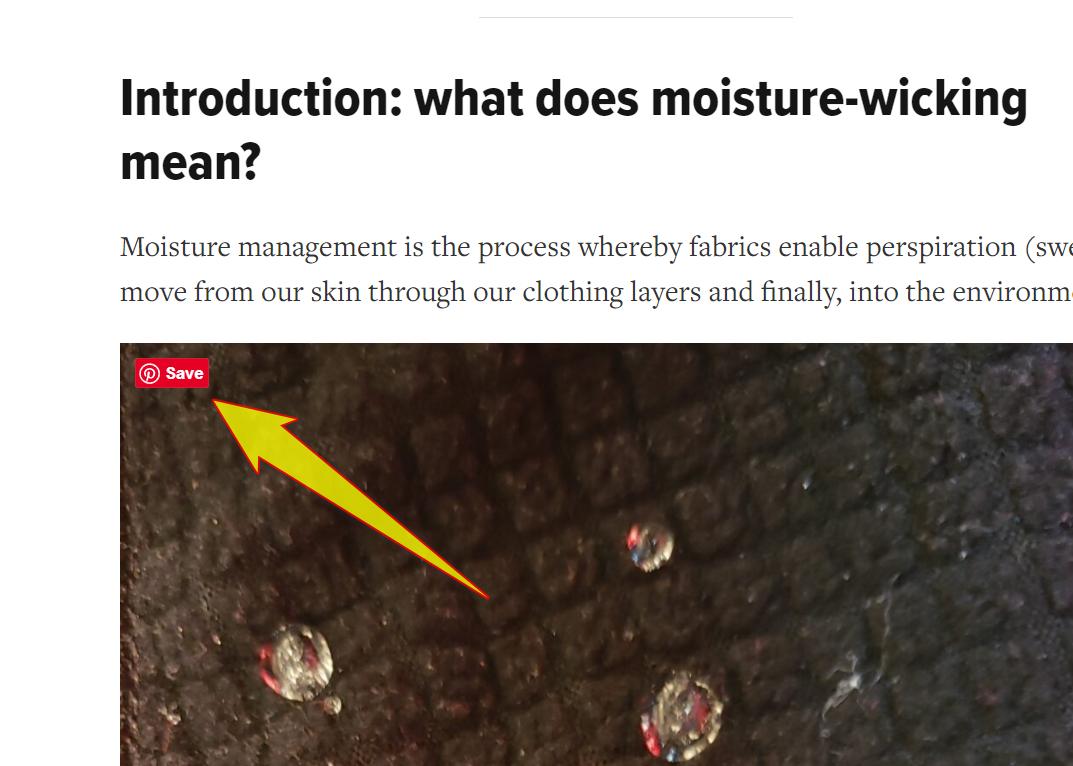
Would the BPL webmaster please indicate whether the Pinterest Save Button in the image below, coded into the BPL website server?

The code that creates the button on all 4 of my browsers is:

<span class=”PIN_1641769225109_button_pin PIN_1641769225109_save” data-pin-log=”button_pinit_floating” data-pin-href=”https://www.pinterest.com/pin/create/button/?guid=yLW44riYhpyj&amp;url=https%3A%2F%2Fbackpackinglight.com%2Fhow-do-moisture-wicking-fabrics-work-testing%2F&amp;media=https%3A%2F%2Fbackpackinglight.com%2Fwp-content%2Fuploads%2F2022%2F01%2Fstephen-seeber-wicking-12-1245×1456.jpg&amp;description=Do%20moisture-wicking%20fabrics%20work%3F%20-%20Backpacking%20Light&#8221; style=”position: absolute; top: 1165.56px; left: 40px; z-index: 8675309;”>Save</span>

Of course a browser extension could add this, but I have none, and have never associated with Pinterest.  So I’m wonder if this mouse-over button is generated by the BPL server?

Thanks in advance.

Pinterest Button

Matthew / BPL Moderator
PostedJan 18, 2022 at 4:49 pm

Yes. It is coming from BPL.

Sorry for the late response. I meant to respond to your first post but I got distracted.

Viewing 4 posts - 1 through 4 (of 4 total)
Loading...