Topic

New Navigation App Looking for Beta Testers

Viewing 14 posts - 1 through 14 (of 14 total)
Ashli Baldwin BPL Member
PostedMay 14, 2024 at 3:46 pm

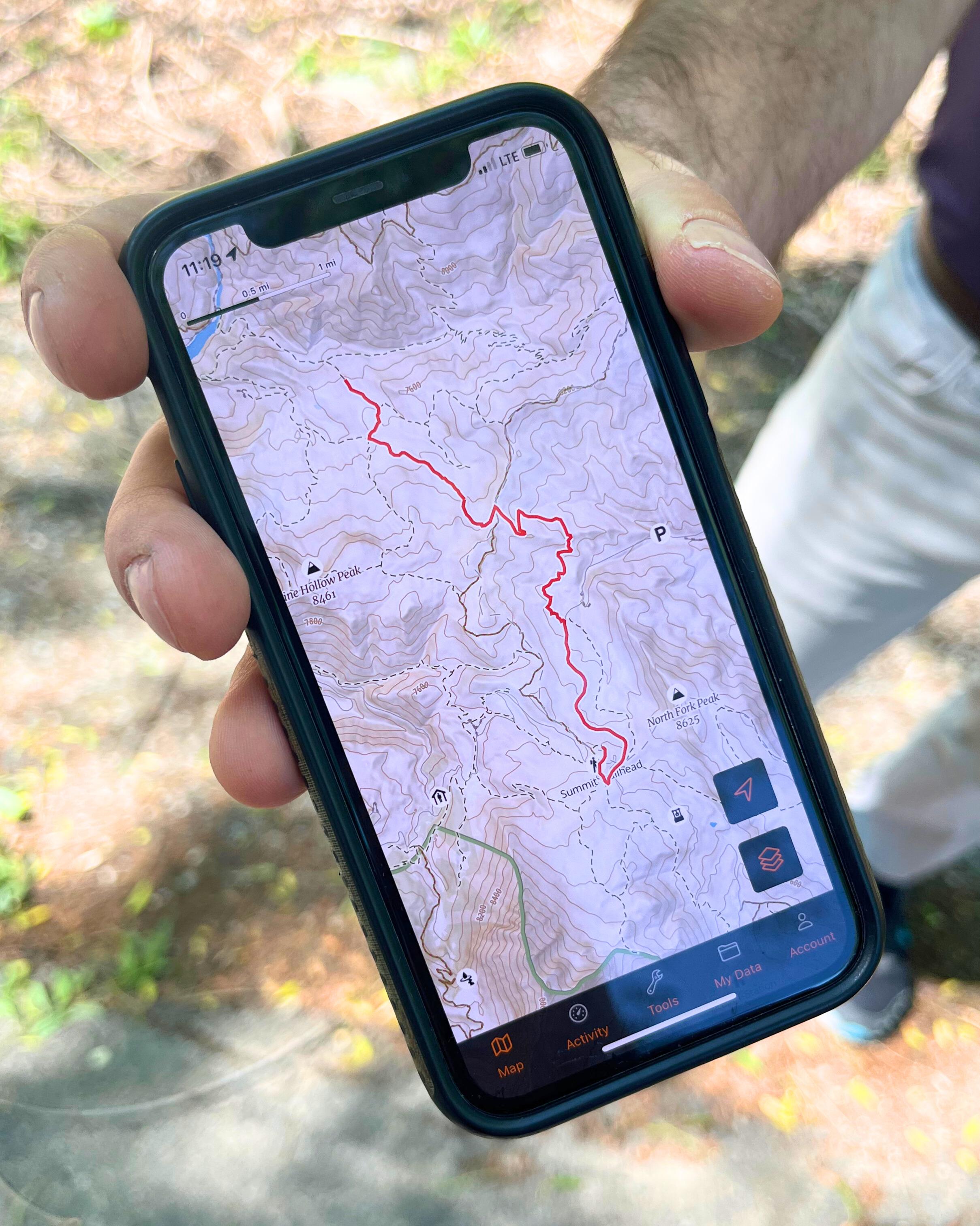
I’m excited to share something cool I’m part of: Goat Maps. It’s a new navigation app that is being developed by the original creators of Gaia GPS and we’ve just launched the first beta on iOS.

Here’s what we’ve got in this initial release:

  • Track recording
  • Route planning – snap, point-to-point, and free draw
  • A custom worldwide topographic map

We’re really aiming to refine these features and then build more – directly based on tester feedback.

To sign up to test, go to https://www.goatmaps.com
Goat Maps


Matthew / BPL Moderator
PostedMay 17, 2024 at 10:57 pm

I think this looks very promising. I particularly like the ability to “paint” routes with your finger rather than plotting individual points.

I hope to see more map layers and overlays in future versions. I want shading, slope shading, and Sentinel layers.

The default map seems to load quickly and is easy to read/understand.

PostedMay 18, 2024 at 6:27 pm

Can you comment on how this app will be different from Gaia?

PostedMay 19, 2024 at 8:43 pm

So far it seems pretty solid. I like it. Some things that I assume are coming but I noticed the lack of right away:

  • Any sort of compass function, including an arrow at your location indicating which direction you are facing on the map.
  • While you are recording a track, the dashboard options are extremely limited. The ability to put distance traveled in the dashboard would be nice. I do like the drag to rearrange feature.
  • The satellite maps are pretty poor for my area (Kodiak, AK). The most important map type in Ga!a for my use is the satellite with topo line overlay.
Ashli B BPL Member
PostedMay 20, 2024 at 4:10 pm

Thanks! We definitely plan to have slope before winter and are investigating options for improved satellite.

Ashli B BPL Member
PostedMay 20, 2024 at 4:19 pm

Gene: With Goat Maps we’re focusing on building features that are the most helpful to the backcountry planning/hiking folks and hammering on them often to keep them working very reliably. We’re also focusing on simplicity. I think when a lot of people use Gaia for the first time, there is a large learning curve that is difficult to overcome.

Philip: I do believe we plan to change the location marker to something that indicates your heading more effectively. When you’re recording you can swipe up on the drawer to see more stats but if you’re still missing stats you’d like to see, send us an email.

Jerry Adams BPL Member
PostedMay 20, 2024 at 5:05 pm

I downloaded all the highres topo maps for Oregon, Washington, and Northern California with gaia onto my phone

Then, gaia automatically uploaded a new version

Then, my downloaded maps were gone, but I think they were actually somewhere on my phone

Then, I downloaded highres maps again

Now it works

There’s a way you can see which maps are downloaded, but it lied to me, said maps were downloaded but they weren’t visible

Maybe your new navigation app could better tell what maps are downloaded

In my case, when it wouldn’t show high res maps it didn’t matter.  I knew where I was going and didn’t need a map.  There was still a low res map so I could see a few things


PaulW BPL Member
PostedMay 25, 2024 at 10:30 am

Ashli, what is the process for providing feedback, or reporting bugs? I receive errors when trying to create an account or email from the app. Thanks.

PostedMay 25, 2024 at 11:13 am

I couldn’t figure out how to do snap-to-trail route drawing in the app.

Matthew / BPL Moderator
PostedMay 25, 2024 at 6:12 pm


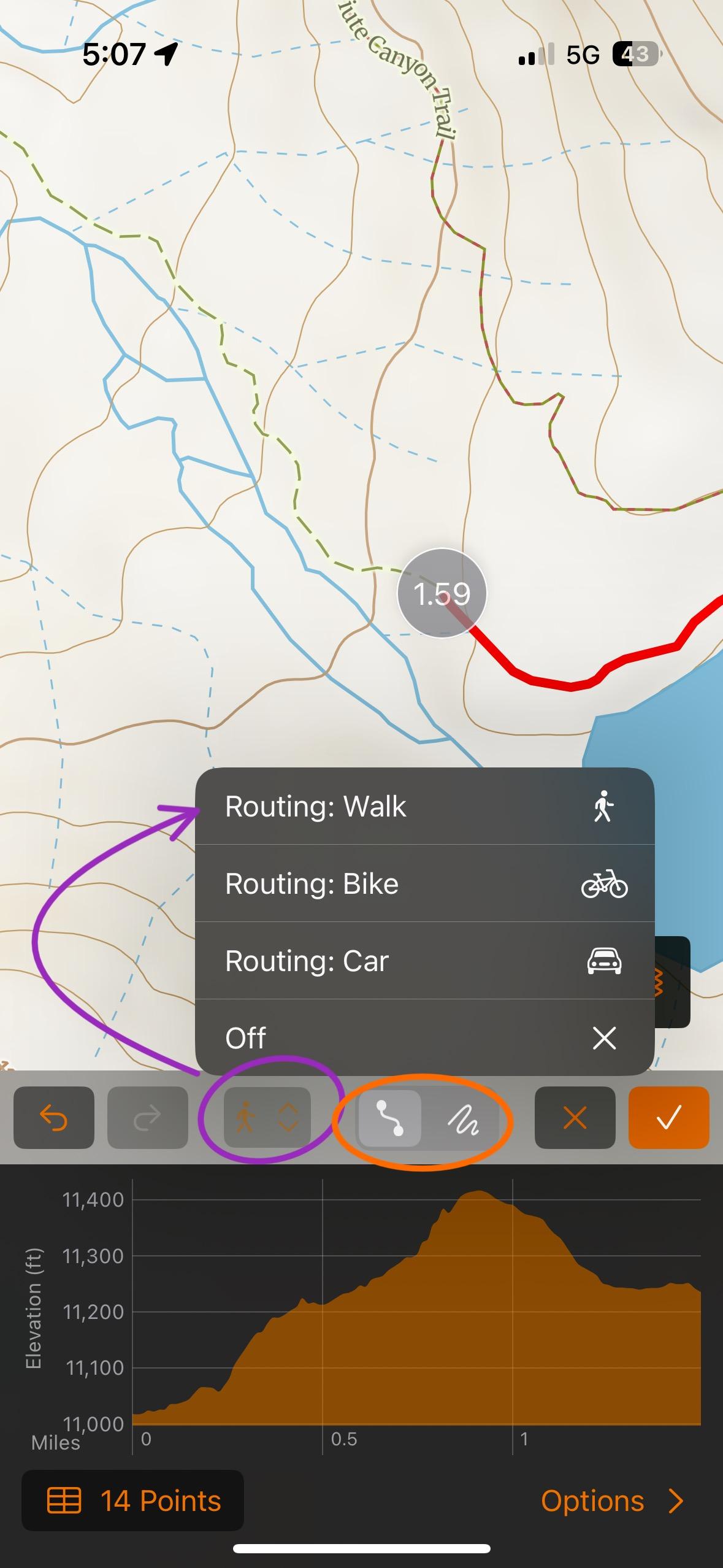
Gene, the orange circle picks between point to point and freehand modes when making a route. You have to be on the former to snap to trails. Then you hit the button I circled in purple and then Routing: Walk to have it snap to trails.

Also it seems like it got better at snapping to trails in the latest update although that could be my imagination.

PostedMay 26, 2024 at 10:21 am

Thanks, Matthew. I wouldn’t have figured that out on my own.

PostedNov 29, 2024 at 1:04 pm

The full version of Goat Maps is out. They were quite responsive to feedback from beta testers, and I have to say the released app is quite nice. It has a simple and clean interface, but offers unfussy details of the objects you are interacting with like an elevation profile of the selected track (though not all render correctly- especially really short ones), etc. Quite well done so far, and I expect improvements.

Some features available in Gaia are missing like tile count limits for downloading certain offline cached maps (no idea if there is a limit in GM), and online data management, but I doubt many people even interact with these details.

Anyway, a tentative thumbs up from me.

Geoff Caplan BPL Member
PostedNov 29, 2024 at 6:40 pm

I hope that they won’t neglect Android and Europe. There’s a market opportunity here.

The best Euro-centric app was taken over by a larger company who promptly shafted the user community and forced them across to their own app – which is so inferior it’s a genuine threat to life…

There are significant drawbacks to all the competition – this is looking like a more modern approach.

But the key would be to access the best commercial and national mapping, at least for the most popular areas, at a sensible price and offer them through an easy-to-use online store. Gaia’s coverage outside of North America is far too patchy to be attractive to most.

Do this properly, and they’ll open up a market that’s larger than the US – though admittedly it’s more complex to serve because of the range of mapping you’d have to carry.

Viewing 14 posts - 1 through 14 (of 14 total)
Loading...