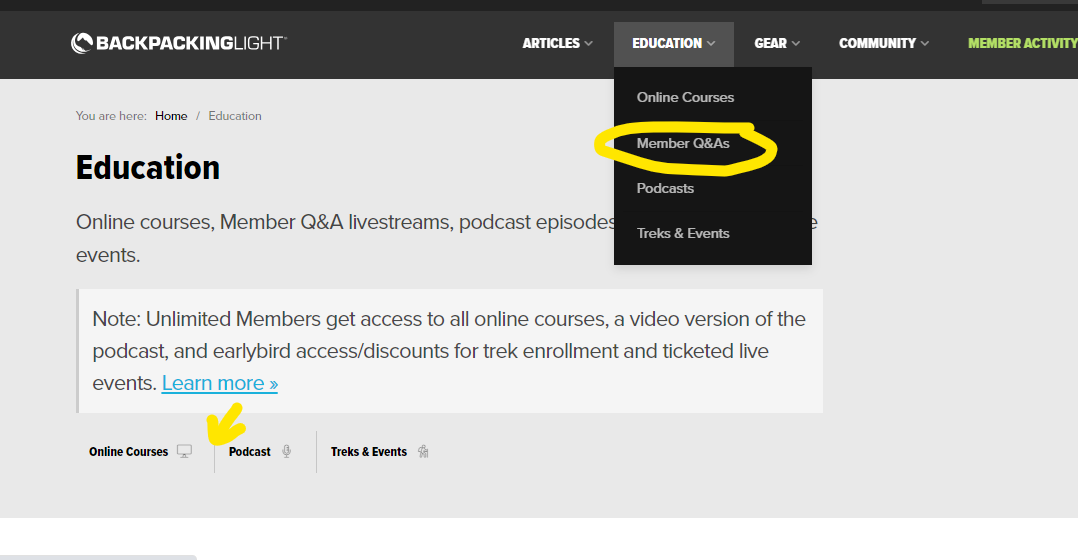
This isn’t a bug but just highlighting a minor issue. When I am viewing on my phone I don’t think I can see the sub-links that appear when you hover over the main links (Articles, Education, Gear, etc) in the top navigation bar. So something that is new like “Member Q&As” doesn’t show up when I try to find it on my phone, especially when that link hasn’t been added to the main education landing page. I can easily get to it on my laptop because I can find it in the drop down menu in the navigation bar, but again I think it should be added to the education page as well (see screenshot below).
The same applies to other top navigation sections. If a sub-link has been added to the drop down menu it should have an accompanying link on that section’s landing page. Another example: on a laptop I can see the gear merch link in the top drop down menu, but on my phone it isn’t there because “Gear” takes me to a page without a link to it. I only know there is a store because of the update link currently in my dashboard on my phone.