Topic

InReach Mini – Route shown on map that email recipient sees?

Viewing 10 posts - 1 through 10 (of 10 total)
Richard Nisley BPL Member
PostedJun 20, 2018 at 2:03 am

I am a new InReach Mini user. I planned a backpacking trip route; imported the route to my PC at URL https://inreach.garmin.com/Map; enabled MapShare (so friends can also see my waypoints, routes, and destination); and synced the route to EarthMate on my iPhone.

When I send a message, via InReach, the recipient’s email or text has a link to a map which shows my current position but my route is not visible. If I manually open my MapShare map both my route and current position are shown but this is a different map address than what is included in a message.

Is there a way for the route to display on a map link included with the  message?


PostedJun 20, 2018 at 2:19 am

Hi Richard,

Not sure I’m understanding the question completely, but I believe the Mapshare link you send will only show your current position and the route you’ve taken so far (so, ie., the 10 miles you’ve hiked so far and the current position from where you’re sending the message), but not the entire route you’ve yet to hike.

Edit to add: According to my brother, who often ‘follows’ my trips via my inReach, if he clicks the link sent in the message I send him, it only shows my current position. But if he signs in to Mapshare, it shows him the route I’ve taken so far as well.

Richard Nisley BPL Member
PostedJun 20, 2018 at 2:39 am

I don’t want to use automatic tracking. I want to just send an  “I am OK” message each evening and let multiple people see where I am superimposed on my planned route.

If I send a message to a friend, the included map link won’t show the route, just the message origin location. If I send the daily message to myself and tell my friends to just look at my MapShare page each evening, it appears as if they can see my route, my messages, and the message origin locations.

Is there a way to send a message to someone new and have them be able to see both the message origin location and my route?

PostedJun 20, 2018 at 3:01 am

Hopefully someone else has a different answer, but AFAIK, no. The message link only shows your current location. The Mapshare page shows whatever you allow it to (you can ‘turn off’ messages from appearing on the Mapshare page).

Graham F BPL Member
PostedJun 20, 2018 at 3:28 am

Hi Richard, I have the SE and in my research/experiences there has been no upgrade in the mini which will allow anything other than message origin and opportunity for the recipient/s to reply. If that was available I would like to know as well. My understanding is the mini is just smaller and harder to toggle thru’. Garmin has a forum as well I believe? Someone there may know perhaps if no-one here does.

PostedJun 20, 2018 at 2:54 pm

I’m trying to figure out the same thing with the Mini, with no success. So I’ve simply been sharing my login to those with whom I want to share my route.

I’m also exploring the API, and am hoping to hack together something on my own.

PostedJun 22, 2018 at 2:42 am

I am grappling with this and other questions as well. But this may be a partial answer: Under the account CONTACTS tab, it says:

Sync this contact to an iOS or Android device. To send messages to your MapShare page, select this contact when composing a message.

So perhaps that contact is alerted to their message, but is directed to Mapshare, where the route and tracks are? Not sure if it stays personal at that point however. Mapshare does not appear to offer personalized interfaces, and is only protected by one general password?

Nick Gatel BPL Member
PostedJun 22, 2018 at 3:09 am

If it can’t be done, here’s an option. I have done this with Peter Vacco on his last two trips to the Arctic (keep in mind these are two month trips often on sea ice so his routes may have to change with the conditions). The last part of his trip in 2017 he veered was off course and change directions, but after a few days we kinda figured out what he was doing. We were getting daily pings and he was moving at a reasonable pace.

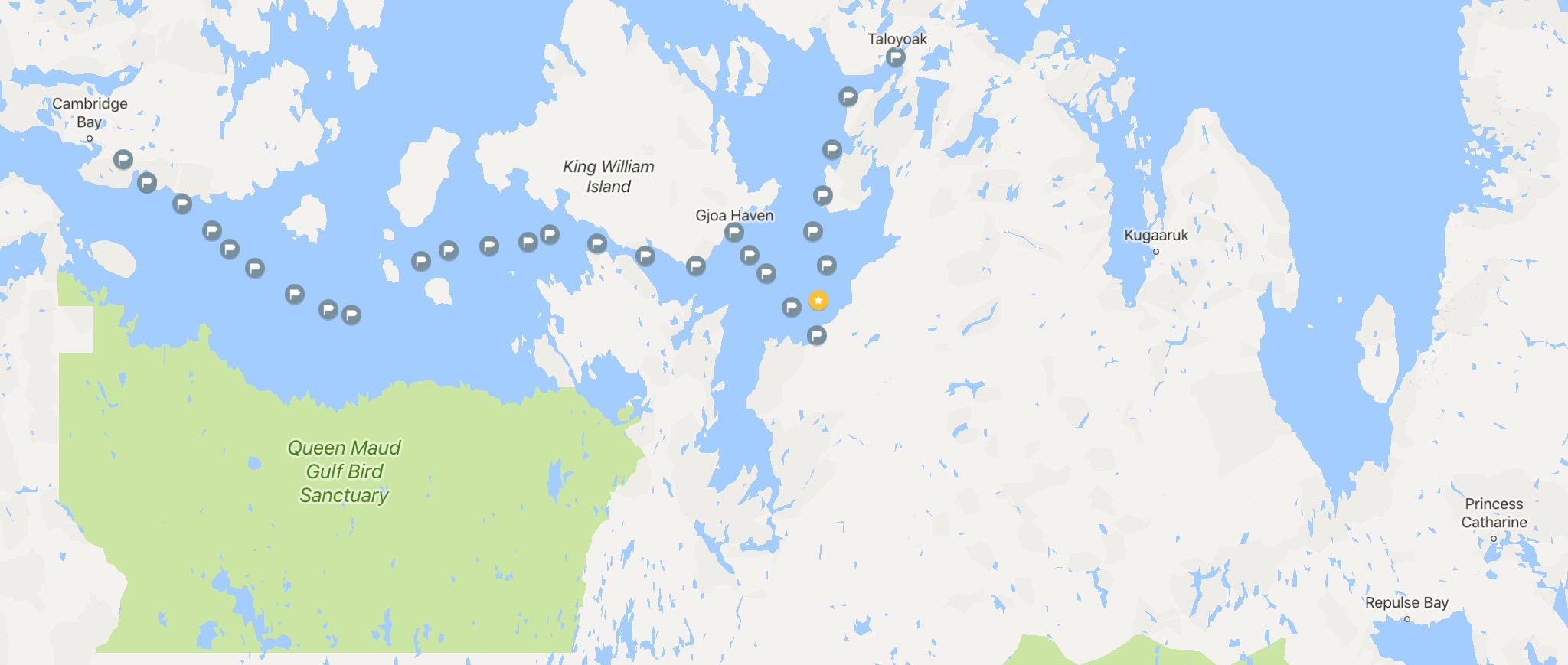
With each message there is a link to the device’s website and also a link to Google map. I had the intended route on another map he sent to his friends. Each time I got a message I would open it in Google map and “label” the position. You right click the pointy thingy from the link and choose “label” which is really easy for dummies like me. Google would remember all the previous labels automatically, so it was easy to see his tracks. How all this works is beyond me. I’ve never used one of these things — actually I’ve seen one close up only once, when the Idster dropped his and I was behind him.

Here is an example from Peter’s 2017 trip. There is one large gap where we didn’t get a message and he was pinned down in a storm so a lot of worrying for his friends here on BPL. BTW, he isn’t pack rafting, he’s walking on water ;-)

Rex Sanders BPL Member
PostedJun 22, 2018 at 4:55 am

Ok, I’ll add the obligatory message:

Leave a detailed, written (on paper) itinerary with a trusted source.

You don’t want to depend on a map on a web site (that might be down or borked) to save your bacon when someone starts looking for you.

Other than that, seems like a desirable feature.

— Rex

Viewing 10 posts - 1 through 10 (of 10 total)
Loading...