


Well now …
Topic
Become a member to post in the forums.
 .
.
Well now …
Since moving from a PC to a Mac I’ve been unable to create trip profiles – for planning or for history.
In Mike M’s recent post https://backpackinglight.com/forums/topic/training-thread-goals-updates-questions-etc/page/4/#post-3447591 he showed this – 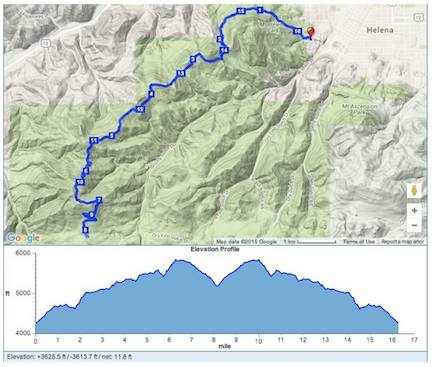
Can anyone (Mike) give a brief summary of the process. I’m very jealous.

For Google Earth Pro it’s very easy. Draw the route, right click on it, select “show elevation profile” and it pops up below the map.
Well, free is way better than $400. Obviously I wasn’t keeping up.
GooglePro is now installed, and the learning curve begins.
Thank you.
Caltopo does that too and snaps to most existing trails which makes drawing routes really easy. Free or cheap ($10/year allows you to save more maps and export maps larger than letter size.
Become a member to post in the forums.
 Ultralight Backcountry PowerThe Nitecore NB10000 Gen 4 = 10,000 mAh + 5 oz (143 g) + Dual USB-C ports + pass-through charging + carbon-fiber panels + IPX7 water-resistance + integrated lanyard cable.
 © Beartooth Media Group Inc.
 Loading...