Topic

Sierra Mapper: A new planning tool for hikes in the Sierra Nevada

  • This topic is empty.
Viewing 25 posts - 1 through 25 (of 36 total)
Adam White BPL Member
PostedJul 3, 2014 at 10:53 pm

Edit: New Alpha released on *ahem* 2/2/15! Go directly to the Alpha, or see the blog for more information: http://SierraMapper.blogspot.com

Edit: New Beta released on 10/27/14! Go directly to the Beta, or see the blog for more information: http://SierraMapper.blogspot.com

The TL;DR version:
I’ve been working on a tool to make trip-planning in the Sierra Nevada easier. It will:

1) Automatically route you between any two selected “nodes” in the Sierra Nevada trail network that I’ve entered (all of Yosemite, and King’s Canyon National Parks, a bit of Sequoia National Park, and some of Sierra, Inyo, Toiyabe and Stanislaus National Forests) – currently over 1,500 miles of trails!

2) Take your routed trail, and in one-click, send you and your route over to CalTopo for all that CalTopo magic

3) Give you a beautiful (labeled!) elevation profile

4) Allow you to download the route as a .kml file

It is a very, very early beta–a baby deer of a website, wide-eyed and knees-knocking.

Try it here:

https://awhite4777.pythonanywhere.com/SierraMapper

There’s a useless intro splash–click on Sierra Mapper and you’ll be whisked away to the mapping.

Click on instructions for some (slightly outdated) instructions. They still should be useful.

Most importantly of all, if you have feedback, please let me know! PMs on BPL are best for now.

This is a very limited beta release to the BPL forum-goers. If anybody can break it, I suspect you can.

The Too Long, but You’re Reading it Anyway version
There seems to be a little bit of hole in the mapping tools available for would-be hike planners. What tools are there that can easily route along trails, to compare distances and elevation profiles for prospective routes? National Geographic TOPO! and DeLorme Topo come to mind, but they are 1) expensive, 2) have lousy interfaces, and 3) provide results that are not easily shared. A calculator and Tom Harrison maps can–through a bit of labor–give you the distances, but not the profile or profile statistics.

So, I wanted to see if I could come up with something that would do it. This little project started as just a bit of Python code–to see if I could solve the “shortest path” problem* on a manually-built trail network in the Sierra Nevada.

Turns out I could.

The project evolved into what it is now–a very, very beta website–but one that has worked for a few people, for a little while.

Instructions are on the website, but it’s quite simple. Just click on any nodes in the order you’d like to visit them. Right click on a node for more information. Popular trailheads are purple, but only to make it easy to identify them–they’re otherwise functionally identical to all the other nodes.

It will pick the shortest route between the nodes you selected.

I restate that with slightly different wording, and louder: You do not need to click on each node that you want to visit! It will pick the shortest path for you! I mean, that’s kinda the point.

For example: You want to go from Happy Isles to Whitney Summit via the shortest path. So, you zoom in to Happy Isles, and click on the purple Happy Isles node. Then you zoom out, pan down to Whitney, and click on the Whitney Summit node. Then you click “Calculate Route”, internet magic happens, and voila!

Another Example: You want to go from Happy Isles to Whitney Summit, but want to detour to Tuolumne Meadows. So, you do the same as before, but after clicking on Happy Isles, you click on a node in Tuolumne Meadows, then click on Whitney just as before. You click “Calculate Route” again, some slightly different internet magic happens, and voila!

The routes are all loosely based on the USGS quads. Many trails above the treeline were verified by comparing satellite imagery with the USGS quad trails. Some have been compared with my own GPS tracks. In general, I believe accuracy is pretty good–certainly better than the DeLorme software I made some comparisons with. I think the distance may be slightly low–something like 2%. I could include an empirical correction factor for this, but I have not–I think that deserves some forethought.

Elevation change is calculated by interpolating the USGS published National Elevation Dataset at the points on the route. This is also fairly accurate, but slightly less so than the routes. I suspect it is a several percent high–5%-10%.

The search function is, like, an experiment. You can try it, but no promises. It’s more like “select” than search–start typing something in, then click on the one you want. Otherwise it will probably break.

In my opinion, the worst aspect are the maps–Google terrain maps are not outstanding. That’s something I’m working on.

As a final disclaimer, I’m not a web-programmer, so this was highly hobbyist, and is a little rough around the edges. It’s also free. You get what you pay for.

*a graph theory problem in which the path between any two vertices in a graph is selected such that the sum of the weights of the constituent edges is minimized.
PostedJul 4, 2014 at 7:49 am

Adam this sounds exciting… I am a sucker for mapping tools, looking forward to checking it out… Thanks for the post…

Sharon J. BPL Member
PostedJul 4, 2014 at 9:39 am

Very cool! Played around with it just a little – so nice not to have to click on every switchback to get the route for the elevation profile. One thing though: clicking on CalTopo just took me to the last location viewed, not the region selected through Sierra Mapper.

Adam White BPL Member
PostedJul 4, 2014 at 10:41 am

Sharon,

Thanks for the reply!

Matt warned me that CalTopo won't automatically zoom to the imported route (as you noticed, it brings you to the last location viewed)–but the route still should show up. It does for me (although, it wouldn't on a Mac–something to figure out there).

To see it: if you're not using a Mac, after you're taken from Sierra Mapper to CalTopo, look under "Shapes" in the left frame, and you should see "Custom Route". Click on that, and you should be taken to your route.

If you're using a Mac, for now, the only solution I have is to download the .kml file, then upload to CalTopo. Not one-click, but only a few-click. That's not satisfying, and it's on my list of things to fix.

I think I'll create a FAQ post below this and start addressing topics like these.

Adam White BPL Member
PostedJul 4, 2014 at 10:41 am

Frequently Asked Questions:

Will you be adding more trails?

Probably, but it's laborious. The shapefiles from the various agencies in general are too inaccurate to use for calculating distance and elevation, so much of it has to be done manually.

My first goal was Yosemite NP, and that's done. The second goal was the JMT and all reasonable spur trails, and that's done. I will probably continue to expand the trail network, depending on feedback.

After I click on "View at CalTopo.com", I am taken to CalTopo.com, but I don't see my route anywhere.

Well, that's not a question, but I'll answer it anyway.

At present, life is different if you're a Mac user.

If you're not using a Mac: Your route should show up at CalTopo, but CalTopo will not automatically set the view appropriately for the imported route. Look in the left frame under "Shapes", and you should see a route labelled "Custom Route". Click on that, and CalTopo should zoom to your route, which will default as red.

If you're using a Mac (maybe just Safari?): The one-click export/import with CalTopo isn't working just yet. Instead, you'll have to download the route .kml file, and import it into CalTopo.

Is there any way I can map off-trail sections of my route?

Yes and no.

Not in Sierra Mapper, but that's where linking to CalTopo helps. Calculate the on-trail route in Sierra Mapper, then take the route over to CalTopo to split the route into sections, manually enter the off-trail sections, and rejoin the sections. There is no way to send it back to Sierra Mapper for a labelled profile, yet.

Allen C BPL Member
PostedJul 8, 2014 at 5:55 pm

Adam, that is super cool, thanks for putting that together and posting it! I've been wishing for something like that and it worked great for me just now.

I tested it with a JMT section hike from South Lake to Red's meadow and it seemed more accurate in terms of distance but maybe a bit high (10% or so) in terms of elevation gain/loss compared to what my Suunto Ambit2 GPS watch logged. I would think the GPS does a pretty good job at measuring total elevation gain/loss but it seems to underestimate the distance compared to the distance on the maps – maybe it cuts off the switchbacks if it is set to a longer time interval? Its pretty new so I'm still figuring it out.

Anyway, distance on your tool seemed more in line with the map distances while the distances the watch measured were significantly lower.

Rex Sanders BPL Member
PostedJul 8, 2014 at 8:00 pm

Elevations from consumer GPS receivers are not terribly accurate, and sometimes have a lot of noise, which will artificially inflate simple computations of elevation gain and loss.

For example, my inReach SE logged alternating negative and positive elevations, varying up to100 feet, while hiking on the beach a few feet from from the ocean. Even logged several negative elevations, when I'm certain I stayed dry.

And – Sierra Mapper is cool. Looking forward to expansion and enhancements.

— Rex

Bob Gross BPL Member
PostedJul 8, 2014 at 9:26 pm

What Rex stated is very true. The inReach SE GPS function is not a super performer, and that shows up in altitude readings. It will normally be in the ballpark, but not exactly spot-on. GPS receivers have horizontal errors and vertical errors. The best that the vertical error can be is 1.5 times the horizontal error. If you have multipath interference or other things hitting a tiny antenna, then you can get vertical errors of several times the horizontal error. About all you can do is to try to get the best view of the sky and hope for the best. I am not aware if inReach has any sort of satellites-in-view screen to warn you of a problem.

If that doesn't work for you, then go get a choke ring GPS antenna to lug around.

–B.G.–

Adam White BPL Member
PostedJul 8, 2014 at 10:08 pm

Agreed regarding GPS unit inaccuracies.

The hope is that GPS units that include a barometric altimeter (such as Allen's) can do better, and in general, they do.

But calculating something like elevation change is still a mathematical operation that is highly sensitive to noise, since it's essentially differentiation (differencing, if you want to be pedantic).

The solution I expect most GPS manufacturers use is signal processing, which tends to be one part science and two parts art.

I parse raw GPX file data on my own, rather than let my GPS do it. That way, I know what signal processing is being applied. I typically process the data in a variety of ways, including:

1) apply signal processing to the barometric altitude data

2) apply different signal processing to the barometric altitude data

3) use the raw 2D location (which is typically pretty accurate) to interpolate the elevation from the USGS National Elevation Data dataset, and

4) apply signal processing to the 2D location then interpolate the elevation from the USGS National Elevation Data dataset

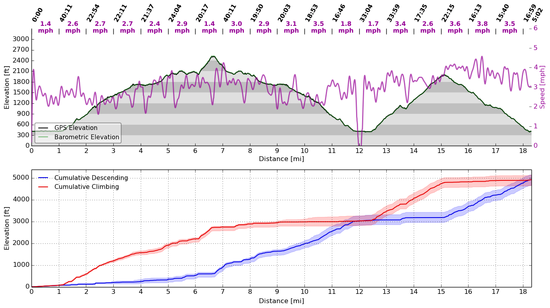
I plot all four, and take the median as the most accurate value. But seeing the others plotted gives me a sense of the accuracy. I'd prefer all four be on top of each other. Typically, the spread is about 15% or so. An example is below–the filled red and blue transparent areas on the cumulative climbing/descending show the spread in the calculations. That was from a dayhike at Sunol earlier this year (the first summit is Mission Peak, the second is "most" of the way up Cerro Este road. I climbed Mission Peak with old farts, so we went slow).

Profile

Finally, how it's done in Sierra Mapper is–presently–very straightforward. It takes the 2D location of the trail, interpolates the altitude at each point, and calculates the cumulative difference. Point spacing is close enough that I don't believe much elevation change is missing. The USGS data is smooth such that oversampling would not result in erroneously high or low cumulative values. However, the location of the trail is imperfect–it is imperfect in the USGS quads as well, and also in the national park and forest shapefiles. It is an area for improvement, but I don't think Sierra Mapper is doing it any worse than DeLorme or TOPO! is. This also relies on accurate USGS NED data.

I've thought about an empirical correction for it, but that's unsatisfying. I think continuing to compare GPS results (particularly the 2D track with the trail network entered into Sierra Mapper) is my preference. If it appears there is systematic error, I'll probably introduce an empirical correction, but anything I did now would be a pretty unjustified WAG.

The only time I compared a route measured with a GPS (barometric, and parsed using the method above) with the Sierra Mapper prediction, the results were within about 0.8% in both distance and elevation. This is far better than I think the true error is, but is a data point nonetheless. That leads me to believe that 1) the algorithms I use are relatively sound, and 2) the USGS NED data is fairly good.

Adam White BPL Member
PostedJul 8, 2014 at 10:22 pm

Allen,

Glad to see you got a chance to try it out the mapper!

I believe the Suunto Ambit2 has options for GPS point intervals–1, 5, and 60 seconds, or something like that (I know this because I've been drooling over one for a while). Battery life is inversely proportional to the sample rate, so for longest battery, you'd have it set to the slowest spacing.

I suspect you're correct, that if set to 60 seconds (perhaps 5 seconds at the speed you go!) some of the switchbacks might be severed.

I'd be interested in doing a comparison between your GPS track and the Sierra Mapper trails. That might illustrate the discrepancy, if it is gross. If you have either a .GPX or .KML file that you could send me, I can make the comparison.

Paul Wagner BPL Member
PostedJul 9, 2014 at 8:29 am

This is a fun tool, and once you are ready to share it, I'd be happy to post a link/recommendation on our website, too.

After playing around with it for a few minutes, I found it pretty darn intuitive. Big PLUS.

It was a bit hard finding trips that we had taken that would complete match the criteria of what you have in the database right now. Most of our include some off-trail hiking, and many of them involved starting outside the normal trailheads—a good way to avoid crowds/permit/quota issues.

But we are the out-lyers of your audience. For most folks who want this kind of info, this is a very cool app.

How can we help you move this forward?

Adam White BPL Member
PostedJul 9, 2014 at 10:47 pm

Paul,

Thanks for the feedback!

> After playing around with it for a few minutes, I found it
> pretty darn intuitive. Big PLUS.

Glad to hear it–that was a main goal. The DeLorme Topo interface leaves something–almost everything–to be desired.

Agreed regarding the off-trail stuff. It's just beyond the scope of what I originally hoped to do. As I've mentioned, taking it over to CalTopo allows you to complete the route, but I don't have a way yet to re-import the route to generate a complete profile.

I have thought about adding things like popular use trails or popular off-trail routes (Mt. Dana, Lamarck Col, etc), but it would take a bit of work–I'd want those trails to be categorized differently, so people couldn't inadvertently throw a Class 3 traverse into their first backpacking route.

> How can we help you move this forward?

I think the biggest question right now for me is: where do I go with it?

I set out to make a pretty simple (intuitive!) mapping tool that would route you along trails in the Sierra. Something simple that you could do from a tablet, laptop, desktop or even a phone, and something that was easily shareable–so that on forums like this, you can just post a link and say "That's the route I'm talking about", instead of saying, "Start at Road's End and go up Paradise Valley, but don't cross Wood's Creek, go north towards Pinchot Pass…"

Well, it does all that. And it even gives you a labelled profile! AND you can send it right to CalTopo to overlay with USGS quads, or upload to a GPS!

So I think my question to the community is: What else should it do? Specifically–is there any low-hanging fruit? Easy things to add that would add significant functionality? Or, does something in the interface need improvement?

I have (lofty!) ideas about improved maps, elevation profiles with customized annotations (1st night here, resupply here, etc), adding established campsites and water sources to the profiles, etc. But many of those require significant effort–again, are there any easy changes to make that I'm overlooking? Should I emphasize mapping more trails before adding features? And exactly how can I get rich from this? (Okay, kidding on that one. I'd figure out how to write mindless candy crush whatever phone games if I wanted to get rich)

So at this point, I think that's the best way to help: Where do you think it should go from here?

I should probably add an honest-to-goodness website with a forum, blog, etc to stop plugging up BPL with this, but for now, PMs are a great way for me to collect that info from you, and any other users reading this.

Thanks again!

PostedJul 10, 2014 at 5:27 am

So handy for comparing alternate routes to the JMT. Thanks for sharing! (BTW, I'd love to see you connect Cecile Lake to Johnston Meadow via Minaret Lake!)

Bill Law BPL Member
PostedJul 10, 2014 at 1:05 pm

Here's my wishlist:
1. more trails and THs
2. rather than the shortest route, how about the one with the least elevation gain?
3. maybe calculate a set of alternate routes and then list them by distance and elevation gain
4. alternate map layers (the FS or USGS topo quads are better than the Google terrain maps, IMHO)
5. Let me choose a destination and you figure out the closest trailhead and calculate the route from there. I don't often have the luxury, or ability, to do long enough hikes that there are actually choices on which route to take.

As an aside, I find the issue of measuring the elevation at every point along the route a bit of overkill. I think it would suffice to simply have a set of local minima/maxima (the high point on ridges and low points at stream crossings and meadows). The piddly ups and downs in between fall out in the wash. Or, are too easily due to measurement error.

For example, I looked at the Kearsarge Pass trail up to Gilbert Lake. That route reportedly had almost 200' of downhill, but I'm kinda skeptical of that (I haven't actually walked that trail, however). Guitar Lk to before Trail Crest: 250' of downhill. Trail Camp to Trail Crest: -453'. I don't remember any downhill on that one!

BTW, I kept getting "Internal error" when attempting to calculate routes in the Sonora Pass area.

Adam White BPL Member
PostedJul 10, 2014 at 3:12 pm

Kent,

Do you know if there is a trail along that route (or if not, is it Class 1 walking)?

I'm hesitant to include routes that are anything beyond Class 1 until I have some way of including a disclaimer–but as I mentioned above, I'm interested in doing that, especially for popular off-trail routes such as this one.

Thanks!

Adam

Adam White BPL Member
PostedJul 10, 2014 at 5:01 pm

Bill,

Thanks for the feedback!

> 1. more trails and THs

Are there any in particular? Currently, I plan on finishing all of Sequoia NP, then finishing the Sonora Pass region of Stanislaus NF (which currently is not complete–as you observed with the internal errors). After that, revisit all the NFs to see if popular trails are missing.

> 2. rather than the shortest route, how about the one with the least elevation gain?

That's an interesting idea. It would require a bit of reprogramming. Since there are usually only a handful of options for getting between points A and B in the Sierra, right now, the user could just try those to see which are the flattest. Adding "flatness" as a criteria would be interesting.

> 3. maybe calculate a set of alternate routes and then list them by distance and
> elevation gain

That would be neat. It would also require a fair amount of work, but is possible. Thanks for the suggestion.

> 4. alternate map layers (the FS or USGS topo quads are better than the Google
> terrain maps, IMHO)

Totally agree. I think the maps are the weakest part, but until I tile the USGS quads, I'm stuck with what Google has. I'm looking at other options.

> 5. Let me choose a destination and you figure out the closest trailhead and calculate
> the route from there. I don't often have the luxury, or ability, to do long enough hikes
> that there are actually choices on which route to take.

That's an interesting idea. It would be quite doable, I think I'd have to add a separate function. Can you give an example of somewhere where the nearest trailhead is not easily found?

> As an aside, I find the issue of measuring the elevation at every point along the route a
> bit of overkill.

Perhaps it is.

I think the climbing/descending results produced are high, by perhaps 10%, due in part to errors in trail location (the trails are not very accurately represented on USGS quads, which are is what they are based off of in Sierra Mapper).

Where possible, the trails are compared with satellite imagery to ensure accurate placement, and to minimize that error.

Even in those cases, another source of error is the limited resolution of the USGS data–in most of the Sierra, it is 10m. That's the horizontal resolution (each "pixel" is that large), and some elevation features have scales smaller than this (the side of a cliff, e.g.). When the trail passes near those features, error can accumulate from poor interpolation. I think some of the examples you shared exhibit this.

Now, if you mean that the "human" perception of elevation change doesn't care about the small ups-and-downs (and I'm guessing this is what you meant, because you used the word "piddly", which is a word typically associated with human perception, and not math!), my suspicion is that everyone's perception of "small" may be different, and I'd prefer not to define that for them. Again, this is based on USGS data that has 10m resolution–we're not integrating the surface area of pebbles, and we're not talking about noisy GPS data.

The good news is that if you only care about the big ups-and-downs, you can just look at the profile, and ignore the ascent/descent plot–it clearly shows the macroscopic ups and downs.

Bill Law BPL Member
PostedJul 10, 2014 at 7:06 pm

I was looking for THs and trails in Emigrant Wilderness. Mostly because that's where I've been this spring/summer. But that area is popular with many in the bay area because it is so close.

I'm stuck with what Google has.

CalTopo has more layers. Doesn't it use Google maps engine? Those tiles seem to be coming from amazonaws; not sure who owns those.

Can you give an example of somewhere where the nearest trailhead is not easily found?

No. But I can give you an example where the TH requiring the least elevation gain is not easily determined. Try Deer Lk. in Emigrant Wilderness. The answer, I think, is Coyote Meadow. Which few might guess. It is a few miles further that way. But even deciding between the (at least) three trails from Gianelli or Crabtree requires some effort to discern (mileage-wise, too, now that I look at it).

re: elevation data

True; looking at the profile would make it easier to find the minima/maxima than my current strategy (eyeballing how the trail crosses the contour lines, and then grabbing the elevation data from CalTopo). But I'd still have to do n+1 subtractions/additions to total the elevation gain for a given route. That's the kind of thing computers are supposed to do for me. I think what would work (and seems relatively easy, intuitively) is that you add another set of "nodes" to your data: the local minima/maxima along with their elevations.

You're kind of already doing that with some nodes (e.g., lakes); they are not all trail junctions.

As to what I mean by "piddly": I can't define it, but I know it when I see it :-).

How are you using the elevation data now? Is there any sort of averaging with nearby points, or other data smoothing going on? That might help.

Adam White BPL Member
PostedJul 10, 2014 at 7:46 pm

Bill,

Thanks again for the feedback!

> CalTopo has more layers. Doesn't it use Google maps
> engine? Those tiles seem to be coming from amazonaws;
> not sure who owns those.

Matt at CalTopo does–He's using Amazon Web Servers for the content delivery (and paying for it).

The work is really in creating the tiles from the USGS quads. I could do it–but maybe Matt would give them to me, since he's already done it.

After I figured out that the mapper would actually work, my first step was to contact Matt and see if he was interested in integrating this functionality into CalTopo–I thought that would be ideal. But, he wasn't really interested–he recognized that it would be very difficult (impossible?) to do on a national scale, which was the direction he was heading.

In any case, still totally agree with you, the USGS quads are my maps of choice as well, and I'd much prefer having access to them (although, they aren't great at large scale, and the 250k maps leave much to be desired).

> (paraphrasing) Add Emigrant Wilderness!

Agreed–that and Sequoia National Park are next in the queue. Unfortunately, adding the trails (accurately) is a laborious process. Those are coming though!

> No. But I can give you an example where the TH requiring the
> least elevation gain is not easily determined.

That's true. The optimization might be better if it were something like: find a route that minimizes k, where k = a*distance + b*climbing, with weights a & b determined by the user. They could default to a = 1 and b = 0 (as it is now), but the user could alter those, such that climbing was weighted how they saw fit. I have to think about that a little more, but seems plausible to implement. I think that would be neat.

> As to what I mean by "piddly": I can't define it, but I know
> it when I see it :-).

Ha, I agree. "Klugey" is another word that falls into that category.

> I think what would work (and seems relatively easy, intuitively)
> is that you add another set of "nodes" to your data: the local
> minima/maxima along with their elevations.

This could work. Those points would have to be chosen judiciously, and would have to have unique characteristics that don't presently exist. This would add complexity.

> How are you using the elevation data now? Is there any sort
> of averaging with nearby points, or other data smoothing going
> on? That might help.

No, it is straightforward–the USGS data is interpolated (using cubic splines) at each point on the route.

When trails are accurately routed, and geological features are greater than the scale of the USGS data, this works quite well. As I mentioned above, if the geologic features are smaller than that, or if the routing of the trails is incorrect, there are errors.

I could apply some low-pass filtering (averaging is one example), but it has to be judiciously done–otherwise you reject real features in elevation change, which I do not wish to do.

As I mentioned (perhaps a few posts) above, when trail routing is accurate, the results are quite good–they agreed to within 0.8% on both distance and elevation change on the one comparison I've made between a barometric altimeter and the mapper. My preferred solution is to ensure trail routing is accurate, and report total elevation change, rather than reject some of it–the "piddly" amounts–but I'm not opposed to that rejection being a user option.

In addition, I think that filtering will help reject real errors in the elevation profiles from the sources mentioned above, but they're empirical tuning factors, and I haven't yet played around with them enough to think I can do better than just the raw data.

PostedJul 11, 2014 at 7:57 am

Adam,

Thanks for the reply. Unfortunately, the climber's trail between Iceberg and Cecile Lakes does not appear on any USGS or other topos I have have seen. Plus I think it would be considered Class 2+ or 3. I understand your reluctance to include such segments in your program. You could, however, include the popular trail that connects Minaret Lake to the Johnston Meadow-JMT trail junction, thereby almost completing the circuit.

Anyway, thanks again for sharing that very nifty program!

Bill Law BPL Member
PostedJul 12, 2014 at 12:03 pm

Re: filtering elevation data

The noise reduction of the underlying data doesn't address the problem, perhaps. Consider these elevation along a given trail: {0,5,10,15,10,25,30,35,40}. While the value 10 in the middle might well be accurate and smoothed out with the neighboring points in the raw DEM data, it seems way off in context of the neighboring points along this trail.

A simple averaging of each point with it nearest neighbors would yield {0,5,10,10.2,17,23,30,35,40}. That's much closer to the reality, I'd wager.

While I appreciate what your tool does, it seems a bit "OCD" to me. I don't care that much about the minutiae of every twist and turn of the route.

The 80/20 rule (or 90/10 rule) might apply.

All I need are the nodes, their elevations, and the distances between them. Only the last property is not readily available. Your technique, while obtaining that data with incredible precision, seems way too much work for me.

Maybe crowd-sourcing is a better means? There are already some published data. I have 2 FS publications with trail mileage for Emigrant Wilderness. Plus there are mileages in Ben Schifrin's book. Plus Tom Harrison's map. Note that all these only give figures to the tenth of a mile. So the average error is on the order of 1/20 mile, at best, and nobody

If everybody who carried a smart phone or GPS contributed estimates for a given stretch of trail, we would have the data we want, and most quickly for the trails most frequently travelled. Won't have every foot of the trail mapped to within 0.8%, but truth be told, whether the trail is in the shade makes a way bigger difference, anyways.

Adam White BPL Member
PostedJul 12, 2014 at 1:11 pm

Bill, in your example of {0,5,10,15,10,25,30,35,40}, is the middle 10 noise or otherwise erroneous, or is it real–does the route descend to 10 before ascending to 25?

I think that will affect my response, so I'll wait to address that point.

> All I need are the nodes, their elevations, and the
> distances between them. Only the last property is not
> readily available.

I agree with that, with the exception that I also find it useful to have a reasonably accurate depiction of the route on a map as well, so that it may be imported into onto a GPS or into CalTopo–since, as we both agree on, the Google maps leave much to be desired.

Given that a reasonably accurate route is necessary for this, why not make it accurate enough for calculation, and not have to brute-force distances onto routes? Turns out, it's not hard to do–remember, there are already over 1,500 miles of route-able trails.

I think the approach you're suggesting is to 1) insert additional nodes at meaningful minima/maxima, 2) brute force distances onto each segment either by using existing maps (now difficult, because those maps certainly won't have the same nodes–definitely not the minima/maxima nodes) or crowd-sourcing, which would rely on collecting a significant number of GPS tracks for each segment.

I guess I contend that the approach I used is simpler and has sufficient accuracy.

> While I appreciate what your tool does, it seems a bit "OCD"
> to me. I don't care that much about the minutiae of every
> twist and turn of the route.

Do the minutiae make it less useful to you?

> Your technique, while obtaining that data with incredible
> precision, seems way too much work for me.

> The 80/20 rule (or 90/10 rule) might apply.

I appreciate your concern! Entering trails is laborious, but I assure you, it is not overly so. One of my goals was to prevent would-be hikers from having to manually click-click-click-click at sites like CalTopo. Each trail that is entered on my site is usable to a large audience, saving good people from thousands of clicks (WAG).

> If everybody who carried a smart phone or
> GPS contributed estimates for a given stretch
> of trail, we would have the data we want, and
> most quickly for the trails most frequently
> travelled.

Are you volunteering to coordinate this effort? :) Even if I didn't implement it as the weighting method for route calculation, I have no doubt that it would be vastly useful for comparisons with Sierra Mapper and other tools, and for the community in general.

Bill Law BPL Member
PostedJul 13, 2014 at 12:30 pm

Bill, in your example of {0,5,10,15,10,25,30,35,40}, is the middle 10 noise or otherwise erroneous, or is it real–does the route descend to 10 before ascending to 25?

That's funny; I thought it was obviously noise. But maybe it depends on how far apart those points are. While nobody in their right mind would throw in a dip like that into an otherwise uniform uphill grade, one does see similar dips when on an inside curve crossing a stream gully, for example (although I personally would curse the trail maker for not smoothing it out better).

But even so, based strictly on the odds, it is more likely to be a point on the trail being misplaced by 5m on a moderate slope and picking up the elevation for a point downhill.

Do the minutiae make it less useful to you?

Only insofar as it might delay availability of broader coverage.

Are you volunteering to coordinate this effort?

Hah; good one. I'm an engineer, not a marketing weasel. I might go spend some time investigating using caltopo as a tool for doing community-authored maps. Maybe you could extend your tool to allow others to assist in the chore of mapping routes?

I was inspired to go try to implement a tool to automatically follow trails on caltopo by examining the images and look for the black dashed lines. Either that, or figure out how to get the routes from the underlying map data (which you seem to know how to do). But since I do front-end software, that seems way harder :-).

Adam White BPL Member
PostedJul 13, 2014 at 8:03 pm

> Hah; good one. I'm an engineer, not a marketing weasel.

Hah, I'm also an engineer–hence my desire to find someone else to organize something like crowdsourcing :).

> Maybe you could extend your tool to allow others
> to assist in the chore of mapping routes?

Yes, I think that's a great idea.

> I was inspired to go try to implement a tool to automatically
> follow trails on caltopo by examining the images and look
> for the black dashed lines. Either that, or figure out how to
> get the routes from the underlying map data (which you seem
> to know how to do).

You know, I did give that some thought when I started doing this. I'd probably try it with the forest service maps instead of the USGS quads–they are not scanned prints, so have better uniformity, which would undoubtedly make rejecting things that weren't trails easier. I've written some patter identifiers using neural networks; some combination of that and image processing seemed like it could accomplish this.

But then I did figure out how to get the routes from the underlying map data. These are not always available (depends on the forest/park), and when available, aren't perfect, but the image processing approach would take a bit of massaging, also.

Adam White BPL Member
PostedJul 13, 2014 at 8:17 pm

All,

I started a blog for Sierra Mapper, with the intent of using it as a medium to continue the discussion and to broadcast the updates and improvements as they happen.

The blog is (predictably) here: http://SierraMapper.blogspot.com.

There’s not much there yet–only an introductory post (at this point there’s more information in this thread than in the blog), and a link to the mapper.

Feel free to continue to comment here, or PM me BPL–but I didn’t want this to be the only (or primary) venue for discussion.

And to those that have provided it, thanks for all the feedback so far!

Viewing 25 posts - 1 through 25 (of 36 total)
Loading...
