Topic

Wrist GPS with digital mapping

  • This topic is empty.
Viewing 13 posts - 1 through 13 (of 13 total)
PostedMay 16, 2014 at 1:19 pm

Does a wrist GPS which performs like a handheld one exist (with digital mapping etc.)? If not, if I only use paper maps, will a wrist GPS suffice for:

Display position
Point-to-point navigation
Route navigation

or would I need a handheld one? (I have a compass too)

Roger Caffin BPL Member
PostedMay 16, 2014 at 3:32 pm

> Does a wrist GPS which performs like a handheld one exist?
Probably not. There are two big differences: the wristwatch has a much smaller aerial and so gets much less signal and poorer position lock, and the wristwatch battery is much smaller and so has a much shorter life.

Could one suffice? Probably not. The risk of battery failure is always there. Carry and know how to use a compass and map.

Cheers

Mark Fowler BPL Member
PostedMay 16, 2014 at 4:08 pm

No mapping on the ForeTrex models. Apart from that they perform as a hand held (battery life, signal reception etc.

PostedMay 16, 2014 at 4:15 pm

Personally I I'd be quite happy using the Foretrex models alongside a paper map, although you may find entering waypoints a bit tedious as they only have about 4 buttons for entering data.

The Foretrex 401 is also the cheapest model REI sells that includes a barometric altimeter, although the much bulkier but /very/ capable model GPSMAP 62stc is on sale for half-price, making it even cheaper than the Etrex 30.

PostedMay 16, 2014 at 4:22 pm

I think handheld models are less portable/bulkier than wrist ones and I would have to purchase maps separate, which might get expensive for the whole of Central and South America to be honest…

but I might want to do that at times, who knows?!

PostedMay 16, 2014 at 4:54 pm

The Garmin fenix 2 GPS watch will do point to point navigation, has a magnetic compass, a barometric altimeter, and will display small low resolution maps — pretty limited storage for maps. You can only upload small map section to the watch. I have been using it side by side with a Garmin Montana mapping handheld and the GPS tracking of the fenix is at least on par with the Montana. In normal mode, taking a GPS reading every second, it has a battery life of about 15 hours between charges and can be charged from a USB power brick or solar charger while it's working. There's an ultra mode that turns on the GPS to take a reading every 60 seconds. This is good for up to 50 hours between charges.

For mapping, it's really not a substitute for a Montana or Oregon hand held, but it is a fantastic GPS watch for hiking, running, or general fitness. It also links to ANT+ heart rate monitors, bike speed sensors, temperature sensors, etc.

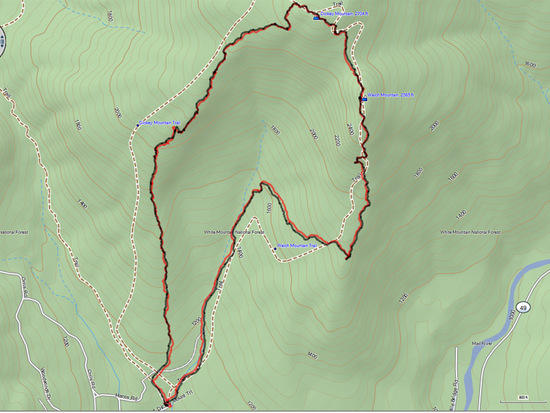
Here's a hike from earlier this week. The black track is the fenix 2. The red track is the Montana handheld:

GPS track

Bob Gross BPL Member
PostedMay 16, 2014 at 5:18 pm

These wrist-size GPS receivers are not much good if you have been used to using a normal handheld receiver. For one thing, the display is tiny, and for most of them that I am aware of, they are only Black & White. So, there is no underlying base map of anything. They will display your track, which is where you have been moving, and that can be helpful for getting back to your starting point. They will display lat/long, and that can be helpful at finding your position on a paper map, assuming that you have one that has lat/long or some other coordinate system on the margins.

So, the wrist-size units are not completely worthless, but I would never use them on a backpacking trip.

The word that Roger was looking for was "antenna." The big ugly antennas that are a little larger than your thumb work better than the microscopic ones. Trust me. I have installed many hundreds of even bigger ones about the size of an apple, and they work a lot better.

Note that I have been a GPS user for about twenty years now.

–B.G.–

PostedMay 16, 2014 at 7:11 pm

https://www.youtube.com/watch?v=4n-sACErYL4

The video above shows an example of loading a section of map to a fenix GPS watch. This is the older fenix, but I think it's the same on the new one. You can zoom and pan the maps, but the small screen makes it pretty limited, IMO.

This video shows the level of detail available on the high end hand held mapping GPS units. The very detailed 24K routable topo maps are pretty amazing:

https://www.youtube.com/watch?v=JXvs9SFTd7E

The thing that I really like is that I have the same maps on my computer and on the handheld GPS. I can transfer routes, tracks, waypoints, and so forth from one to the other. So I can plan a hike on the computer and then just copy it all to the handheld for reference for hiking. I almost always load an existing GPS track for the trails I'm hiking (either my own previous track or somebody else's) so that I can see immediately if my hiking track is not on the previous GPS trail.

PostedMay 16, 2014 at 8:15 pm

I have a Garmin fenix and find that I mostly use it for tracking and not navigating although it could do that. What I find works best for me however is to have the fenix track where I have been and if I need to navigate or view a previous track I will use my iPhone with Gaia or PDF maps

Roger Caffin BPL Member
PostedMay 17, 2014 at 3:10 pm

> The word that Roger was looking for was "antenna."
Nope. I wrote what I meant.
Language difference between Oz and USA. You say antenna, we say aerial. No diff.

Cheers

Bob Moulder BPL Member
PostedMay 18, 2014 at 3:10 pm

I am just throwing out some ideas here.

Always have map and compass. GPS is dependent upon batteries, so if the batteries die you are royally screwed.

UTM coordinate system is MUCH easier to use than lat/lon. Once you become familiar with UTM grid numbering you can locate your position to within about 50 meters using eyeball alone on a 1:100,000 scale map. Once your "eyeballing" improves with experience, you can get it to within about 10 meters. All is needed is a simple, no-frills GPS which can be turned on for a few minutes every now and then for a position check against the map. Used this way, one set of batteries could theoretically last for the entire trip.

One possibility for a long trip requiring many maps is to make PDF scans for the entire trip and upload them to a Cloud app such as Google Drive. The maps could then be downloaded as needed and printed at an internet cafe, or d/l'd to a handheld device.

Of course, I have NEVER done this and don't know if it is at all feasible, especially in Central and South America. Maybe someone with experience can chime in.

PostedMay 18, 2014 at 6:11 pm

I have always used the UTM system with a Foretrex and paper map.For me, typically plotting archaeological sites, etc. it has worked quite well. I have never been lost, although I have been rather confused for several days……

Viewing 13 posts - 1 through 13 (of 13 total)
Loading...