Topic

GPS track analysis

  • This topic is empty.
Viewing 12 posts - 1 through 12 (of 12 total)
PostedApr 25, 2014 at 1:43 pm

I normally like to log/record my outings (via GPS) and look at the basic statistics afterwards.

Most apps and sites for “post hike analysis” provide total distance, elevation gain and elevation loss, however I’m also interested in finding out how many miles I was going uphill, downhill and flat(ish).

I found this website (uTrack) that provides this data (and other interesting statistics). Unfortunately I found it not very accurate. Does anybody know of a different site that provide the data I’m looking for?

Thanks

Bob Gross BPL Member
PostedApr 25, 2014 at 1:57 pm

I come from the GPS community.

I think that you will find that the automated systems for estimating distance and elevation based on a topo map are somewhat poor estimates. If they operate off your recorded GPS track data, then they are more accurate, but still off a bit. That is because there are lots of factors that can cause GPS track data to be off. Plus, the GPS receiver manufacturers never tell you their algorithms for calculating distance from track data. For example, if you were going through a virtual tunnel in the woods, and if the receiver tracks you on one side, and then twenty minutes later on the other side, with no signal in between, then what should it get for distance? Some will completely skip the apparent distance and give you zero miles. Others will estimate the distance as a straight line between the two points. It gets much worse when you get to vertical coordinates.

Analysis programs typically use Kalman filtering, and that is the same as what is used inside the actual GPS receiver. This throws out the outlier data points, but somebody has to pick the filter factors depending on how smooth or how rough the track log is compared to the actual trail.

–B.G.–

PostedApr 25, 2014 at 2:30 pm

Thanks Bob, I'm using my Iphone 4S (which has a GPS chip) to record my tracks. (It does not have a Barometric Altimeter built in).

Bob Gross BPL Member
PostedApr 25, 2014 at 3:07 pm

Apple has an extremely bad reputation for this. Either they don't know the true technical specifications or else they tell you something bogus because they don't know. Part of that is because the chip manufacturer didn't tell them, and part of that is because even the chip manufacturer didn't know.

Just a couple of weeks ago I contacted a different device manufacturer about technical specifications, and they didn't know. When I asked them to go find out, they returned with the wrong answer. You just can't get good help these days.

–B.G.–

PostedApr 25, 2014 at 4:14 pm

I use MyTracks on my Android. It gives a graph of your elevation over the duration of the trip along with the usual numbers.

Not sure if this would fit your needs and apparently the iphone one isn't as good. I use it on a $10 android phone I got from target though and it works surprisingly well when checked against my topo maps.

Of course it isn't going to be perfect as the GPS units in most phones are subpar (and I hear iphones are pretty bad). That said it is probably more accurate and a huge timesaver vs. calculating the numbers off of my topo maps.

PostedApr 25, 2014 at 5:19 pm

Bob / J Mag,

Actually my experience with Iphone 4S as a GPS has been quite positive. Once I get a fix on the satellites it works well even in heavily wooded areas. I have checked and used several "post activity" GPS Tracks analysis websites like Strava.com, etc and they all produce nice smooth graphs (both on maps and elevation profile), unfortunately none of them (except for the one I originally posted) tells me how many miles I did going uphill / downhill / flat. Strava is a nice application that allows you to create segments at will on a specific track, and look at the stats on that segment but that is time consuming and it would be nice to have an application that spits out those stats as they do with elevation gain / loss.

The search continues :-)

Bob Gross BPL Member
PostedApr 25, 2014 at 5:33 pm

"Once I get a fix on the satellites it works well even in heavily wooded areas."

At least that is what they want you to believe.

In country like that, what kind of Horizontal Dilution of Precision and Vertical Dilution of Precision do you get?

There are some mapping programs such as National Geographic TOPO! that show a good trail profile. By that, I mean that TOPO! graphically shows the miles along the horizontal axis and the elevation gain and loss along the vertical axis. So, you get a good visual indication of steepness and flatness.

–B.G.–

PostedApr 25, 2014 at 5:47 pm

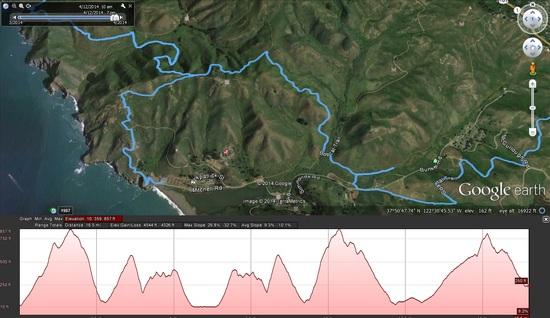
If I upload a GPS track recorded with my Iphone 4s into Google Earth I can see my track pretty much follows (lines up with) the trail visible from the satelite. Not sure how good of an indicator technically that is but that is good enough for me :-).

Here is a sample ….

sample of Iphone 4S GPS track

Chuck Susie BPL Member
PostedApr 25, 2014 at 6:54 pm

Suunto has a free iPhone app for their Movescount website. I think it will do what you want.

PostedApr 25, 2014 at 8:13 pm

I use SportTracks for all my workouts and hikes. It does comprehensive elevation data and plots, using elevation correction for GPS elevation or barometric altitude plots, depending on what you use to record the GPS track:

http://www.dcrainmaker.com/2010/09/sport-tracks-30-upgrade-review.html

I also use Garmin's BaseCamp for hikes. This allows me to easily transfer my GPS tracks or other people's GPS tracks to and from the handheld mapping GPS I hike with. It also allows me to view the hikes on detailed topo maps which are installed in BaseCamp and on my handheld. I also use this for driving destinations and routes, which download to the GPS. Pretty nifty program.

http://www.garmin.com/en-US/shop/downloads/basecamp

PostedApr 26, 2014 at 9:18 am

Thank you all for your responses and information.

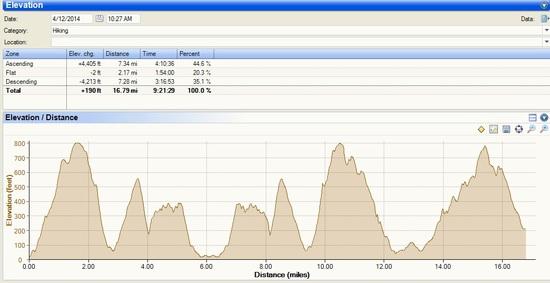
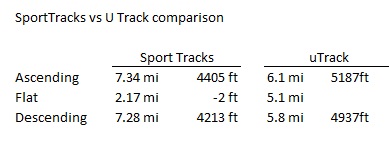
SportTracks seems to fit the bill and provides reasonable estimates of the metrics I was looking for (at least more consistent with the elevation profile / my personal assessment of the actual terrain).

Also I like SportTracks is highly customizable. User can define/change what grades are included in each category (i.e Ascending anything above 2% grade, descending anything below -2% grade, Flat anything between =2% grade and – 2% grade.)

Sports Tracks Elevation vs distanceSports Tracks vs UTracks comparison

edit: revised chart of elevation profile with distance on the X axis as it is more relevant for this post. (i.e very little flat sections as reported by the low flat mileage on Sports Tracks vs uTrack)

Viewing 12 posts - 1 through 12 (of 12 total)
Loading...