Topic

Android Smartphone as GPS?

  • This topic is empty.
Viewing 24 posts - 1 through 24 (of 24 total)
J-L BPL Member
PostedFeb 23, 2014 at 4:30 pm

I have been using my iPhone 4S for a couple years now as a GPS unit with good success. The phone stays in airplane mode most of the time, and whenever I need to check my position, I do the following:

1. Turn airplane mode "OFF"
2. Open GPS App, wait for phone to update position on map
3. Turn airplane mode "ON"

Even without cell/data signal, the iPhone has always been able to get a GPS lock (even in deep canyons and dense forests, and across 5 different states). And used in this manner, the battery has lasted over 6 days with plenty to spare. I do not track my route, only occasionally check my position.

It is now time to upgrade my phone and I am looking at the iPhone 5S or a Droid Moto X. Is anyone successfully using an Android smartphone as a GPS unit? If so, how do you use it? Has it proved reliable and has the battery lasted decently? I am concerned about apps running in the background on Android phones that would consume battery power (ex: I have read that the GPS works even with airplane mode turned "ON").

Ben C BPL Member
PostedFeb 23, 2014 at 5:17 pm

I went from an iPhone to a Samsung and will never go back. GS world's fine and you have more control of what's on and what's off. The bigger screen is much nicer for a GS too. Battery life seems better and you can always carry am extra battery if you want. A new battery will always work better.

J-L BPL Member
PostedFeb 23, 2014 at 8:43 pm

Ben, glad to hear the GPS works with Android. I was concerned it would either not work at all or would be a major battery drain.

Kevin, I'm certainly not going to pack in 4-5 extra batteries when I can go for well over a week with zero extra batteries when using my iPhone. Besides GPS and maybe a quick read at night in my tent, I don't touch my phone when backpacking. What on earth do you with 300GB of SD cards on a smartphone when backpacking? :)

Jason G BPL Member
PostedFeb 23, 2014 at 9:38 pm

I listen to podcasts and audiobooks in one ear while walking. also photos, video, gps, compass, star charts, emergency flashlight, note taking, journal writing, music and some people do movies, tv shows, games at night..

PostedFeb 23, 2014 at 11:13 pm

Kinda related:

I have the MapsWithMe app on my Android device (basically a 4" tablet). It works with no connection or service, as maps are downloadable by state via WiFi (Minnesota is a 79 meg download for example. Some hiking trails were on it before, but there's been another update they say adds more trails too. The lite version is free and combined with GPS it's pretty cool I think.

Stephen M BPL Member
PostedFeb 24, 2014 at 1:00 am

I use View Ranger for Android and really like it, that and Flashlight are my favourite apps.

Pete Staehling BPL Member
PostedFeb 24, 2014 at 2:57 am

I have used my android phone (Note 2) on a few trips now and it worked fine. I also use the GPS to track my daily workout of trail running. Since it also acts as a library of guide books, novels, all my trip planning and notes, and some audio books among other things it is a pretty handy device. Spare batteries are pretty light so charging can be fairly infrequent with careful battery usage and a few spares.

BTW, it also has a surprisingly good camera.

PostedFeb 24, 2014 at 5:03 am

I'm curious about smartphone GPS. I still have the old flip dumb cell phone and looking at finally upgrading to a smartphone. I do have a Garmin eTrex 30 which I really like.

1) How is the quality of the topo maps on the smartphone screen?

2) Can the "App" on a smartphone do many of the same things I can do with my eTrex30?

3) Can you download maps, "tracks" from other files from sources, such as GPSFileDepot.com, like I do with the eTrex30?

PostedFeb 24, 2014 at 12:14 pm

I really like the OruxMaps app for my Android phone. The online maps vary in quality and detail. On my 4.3" Motorola Atrix HD they look very nice. One disadvantage, compared to my Garmin Oregon, is that the screen is practically unviewable in sunlight.

You can also use offline so you don't need a cell signal to view online maps(keep phone in airplane mode, save battery). You can use the app to convert an online map view into an offline map.

You can load certain 3rd-party offline maps, but the availability is pretty spotty compared to, say, Garmin maps. There is a way to create custom maps from various sources and software apps, including conversion of Garmin-compatible "img" maps you get from GPSFileDepot, but at the moment I'm finding that to be cumbersome.

The app records, saves, and loads tracks and waypoints. It breaks down tracks into gory statistical details, more so than what I get from my Garmin. There is the capability to interface to a heart rate monitor, but I don't have one.

You can pair OruxMaps with an external bluetooth GPS receiver and keep your phone's GPS turned off. BT isn't as battery-hungry as the phone's GPS while the external GPS can go a long time between recharges. At some point this becomes a weight-saving proposition if it saves you from carrying extra phone batteries, as the external GPS units are very small.

PostedFeb 24, 2014 at 12:35 pm

Here is a screen shot showing an offline map created from the online Google Terrain map. The blue track is one stored on the phone as a separate file, the red is what was being recorded and stored in the track database but not yet saved as a separate track. BTW you can export tracks to GPX, KML and maybe others.

OruxMaps screen shot 2

J-L BPL Member
PostedFeb 24, 2014 at 1:10 pm

I use Gaia GPS. Map quality is great – far better than my old Garmin. I can easily download tracks and all necessary maps ahead of time and access them offline. I don't track my route – I can easily look at a map afterwards and trace how far I went/climbed.

The sense that I am getting is that Android phones do not last long when used as a GPS device in the manner I stated in the OP. Is there an easy way to turn off the GPS on an Android phone, or is this model-specific?

diego dean BPL Member
PostedFeb 24, 2014 at 5:29 pm

Using a Note 2, I used two batteries over a period of six days with the gps on only for about 8 hours p day. I guess i did watch about an hours worth of video too. I thought that was pretty good.

PostedFeb 25, 2014 at 8:47 am

I have — sadly — owned three different Android phones, and used each at least a fair bit on trail. All three worked fine as a GPS when out of range of any cell towers.
If you're getting a smartphone to use in part as a GPS, look for one that is listed as being able to utilize the Russian Glonass satellite system (too).

For most of what I do, a smartphone GPS is all I want/need. There are specific situations where I find it worth having a standalone, dedicated GPS, however. Primarily so that I can carry spare AA batteries and not have the GPS compete with other uses of the phone on trails where navigation is more of a challenge. So I liked a standalone GPS on the CDT. I'll bring one when I hike on the PNT. But for most cases (and most trails), life is just easier and better to have this as yet one more extra function on the smartphone. For me at least!

Ben C BPL Member
PostedFeb 25, 2014 at 9:15 am

John,

The GPS is very easy to turn off on my Samsung S4. The main drop down menu allows you to separately turn on/off the WiFi, GPS, Bluetooth, Airplane Mode, etc. You can have everything off except the GPS if you want.

I think you can expect an Android based phone to have battery life as good as an iphone. And, as mentioned earlier, since the Android phones open up, its easy to carry an extra battery.

I have the Gaia app and really only open it up occasionally if I have a little concern that I am where I want to be. I think it will last about a week with a little camera use too.

J-L BPL Member
PostedFeb 25, 2014 at 11:09 am

"I have the Gaia app and really only open it up occasionally if I have a little concern that I am where I want to be."

I think this about sums up my GPS use. I also have a stand alone GPS but the smartphone is proving to be very practical, so I rarely carry the stand alone anymore. Very good to hear you can easily turn on and off different parts of the phone.

PostedFeb 25, 2014 at 11:49 am

Some additional data. I use a Samsung Galaxy S4. I don't use it for tracking, but since paper maps are unavailable for where I hike, it probably gets more use of the GPS than those who are using for the occasional position check. I also use it for photos. One charge will usually last me 4 days. Battery changing is easy.
Turning the GPS off is easy as mentioned in a post above. However, it's also unnecessary, at least with the mapping apps I use; they can be set so that they automatically turn the GPS off when the phone goes into standby mode.

PostedFeb 25, 2014 at 2:17 pm

"However, it's also unnecessary, at least with the mapping apps I use; they can be set so that they automatically turn the GPS off when the phone goes into standby mode."

OruxMaps lets you turn on/off the GPS within the app.

Amy Lauterbach BPL Member
PostedFeb 25, 2014 at 4:45 pm

John – since you mentioned that you’re considering the iPhone 5S, make sure you read the updated article about battery drain, as there are some significant nuanced difference in the iPhone 5 compared to the iPhone 4. Here’s the article: How to use the iPhone as GPS mapping device for backpacking

wiiawiwb asked How is the quality of the topo maps on the smartphone screen?
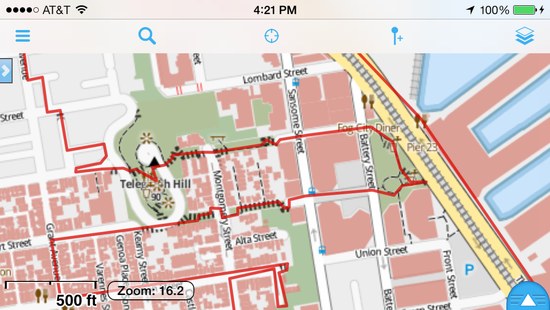
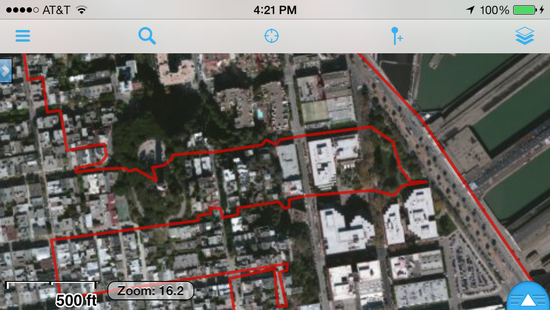
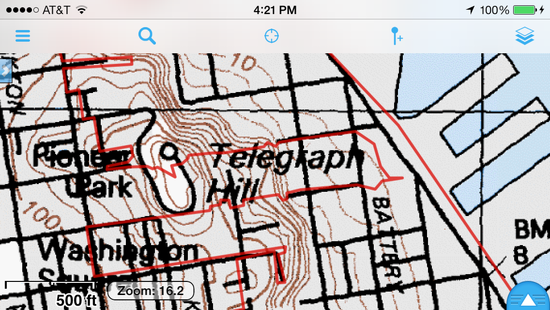
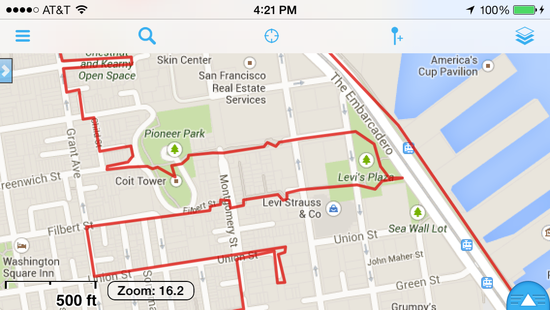
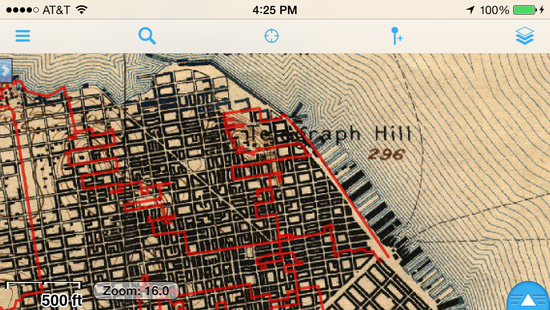
That depends on what app you use, but if you choose the right apps the answer is MUCH MUCH better on the smartphone. I use an iPhone, but the same is true for the Android phones. Screen resolution (dots per inch) is far superior compared to Garmins. And the availability of map sources terrific. For example, this weekend Jim and I will be taking a four day urban backpacking trip — 80 miles of convoluted route through San Francisco, climbing as many of the public stairways as we could weave into an 80 mile walk. I have several map sources preloaded into my phone. All of these map sources are free. I would choose different maps for a different destination.

Downloading the maps to the phone (so they are available for offline use) is super simple. First, I import my gpx (or kml) data. Then, I go to the track details page and hit the button “Download Maps for Track” button — all of the maps, at all zoom levels, are imported. I’ve done this for routes that are 800 miles in length, and it takes me just a few minutes to prepare the phone with all the maps.

For our San Francisco walk, our route line is red, and I’m showing the Telegraph Hill area in the selection below:

OpenStreetMap
imap-1

ESRI Satellite Imagery
imap-2

USGS
imap-3

Google Street Map
imap-4

USGS Historic (because it’s fun to see which parts of the city had been developed in 1900)
imap-5

J-L BPL Member
PostedFeb 25, 2014 at 6:10 pm

I had read about the iPhone 5S battery drain. Thankfully, I am on Verizon.

Based on the responses here, I will likely be going with an Android phone. Just need to check on some features when at the store.

PostedFeb 25, 2014 at 10:23 pm

"OruxMaps lets you turn on/off the GPS within the app."
Frank, my point was that it's unnecessary to turn off the GPS (in app or otherwise) as the app will automatically turn off the GPS when the screen turns off (unless you set it up not to). I think most apps (including Orux, IIRC) do this.

ed hyatt BPL Member
PostedFeb 25, 2014 at 11:28 pm

I use my Android phones quite a lot as GPS – the screen is way better than my etrex 30.

I root my phones and install a custom Android OS onto them (CyanogenMod) – this can give a significant increase in battery life; it can also turn your phone into a lifeless lump of plastic and glass if you get it wrong….

PostedFeb 27, 2014 at 12:28 pm

I've used Backcountry Navigator Pro on my Android device on very short trips. I believe there is a free version to try out before you buy the pro. I just search for the area I plan to hike, pick my map to download (U.S. Forest Service one has trails), and then download the map while I'm at home, and when I'm out of cell service, the map is still in my phone and my phone's GPS knows where I'm at within the chosen map.

I just downloaded the apps talked about here as well as backup and to try out.

P.S. I love the huge screen on my Samsung Galaxy Note 2. I bought extra batteries for it for cheap online, but you'd have to rarely use it to make it last for an extended period of days, in my opinion.

Kevin Burton BPL Member
PostedFeb 27, 2014 at 11:25 pm

> Kevin, I'm certainly not going to pack in 4-5 extra batteries when I can go for well over a week with zero extra batteries when using my iPhone.

oh… well your S3/S4/S5 will get similar battery life as the iPhone 5.. I just make it a point to take LOTS of video and pictures and I will sometimes watch a TV show in the evening. I found this can burn a lot of power. I've never exhausted my batteries though.

And I carry that much data as I have ADD and quit movies half way and then watch something else. Helps to have lots to choose from.

Viewing 24 posts - 1 through 24 (of 24 total)
Loading...