Topic

old film camars and slides… what to do?

  • This topic is empty.
Viewing 19 posts - 26 through 44 (of 44 total)
PostedJun 24, 2014 at 5:59 am

The budget option if you want to scan yourself is an Epson v600. As with most things, the more time you're willing to put into learning the details, the better your results. For many people who aren't technically inclined, paying to have the slides scanned will be the better route. Low resolution scans are more than adequate for screen resolution and if you want to print a few big, send them off to be scanned on a drum scanner.

Regarding your old cameras, you might be surprised what some are going for these days. What do you have?

PostedJun 24, 2014 at 9:01 am

Anyone tried displaying the slides (via old-style projector) and taking a digital photograph of the screen?

PostedJun 24, 2014 at 9:05 am

Comment the second: Who makes digital backs for classic 35mm cameras, if anyone?

Wouldn't it be cool if you could attach a digital back to a classic old Leica or Contax?? Yeah, I know, you'd run up against that "full frame" expense.

Dale Wambaugh BPL Member
PostedJun 24, 2014 at 9:22 am

Poor results that way. If you live in a large city, you may be able to rent a good slide scanner and have a rainy weekend marathon scanning session.

Digital backs are pretty much passé with the cost and features in modern digital cameras.

35mm film camera prices are continuing to fall. The classics will always have some value I think, but digital imaging is much the standard now.

I have much invested in silver- based photography education. It is becoming a footnote in the history of imaging I think.

I really enjoy the low cost and freedom in digital imaging. It is very liberating to be able to take as many photos as I like with no concern for cost. It is equally liberating on the darkroom side and so much more environment-friendly.

That stats may have changed, but a few years ago I read that the largest camera manufacturer in history is Nokia. There are more phone cameras than all of the other cameras in history combined. That's the handwriting on the wall for me!

PostedJun 24, 2014 at 10:00 am

Delmar that was my or rather our family's solution as it was just not fesable to scan 1000's of slides but we wanted to have a record of what my Dad thought something was worth taking a pic of at that time… I am one of six kids so we numbered all the slides via camera and decide only about 100 were worth digitizing for future use, but it would be easy to go back and find a slide in the collection if needed… We used a Canon that could be USB connected on a tripod and trigered from the keyboard, we shot from a screen about 4'x 4' a little smaller than that the colors seemed to be best… Now the collection can be put on a or in anything and projected to a TV or laptop screen… another thing I noticed a small 4×5 print could be made from the pic with no real degradation anything bigger use the cleaned up scan… The whole project took my brother and my self 5 hours to do and the photos did not have to leave my folks place…

Bob Gross BPL Member
PostedJun 24, 2014 at 11:23 am

Been there. Done that. It gets poor results.

–B.G.–

PostedJun 24, 2014 at 12:07 pm

Other than Leaf and Phase One backs for Hasselblads I do not know of any.

PostedJun 24, 2014 at 12:12 pm

Replacement bulbs for most slide projectors are readily available from a number of online vendors.

PostedJun 24, 2014 at 3:02 pm

> It is equally liberating on the darkroom side

That's the massive difference for me. Darkroom skills have been replaced with Bloat-o-shop know-how. You do a half decent job of attaining an image with a mid-range camera, and it's the Photoshopping that makes it an amazing photo. It seems the camera is now just a secondary adjunct to the imaging process.

Of course, you see plenty of badly photoshopped images too. Several here on BPL (I won't name names) where the artist went crazy on the "lighten shadows" command and the image looks plastic-banana.

Roger Caffin BPL Member
PostedJun 24, 2014 at 3:37 pm

> Wouldn't it be cool if you could attach a digital back to a classic old Leica or Contax?

Or to either my OM-2N or OM-2Ti cameras – with ALL their lenses… Sigh….

Any want an OM-2?

Cheers

PostedJun 24, 2014 at 3:51 pm

slides Rock. there is nothing that any of us can afford that will throw an 8' wide image on a screen with half the intensity of a Leica proected slide.
most of the Leia proetors are head and shoulders above the maority of the kodaks that normal people ever see.
the lens is the big deal. kodak made an ektapro line that was very nice. had auto programable coess fades, all sorts of cool features. and, it could take german glass. quite a class act.
Leica's are affordable inthe RT300 series which will also accept the preffered 90mm leica lens.
so, with slides you can get fantatstic images on a huge creen for comparitively not much money.

slides scan nicely in a Nikon scanner. these can be fitted with an auto-feeder, which , once you have it all figured out, you can load with about 2 doz slides, and just go to bed. it will feed a slide, focus, scan, store, and then feed the next slide all with no interaction by the user. very cool. avail in usb or firewire.
cleaning the scanner lens/mirror is tricky.

i have ALL this great stuff, and still have not bothered to group scan all the slides. nobody cares anyway. so, it's like a lot of other things.

but i do on occasion open a case, set up the leia,, pull downt the screen, and tour thru my slides. this is so much vastly superior to crt viewing that there's no way to discuss it.

afterdarkphoto BPL Member
PostedJun 24, 2014 at 4:40 pm

What's funny about film cameras is the nostalgia some people are expressing for the medium format cameras.

I have two old rolleicord/rolleiflex's I shoot night photography with. They were $100 or so when I bought them. I've seen similar ones selling for as much as $850.00 or more so someone could buy it and put it on their desk or shelf…and there are people actually paying that price for these.

One of mine was manufactured in 1952. Someone offered to buy it for $600.00. I thought they were joking…I would never sell it though. It has way too many quirky features about it that I like…

So depending on what you have, there might be some value left in it…or even temporary inflated value.

PostedJun 24, 2014 at 8:07 pm

> Or to either my OM-2N or OM-2Ti cameras – with ALL their lenses… Sigh….

You too? I'm stranded with an OM1n, OM2n, and an OM4Ti…and a buncha Zuiko-OM lenses that go down to f/2. Have been hoping for years a digital back would magically appear for these classics. Alas, not.

PostedJun 26, 2014 at 9:09 pm

Re: "What to do with some old snap-shot grade film cameras?"
They are living happily ever after in a landfill. But just couldn't bear to toss the Yashica T4. You are right about the power of nostalgia.

PostedJun 27, 2014 at 9:56 am

Save the original film negatives or slides, whatever you do with digitizing. Lots of film prints are not very good and have less detail than the negatives had. This is especially true for really old pictures from medium format cameras printed at the drugstore. I love some of the old folding roll film cameras, if you can still get the film.

Some old 35mm lenses were superb optically. You can get adapters to use them on many new DSLRs. I got an adapter for my new Olympus E-PM2 (interchangeable lens micro 4/3). My old Pentax 50mm f1.4 lens is actually very good and faster than most of the micro 4/3 lenses (for a new fast lens $$$$$). For backpacking some of the new lenses are great, small, light and very good optically. When size and weight are not so important, legacy lenses are great.

Bob Shaver BPL Member
PostedJul 3, 2014 at 8:47 am

I had thousands of slides, plus my wife had slides, and her parents had slides from WWII and back to the 1920s, and my brother had slides. I went in with 3 others, and we bought a Nikon coolscan 4000, professional quality slide scanner. It has a slide stack feeder that holds 25 slides, does 4000 x 4000 dpi resolution. It has software that cleans up dust and scratches. It was about $400 each.

I got it first, and we were to each have it for 3 months each, then one year each. That is all I did for about 1 of those 3 months, but I got the large share of the slides scanned, maybe 8,000 slides. The next guy had it for 3 months, and spent the whole time sorting and organizing his slides. He didn't scan a single slide. A year later I got it back, and started scanning negatives, which took a lot more time. Its way easier to scan a stack of prints in a ScanSnap desktop scanner, than a single negative. I have scanned maybe 20,000 images, mostly slides, and its nice to have that job done. As far as I know, of the 4 of us, I'm the only one who scanned anything.

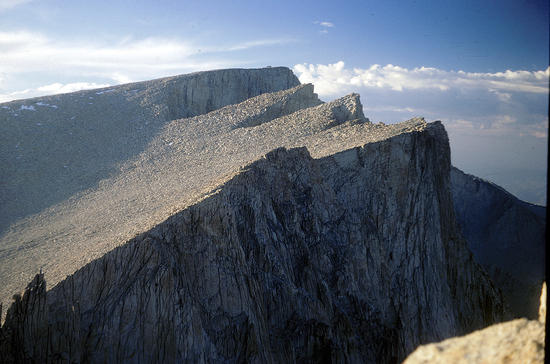
picture of Mt. Whitney from 1971, this version much reduced in file size for internet posting.Mt. Whitney

PostedJul 3, 2014 at 1:48 pm

Warning! This post could cause death by boredom or maybe brain damage!

I will join this discussion and party. About four years ago I finished scanning several thousand slides taken by my parents. The oldest was from about the mid 1950's, the newest was from about 1986. Here is a cover letter, in part and edited, that I attached to the file that accompanied the scanned photos:

The 35mm transparency slide collection…has been digitized and stored on several hard drives. The aim of this project was to make the viewing of the photos easier; to make them more accessible to family members; and in some cases, to arrest the apparent degradation of some of the slides. The storage of these photos on hard drives should not be considered archival since the lifetime of information on hard drives is considered to be reliable for years, not decades. An effort should be made to renew the photos on new drives every few years. I plan on keeping a copy on a small portable hard drive which will be located in a safe deposit box; as well, I will keep the original copy in my home on a portable external drive.
The equipment used:
Slide Scanner–Nikon LS-5000 with bulk slide feeder SF-210
Scanning Software–Vuescan
(http://www.hamrick.com/)

Organizational Software–Name Dropper (http://www.cognitial.com/namedropper/index.htm

Additional color correction software–IrfanView
(http://www.irfanview.com/)

Each slide was scanned for maximum information up to the limit of the scanner's ability. Each scan yielded two files: a JPEG file that is the "viewing" file and a TIFF file that contains all the information extracted from the slide. The TIFF format was chosen because it is thought to be the best candidate for archiving, i.e., software to handle TIFF files is expected to be available twenty or thirty years from now. The resulting file sizes are huge for the TIFF files but reasonable for the JPEG files (the file sizes are settable when scanning). If someone has a special interest in manipulating an image with software the TIFF file would be the best place to start–make a copy of the TIFF and manipulate the copy, leaving the original alone and untouched. There is readily available software that converts TIFF to JPEG if one wants to follow the example set on this hard drive. The JPEG files are best for everyday viewing.
Note that the TIFF files look very weird when viewed by some software including the Name Dropper software. They look very dark, distorted, cropped, etc. This is normal–do not worry about it.
Many of the older slides when viewed closely have small black dots. I did not try to remove the dots other than to blow several puffs of air onto each surface with a rubber hand- squeeze bulb prior to scanning. All of the slides received the bulb treatment. The non-emulsion sides were cleaned with distilled water and Q-tips as necessary. The Vuescan software was able to reduce the black dots and some defects as viewed on the JPEG files. Irfanview software's "auto adjust colors" was good at restoring color from shadowy areas. The TIFF files are untouched by the software so that they can be manipulated in any fashion from scratch if desired.
Some slides exhibit severe damage due to the "flood". No special effort was made to clean these. Other slides were badly underexposed, overexposed, or poorly focused. No effort was made at culling the poor ones–they were all recorded. A relative few of the slides were scanned for "heavy" infrared dust removal. The vast majority were scanned for "light" dust removal. The "heavy" setting resulted in colors that were less saturated, a tradeoff that was not always desirable.
Each slide is represented by a file name that depicts the film "roll" number, photo number, and date. The suffix .tif or .jpg denotes the file type.
Not all slides were dated by the developer, nor were they all numbered. A best guess was used to assemble the slides in approximate chronological order when these conditions were encountered. Note that the dates represent film development dates and not event or photo subject dates.
A future task could involve labeling the slides with keywords such as locations, better dates, names of people, etc. The Name Dropper software could be useful for this purpose.
This whole project took over three years to complete.

End of cover letter and resuming real time comments.

With the passage of those few years I am forgetting some of the details. Irfan software–don't remember using it but I must have! The Name Dropper software was a huge help in renaming files, streamlining the typing.

The largest part of the project was organizational prior to plugging in the scanner. Many of the slides were in their original packages and marked with a date or some form of the event or location. Many of the slides were in carousels arranged by topic and not chronologically as I desired.

Basically it was like putting together a huge puzzle.

I set up a homemade light table consisting of two fluorescent shop lamps and a piece of plexiglass with the protective milky white plastic cover. Worked great except that my dining room table was unusable for a long time.

This site was helpful in solving part of the puzzle: http://www.zoggavia.com/Kodachrome_Slide_Film.html
It appears that I have a couple other similar sites saved, won't list them unless someone requests (yeah, right!).

After the slides were organized and stored in sleeves within 3-ring binders it was time to think about the storage medium and the file type. For file type I settled on the dual TIFF and jpeg storage as mentioned above; that seemed to be the prevailing wisdom at the time. Perhaps things have changed already. The storage medium was also a tough decision. In ~2007 the experts seemed to think that CD/DVD discs were reliable for just a few years, about the same amount of time as hard drives. I vaguely remember reading recently that they (the discs) are probably good for longer, maybe up to 10 years? Also looked into the "gold" discs. They seemed to be a good option with lifetimes into several decades but I would have needed quite a large stack. Maybe I need to revisit the gold discs one day. Yes, I have computers with hard drives greater than 10 years old and they still work fine, but since we are talking about archiving…………

Mentioned above is the "flood" which inundated some of the slides and caused quite a bit of damage. At one point my mother almost threw them away. So glad she did not because the leftover content still has some value and because the software processing of damaged photos does an AMAZING job of recovery. Along similar lines back in my poorer days I cheaped-out in developing some slides of my 1977 Mt. Rainier climb; many of the slides had a reddish cast and I was disappointed. This past winter I ran them through the scanner and "cleaned" them with the default settings. Wow! They look perfect, no sign of unwanted tones. I am no expert, I merely used the default cleanup settings.

There is still much work to do. My personal slide collection is unscanned sitting there taunting me. It is in much better order and should go quickly once I begin. Maybe this winter.

(I have no connection to any of the companies or vendors listed above).

Bob Gross BPL Member
PostedJul 3, 2014 at 2:22 pm

Yes, scanning a large collection is very time consuming.

Additionally, for the TIF file you want to consider the color depth that you use. You can typically use 8 bits per RGB channel, or you can sometimes use 16 bits per RGB channel. The latter is useful if you have the resources to handle the extra data, since it doubles the effective file size of each scan. If the slides contain a high dynamic range, then the 16 bit per channel files can allow for better editing. The 8 bit per channel files might show some posterization.

Yes, Vuescan can be very helpful for applying an older scanner with a newer operating system.

–B.G.–

Viewing 19 posts - 26 through 44 (of 44 total)
Loading...