


How would I go about including an Excel spread sheet in a post?
Daryl
Topic
Become a member to post in the forums.
How would I go about including an Excel spread sheet in a post?
Daryl

Look Here.
Here's one way for Windows OS:
In excel, highlight the area you want to convert, hold down the shift key and select 'Edit' from the menu bar. Select 'Copy Picture…' from the drop-down menu. Open MS Paint and use the Image-Stretch/Skew tool to reduce the size of the blank screen to about the size (smaller doesn't hurt) of the image waiting in the clipboard. Paste the picture and save it as a JPG file. Post the picture to the forum using the 'Insert Image at Curser' button. Instead of MS Paint, you can use another photo editor such as Photoshop.
Here's an example that took less than 30 seconds to convert.
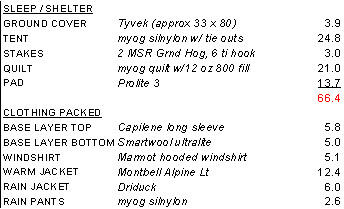
Hope this helps.
If you have Excel for Mac, the conversion from Excel to a .pdf file is on the Print menu.
Mary,
I think he is more concerned about getting into the actual post.
But you bring up a great point, as PDF is required to place a gear list in your profile. Also if you have Adobe Acrobat, you can save a PDF as a JPG file, but is loses a lot of its resolution.
Another little tid bit, if you copy a selection in Excel and paste into another application, such as Word or Power Point, you want to use "Paste Special…" and select one of the picture formats. Much better resolution and bitmaps work best. If you just paste it, the actual spreadsheet is copied, although you can only see the selection. However if you double click the "picture," the actual spreadsheet will open. Not sure if this is true in the newer version of MS Office.
Several years ago during a performance review, my boss built a Power Point for each of his managers, with a screen shot of payroll information for the individual employee. I double-clicked it and it contained all the data for all the managers in several worksheets in the imbedded workbook. Enabled me to negotiate a significant raise :)
Thanks for the info. Looks like a challenge for me, given my computer ignorance, no matter which way I go. But it will be good exercise for my brain.
Daryl
Posting the spreadsheet to an online service such as Google Docs will allow you to publish it as a web page that you can then link to in a forum post.
Sam,
Following up with your suggestion I tried Skyview (or something like that) which is available with my hotmail. Sure enough, I can post it there easily and then include a link in my BPL post.
This is even simple enough for me.
Thanks,
Daryl
Simple is often perfect.
Become a member to post in the forums.
 New Gear with Aluula FabricsLighter, stronger, more abrasion-resistant, and highly water-resistant - explore ultralight backpacking gear made with ALUULA Graflyte fabrics. Engineered for exceptional strength, durability, and lightweight performance, ALUULA Graflyte helps reduce pack weight without sacrificing reliability, making it ideal for demanding backcountry adventures.
 © Beartooth Media Group Inc.
 Loading...