Topic

Laptop Ques. for Ye Geeks and Urban Warriors

  • This topic is empty.
Viewing 25 posts - 1 through 25 (of 32 total)
EndoftheTrail BPL Member
PostedMay 23, 2010 at 3:55 pm

I'm planning on a 5-month solo backpacking trip abroad (some hiking but mostly hosteling) and will be taking my notebook PC with me for the first time. The PC itself (Acer Aspire One) is pretty small and weighs a tolerable 2.5lbs. Two questions:

1. Has anyone replaced the huge factory-provided AC adapter/cable with a "normal size" wall adapter? Are there companies that make smaller replacements? My adapter input is 100-240V, 50-60Hz — and the output is 19v, 1.58A. Would love to get something smaller and lighter!!

2. Power in Bangladesh and Myanmar is both erratic and poor quality and a surge protector is supposedly a must. Does the "huge" AC adapter that comes with a computer normally include a surge protector inside? If not, then what are some light and tiny 100-240V models available?

John Nausieda BPL Member
PostedMay 23, 2010 at 4:34 pm

I've never seen a wall wort that had surge protection built in. When we went to Beijing for a year I purchased a Belkin surge protector that was fairly small for a Thinkpad. They cam in two flavors Micky ears -3 prong or two prong. Which Aspire do you have-what processor? I think my daughter may have the same one… 10 hour battery life?

Nick Gatel BPL Member
PostedMay 23, 2010 at 5:33 pm

Ben,

I am not a computer electronics expert, but I have been a traveling road warrior for 13 years.

The computer bricks also contain circuitry for charging the battery and nominal surge protection. I once forgot my adapter and had to buy a Belkin universal adapter that is even bigger than my OEM one. So, IMO, the adapters are not universal but are designed for each manufacturer's computer. I would use the one that came with your computer.

Also, my comment on nominal surge protection, means that the surge protection for such things as lightning strikes should be accomplished by the building's own infrastructure… which probably is not going to happen in a lot of places.

So I would keep the OEM adapter, and probably purchase some sort of surge protection. I would not leave the computer plugged in unattended while traveling abroad. And I definitely would not use it in a thunderstorm.

With most laptops, it is best to let the battery discharge frequently, and then charge it up. My company has had a lot of premature battery failures, even with the new technology batteries. Dell recommends a discharge/recharge routine, and not constantly using the AC adapter.

Just in case, I would plan on some sort of backup of data while traveling. It could be an online service or hardware.

EndoftheTrail BPL Member
PostedMay 23, 2010 at 5:35 pm

Hi John:

I have the Model 150 – with a 6-cell battery (5 hrs. usage). If there's a choice, I think I would go for the simpler 2-prone. Do you have a model no. for the surge protector?

Nick (and anyone else who knows):

Can I skip the surge protector if I do this: always leave my computer OFF when plugged — meaning I only use the mains to charge the batteries. Then, when actually using the computer, I will make sure to unplug and rely only on the batteries. Will this work? I can make it a routine to charge at night — and I doubt I'll ever need to use the thing for 5 straight hours on any given day…

And yes, I will back up certain applications and all data on SD cards.

John Nausieda BPL Member
PostedMay 23, 2010 at 5:47 pm

The surge protector goes from your room outlet to your power supply and is either a Mickey 3 prong or a 2. That will be determined by the stock power supply.Mine also included a phone line hookup. Perhaps irrelevant with Wifi , but more secure. Bought on eBay for a fraction. These surge protection devices are warranted. $ unbeknown. Also service on the road may be dicey. I went with IBM for an international warranty and service center in China.

PostedMay 23, 2010 at 5:47 pm

I'll add to Nick's observation —

I've noticed on the Dell's we use at work (and on our home systems), that trying to use a Dell adapter that isn't specific to the model will trigger a pop-up alert.

My experience with batteries mirrors Nick's — constant AC adapter use leads to premature failure…

John Nausieda BPL Member
PostedMay 23, 2010 at 6:25 pm

I would never skip surge protection in the 3rd world. Rolling brownouts in Beijing were common. While I never triggered the protector, I wouldn't play dice. This assumes you have a warranty and it isn't a junk machine. I bought the surge protectors on Ebay , but registered the warranties prior to departure. On another note ended up using the Nikon repair facility in Beijing which was OK. When in doubt carry your own verified US batteries, storage medium, and don't connect to WIFI without good Armour for your browser. Don't assume you can replace anything except for a mouse. Everything else will cost you a day and a hassle at the very least.

EndoftheTrail BPL Member
PostedMay 23, 2010 at 6:27 pm

OK… John, can you recommend a 100-240v surge protector — one that's as light and compact as possible that will do the job?

John Nausieda BPL Member
PostedMay 23, 2010 at 6:40 pm

My experience is dated by about 5 years , so that's a caveat. But in that time frame here is the unit and variables.
http://www.amazon.com/Belkin-F5C791-C8-100V-240V-Travel-Protector/product-reviews/B00007B8UW/ref=dp_top_cm_cr_acr_txt?ie=UTF8&showViewpoints=1.
Again I'd check on relevant insurance-that's why you buy Belkin. But given my time frame see if the sands of time have shifted. And I'm sure you'll be teaching us soon on this issue, I appreciate what you do, John

EndoftheTrail BPL Member
PostedMay 23, 2010 at 6:59 pm

Thanks again, John!

Looking at the surge protector gets me thinking…

Most surge protectors are placed between the wall socket and the computer's AC adapter input. It takes a bit of bulk to work with 240V. So, I wonder if there's a DC surge protector that's placed between the AC adapter output and the computer? Should take a lot less to manage a DC current coming out of an AC adapter, correct?

I'll google this a bit…

PostedMay 23, 2010 at 7:05 pm

Ben, you're making this too hard. Use the computer until the battery runs out. Trash it. Buy a new computer. Repeat.

It is, after all, an Acer….. ;-)

Dale Wambaugh BPL Member
PostedMay 23, 2010 at 7:09 pm

Ben,

Two values on your power adapter: volts and amperage. Never mess with the voltage. You might use a unit with a higher amperage, but shouldn't use one with a lower value– it would put a constant overload on the adapter, causing it to burn out over time. If your laptop exceeds the current it can deliver, the voltage would drop, making it equally destructive to your laptop. Better to stick to the manufacturer's specs and prolong the life of your equipment.

The other thing to look at is your laptop AC adapter input voltage(forgive me if you have been through this). Many later model ones are multi-voltage and will work on 120v/60hz or 240v/50hz systems and that should be plainly listed on the adapter. Then you only need to wrestle the adapter at the wall plug. If I recall, you've traveled enough to have done this dance.

I like APC and Tripp brands in general for power-related equipment and surge protectors.

APC makes a small surge protector in two-wire non-polarized and three-wire versions to fit between your power adapter and the removable AC cord and covers 100-240 volts. The three wire rig is illustrated at http://www.amazon.com/APC-100-240V-Protector-Notebook-PNOTEPROC6/dp/B0002RSPFS

One way to add a little more protection would be to plug your laptop in for battery charging and use the booted computer on battery power. That way the charging circuit is still at risk, but your data is less prone to damage (the hard drive is off) — no guarantee of course! I would still recommend the surge protection for countries with flaky power issues. If you get a big hit on the line, like a lightning strike, only prayer can help :)

Get a fat thumb drive and back up your favorite photos and other precious data. Keep it separate from the laptop to spread out the theft risk too

Bon voyage!

John Nausieda BPL Member
PostedMay 23, 2010 at 7:14 pm

The surge protectors always work on the A.C. side. I don't know why but time in nanoseconds seems to be a factor. I'm sure Roger Caffin could chime in and suggest ways of grilling in the field.

EndoftheTrail BPL Member
PostedMay 23, 2010 at 10:06 pm

I'm shocked too. I thought my Acer-supplied AC adapter was HUGE because I was comparing it to "regular" adapters — like the ones for cell phones, calculators, etc.

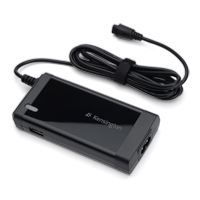
The Kensington claims to be ultracompact — but looking at it, my HUGE Acer-supplied adapter is actually smaller!!

But I do like Kensington's USB charging port and built-in surge protector. These are nice!!

PostedMay 23, 2010 at 10:24 pm

I have yet to find anything nearly as light as the Kensignton adapter though. My ultra compact Dell adapter which came with my 11z is 367 grams.

EndoftheTrail BPL Member
PostedMay 23, 2010 at 11:18 pm

Chris:

My Acer AC adapter weighed 10.4oz (295g). However, I noticed that much of the bulk came from the fat AC cable. The DC wire was much slimmer and lighter. Thus, I cut off 5ft. of AC cable (it now weighs just 7.4 oz (210g) but more importantly, the whole thing is now a lot more compact!! Tomorrow, I will buy 5 ft. of DC wire and splice it in so the entire connection will remain the same length as original.

As mentioned, I really like the integrated surge protection and USB charging port. Wish it were cheaper though…

PostedMay 24, 2010 at 12:02 am

Ben,

Wow, I'm impressed with the size and weight of that Acer power supply. Nice work hacking the cords to shave grams too! I'll be curious to see what the final weight is. I agree on the price of the Kensington. I'm not willing to pay $15/oz when it comes to lightening my backpack for business travel.

Bob Gross BPL Member
PostedMay 24, 2010 at 12:15 am

Benjamin, please note that your modified cords and power supply now no longer meet the UL, CE, FCC, etc. certifications. In other words, if it burns the building down or causes interference, it will be your fault.
–B.G.–

EndoftheTrail BPL Member
PostedMay 24, 2010 at 12:25 am

Bob — I am not sure why shortening the AC cord would do any harm whatsoever! As for lengthening the output or DC cord — I also don't see how that could go wrong… 19V won't burn down anything.

EndoftheTrail BPL Member
PostedMay 24, 2010 at 12:30 am

Chris:

Thanks! I just compared the size of the adapter:

Kensington – 4.5" x 2.2" x 0.8" – 7.1oz
Acer Aspire- 3.5" x 1.4" x 0.8" – 7.4oz (whacked off 5 ft. of AC cord but before adding any DC wire)

But I may still be tempted to buy the Kensington. I found one for $68 on Amazon.com. Why? Because then, I can avoid adding a separate surge protector (more bulk and weight) and I can certainly use a power USB to charge my phone.

Dale Wambaugh BPL Member
PostedMay 24, 2010 at 6:40 am

I would be more worried about the quality of your work and electrocuting yourself or others before burning the building down. If you soldered the wires and used heat shrink over the splice, I *might* buy it. If you just twisted the wires together and taped them over, go buy a manufactured short cord. If you shortened the AC cord, it is wall current — 120 volts in the US– regardless of the output on the DC side. I know you can buy new cords in 12" lengths and might find shorter with a little work.

PostedMay 24, 2010 at 6:43 am

Ben,

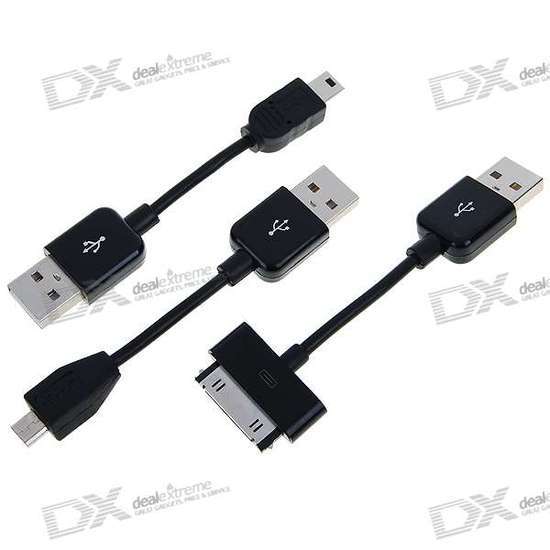
Not sure if these will help you with what you have planned or not but I LOVE these dinky little cables and this product is 33% the cost of iStubz sold on ThinkGeek (if one includes delivery) which only takes care of an iPod. I use the USB to micro USB for my BlackBerry and Bluetooth headset. This gets my charging needs to three devices down to a mere 14 grams and I keep them in a pen slot in my backpack so obviously compact as well.

USB Charging Cables for iPod/iPhone and Micro/Mini 5-Pin Gadgets (Black)
Charging Cables

For $5.29 delivered (takes a little while from Hong Kong) it is pretty hard to go wrong. Highly recommend for any road warrior.

John Nausieda BPL Member
PostedMay 24, 2010 at 6:46 am

With a separate surge protector you can possibly get through a surge with an intact power supply and be able to revert to the original cord-a second chance. Weight is one thing , but a back up is always good. Nice job on the cable mods.

PostedMay 24, 2010 at 8:35 am

It might be a good idea to keep a backup of your important data on CD or DVD. They're more durable than SD cards.

Viewing 25 posts - 1 through 25 (of 32 total)
Loading...