Topic

Backcountry Word Processing?

  • This topic is empty.
Viewing 23 posts - 1 through 23 (of 23 total)
PostedOct 4, 2015 at 11:03 am

Looking for the ability to use a full keyboard (bluetooth?) with my android device to do word processing. I do not need internet connectivity, just the ability to write and transfer docs to word or google docs at a later time. Any suggestions for apps and keyboards that would allow me to do this? Thanks.

Stephen M BPL Member
PostedOct 4, 2015 at 11:19 am

Hancom office which is free on the play store is ok. I have used the word processor but the Spreadsheet part is half decent.

Paul S. BPL Member
PostedOct 4, 2015 at 1:33 pm

MS Office should be free for small devices (e.g. Not pro sized tablets). There a many folding Bluetooth keyboards out there. Logitech is a good brand, but there should be good review sources if you google that product category.

David Thomas BPL Member
PostedOct 4, 2015 at 2:28 pm

Voice recognition software has gotten quite good. An additional app on your phone weighs nothing. And you can dictate as you hike.

PostedOct 4, 2015 at 4:36 pm

Thanks so far. I just discovered the free MS Word app….looks like this will do. Now for a keyboard…

Dale Wambaugh BPL Member
PostedOct 4, 2015 at 5:05 pm

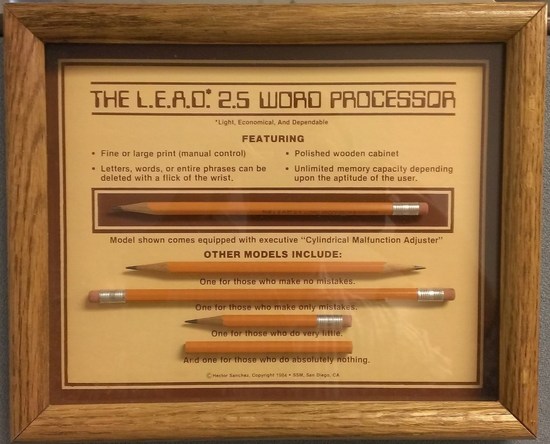
I just use a freebie notepad text file app for writing. IMHO, all the other word-processing stuff just gets in the way on a small device. Keyboard-wise, managing the thing in your lap will be the challenge. You might find device-specific case that incorporates a keyboard that doubles as an easel type stand, but the keys will be small on anything less than a 10" or so tablet. Other keyboards, like the Logitech K480, have a groove at the rear that will hold a phone or tablet on an angle. Whether it will stay there when using it off a desk or table top needs some testing. If you have a protective case that will effect the mix too. I would Google any prospective choice as some have a poor service life reputation. Amazon made at least one that was junk. I've used an Apple bluetooth keyboard with an Android that worked fine, but that is a little big for hiking stuff. Batteries and battery life may be a consideration. Most small, thin keyboards have rechargeable batteries. They last a while, but it should be on your checklist. In the spirit of UL travel, I would get used to the on screen keyboard or get an analog tablet and pointing device :) Analog word processor

PostedOct 4, 2015 at 5:59 pm

Good point about the keyboard in lap issue Dale. Probable quite a pain with something small and foldable if you're lacking a table, including issues with how to set up the screen. Which is why I put the question to you good people. Which makes me wonder if a mini-laptop like a Chromebook would be better suited to my needs. Asus makes the Chromebook Flip which is a hair under 2 pounds and under $250. http://www.techradar.com/us/reviews/pc-mac/laptops-portable-pcs/laptops-and-netbooks/asus-chromebook-flip-1300115/review But Chromebooks raise the issue of how much you can get done without internet connectivity. Can you word process offline on them or is everything Google Docs dependent? As for the venerable pencil and paper, it's an option I've used just fine…but I'm looking to increase productivity and skip the necessity of typing notes. I realize that bringing "work" into the backcountry is quite a distasteful idea for some, but I'm going to be starting a doctoral program this spring that will be highly reading/writing intensive. Having a device on which I can write while I travel is going to be key to me continuing to get out for many weekend camping trips/backpacks.

Jesse Anderson BPL Member
PostedOct 5, 2015 at 6:15 am

Another avenue you might want to check out is the Transformer book line by Asus. they make 2 or 3 10" 2-in-1 devices that run full windows. Weight seems to be a hair under 2.5 pounds. Most charge from USB so an extra battery pack or a solar panel could keep you going. I own one of the larger "Chi" machines that I love but I can't speak for any of the 10" as I never used them. Bonus points that they're crazy thin too, so they wont take up too much space in your pack.

PostedOct 5, 2015 at 10:03 am

Re: "You can use Google Docs(Drive) offline." This seems like a better choice than M. S. Word for you needs. You can then sync the offline with the cloud version when you are back online. Nothing worse than loosing all your work because of an SD card or other failure. I also find that Google Docs plays well with other word processors. MS sometimes does not. I don't know if portability is important for you.

Paul S. BPL Member
PostedOct 5, 2015 at 12:41 pm

There are many options for syncing to cloud-based storage. MS Word supports Dropbox (my favorite) and the OneDrive of course. But if you like/use Google Docs/storage then it's not ideal.

Peter Boysen BPL Member
PostedOct 5, 2015 at 1:23 pm

Not sure exactly what kind of writing you're doing, but for a whole bunch of fields, I've found that Scrivener seems to be a much better writing tool overall than MS Word or similar. Much easier to piece various things together, reorganize, etc. This of course would only work if you go more of a laptop route. A cursory search shows it's possible on a Chromebook, but perhaps more cludgy than you're interested in.

Mike W BPL Member
PostedOct 12, 2015 at 12:40 am

The Verbatim folding keyboard opens up to 12.5 inches and can be used on the lap. This keyboard has a hidden pop-out stand for holding your phone in a suitable position for use when typing and the stand isn't attached to the keyboard, so it's quite useful. The Keyboard without the leather case is 8.2 oz. Docs to Go by DataViz is a good MS Office substitute for use on a phone or tablet. I have the purchased version but there is a free version as well. Docs to Go produces Word, Excel and PowerPoint docs that are compatible with MS Office (formatting is maintained).

Ian BPL Member
PostedOct 12, 2015 at 6:18 pm

I bought an iPad min last year on a pre Christmas sale for $200. It comes with Pages for free which is the word processor I use at home on my Mac. You can save your work as .doc files easy enough and I've encountered no compatibility issues the few times I've opened these files in Word.

PostedOct 12, 2015 at 6:25 pm

I think this is likely going to be the way I go Ian. Tablets are getting cheap….

PostedOct 13, 2015 at 7:54 am

My preference is cave painting and hieroglyphics. ;-)

Diane Pinkers BPL Member
PostedOct 17, 2015 at 9:15 pm

When I go to conferences, I take a Samsung Note 8 tablet, and bluetooth connect to the iWerkz keyboard. The sleeve for the keyboard has an easel that is intended to hold a smartphone. At conferences, sometimes I’m sitting with no table, where the integrated stylus is great on the screen keyboard, or if they have seating with tables, then the iWerkz keyboard is great. Only beef is that there is a definite separation between R and L parts of the keyboard–not generally a problem, except I have picked up the habit of hitting “b” with my left index finger, which I can’t reach on the split keyboard. Slows me down a little, but not much. keyboard

Viewing 23 posts - 1 through 23 (of 23 total)
Loading...