Topic

non-iPhone user with iPhone question

  • This topic is empty.
Viewing 7 posts - 1 through 7 (of 7 total)
PostedJun 5, 2015 at 7:14 pm

Hi iPhone users, quick question if you don't mind: hitting the trail in a few days for a week outing in Yosemite. My daughter has an iPhone on AT&T which is supposed to have among the best (though still spotty) coverage there so planning to take her phone. Only want it to make a quick call when we're within potential signal range, 3-4 calls max, but have it powered down the rest of the time. No need for GPS. Goal is to have enough juice at the end to call my friend to meet us at our exit trailhead.

If its powered down is it still doing stuff in the background that will drain the battery? If so, what settings to change to make the battery last while powered down? If this has been covered before I apologize, couldn't find it, so either direct replies or a thread link would be great. Thanks!

Jim C BPL Member
PostedJun 5, 2015 at 7:54 pm

If she puts it airplane mode, the battery will last for several days, even if she takes occasional photos. I went to bed with my iPhone 6 with 90% battery, and woke with it at 89%.

PostedJun 5, 2015 at 7:55 pm

Depends on what you mean by "powered down." Normally when you hit the power button to turn off the screen, the phone goes into standby, which means it's still doing plenty of stuff in the background (listening for calls, among other things). Since you're not using the phone as a camera or GPS, your best plan is to power it down entirely until you need it. Hold down the power button until you get a "slide to power off" message, and then… well, slide to power off. You'll have to hold down the power button to turn it back on again.

Powered down entirely, it should have no problem lasting a week.

One more small consideration: if it's cold out, warm the phone back up before turning it on. Cold batteries discharge faster than warm ones.

Jim C BPL Member
PostedJun 5, 2015 at 8:14 pm

To add to Mitchell's point about cold: if it's cold, sleep with the phone in your bag or a pocket, and keep it in a pocket (rather than your pack) if it's also cold during the day. I'd do this even if the phone is off.

Nick Gatel BPL Member
PostedJun 5, 2015 at 8:16 pm

Since you are not familiar with the phone, this is the best strategy so you don't have a problem.

Hold the power button down for a couple of seconds. The screen will then show an slider button that says something like 'slide to power down.' Then you will see the screen going through a shut down procedure.

To power up, hold the power button down for a couple of seconds and then release. You will see the Apple logo, then it will power up.

PostedJun 6, 2015 at 4:06 am

This is great, thanks everyone. Silly me, I would have hit the power button thinking that would, you know, turn the power OFF. Will not need the phone at all in between calls so this should work for us. I have elderly parents and a lot of elderly aunts and uncles and such so it's more that I need to check in to make sure everything is alright at home than the other way around.

I also don't anticipate temps getting too cold, perhaps pushing as low as 40F overnight but days should be 70s, 80s, possibly more. I throw my fuel bottle in the footbox of my quilt by habit and will do the same with the phone.

Thanks!

Nick Gatel BPL Member
PostedJun 6, 2015 at 6:29 am

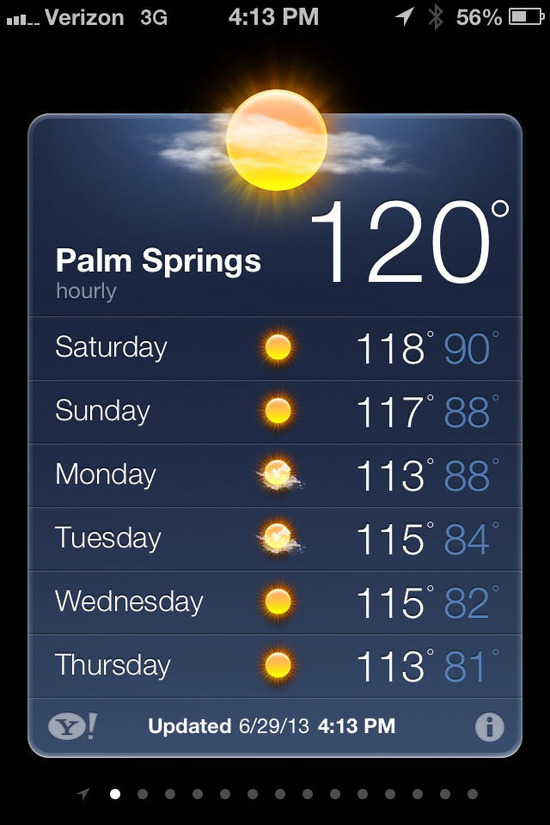
Just so you know, when the ambient temperature exceeds around 110F the iPhone shuts down and will not operate until it gets cooler. You learn these kinds of things when you live in a desert.

On this particular day I had to go indoors to make a phone call.

iphone 120F

Viewing 7 posts - 1 through 7 (of 7 total)
Loading...