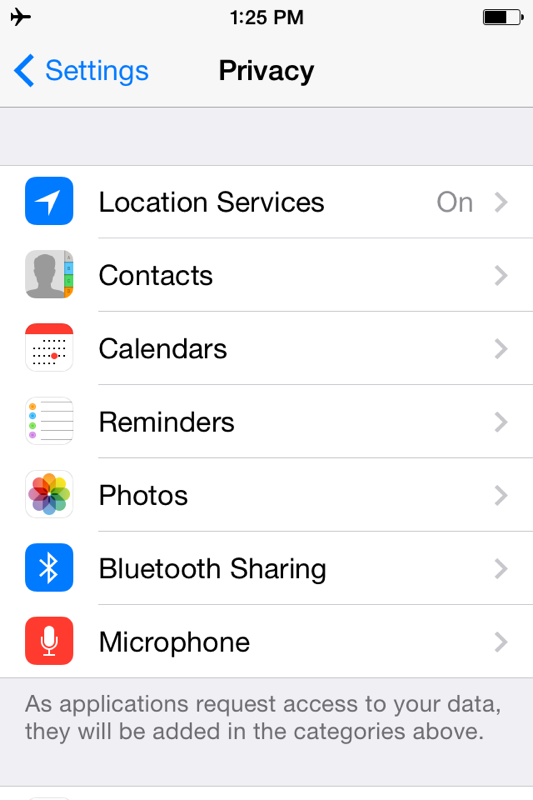
Guthook announced this today on FB, so I tried it on my iPhone 6 Plus and it worked. With the latest software update, 8.3, the iPhone GPS will work while in airplane mode. Many have wanted this feature for a very long time, nice to see Apple finally making it happen.
Topic
iPhone GPS and Airplane Mode
Become a member to post in the forums.
- This topic is empty.
That's the best news I've heard all week! Thanks for posting. I was just complaining about this, and I hadn't realized it was already fixed.
While GPS still drains a battery, it should be a lot less now that our phones are no longer searching for a signal that doesn't exist.
Will this work on the iPhone 5s if it's running 8.3, or only on the iPhone 6? I love using Gaia GPS on my phone, and the only drawback is the battery hit. This would be a much welcome improvement if it will work on the 5s.
I noticed this in Gaia GPS on my iPhone 5S last time I was out, but didn't take the time to actually do much testing to see if it was a feature or a glitch.
I just tested it now by putting my phone into airplane mode, rebooting it, and launching Gaia. No beans. It came up with a "GPS is returning bad coordinates" error message. HOWEVER, I then proceeded to open the Compass app, which gave me accurate coordinates. After that, when I opened Gaia it was able to pinpoint my location.
I retried the same experiment, but this time using Google Maps instead of the Compass app (to make sure it's not some hidden, Apple-only API at work). Same results.
So the results are mixed. Perhaps it varies depending on how an app implements its GPS lookup? No way to be sure at this point, but things are looking up. My guess is that Gaia just needs to push an update and then everything will be hunky-dory. I've waiting for this for a long time! I even sent Tim Cook an email about it last year… does that mean I can take credit?
Mitchell, I tried your experiment exactly with my 6+ and had no errors after rebooting and launching Gaia – it zipped right to my current location. Hopefully with further updates from either Apple or app makers all iPhone versions will be able to take advantage of this new functionality.
Thanks for the news. This is very interesting. One of the main reasons I switched to Android last year was this exact issue. Maybe I will go back to Apple when it's time for a new phone. I find the iPhone drains much less battery in airplane mode than my Android phone
Hmm, not sure I get the big deal about Airplane Mode which to my understanding just provides a one-touch method to disable Cellular, WiFi, and Bluetooth at once. But each of these services has always been and can be disabled individually. It is the Location Services setting turns GPS on/off.
Am I misinformed?
Works on iPhone 5, but as Rick points out, just a convenience.
Rick,
I don't think it's possible to turn cellular off entirely without turning on Airplane Mode. You can turn cellular data off, but it will still search for a signal to use for phone calls, which drains the battery pretty quickly when you're out in the wilderness miles from any cell signal. This is a welcome change.
Jim is correct. The only other way to turn the cell radio completely off is with a SIM lock using a PIN. This requires a phone reboot in and out of SIM lock and is much more inconvenient.
On my iPhone 4S, with Verizon, the GPS was tied to the cellular. If I wanted to use GPS, I had to enable cellular (turn airplane mode off) and it would search for a signal whether I wanted it to or not. On my Android, each component of the phone can be turned on and off individually.
I've been doing this for years by:
1) Turning on airplane mode.
2) Going to: Settings >Privacy > Location Services and toggling on.
Works with google Maps, All Trails, etc.
My Garmin GPS for road travel automatically sets itself for air travel at certain altitudes (above 18,000 ft., I think).
It's a cool feature that also tells you the airspeed of your plane. I noticed the jetsteam boost in airspeed from 'Vegas to Denver and the drop in airspeed on the return flight.
Jonathan – I was hoping this would work but it doesn't on MY iphone 4s. :(


I'm updating to iOS 8.3 right now and will do some testing with iPhone5/ATT.
Question & Info for EVERYBODY who's reporting on the iPhone behavior…
The phone will get a darn good location based on WIFI, even when Airplane Mode is enabled. When you run your tests, and report that you're getting updated locations, please make sure WIFI is OFF.
If any of you have not yet read the old article (not updated with iPhone 6 or latest iOS data yet), please do so: http://adventurealan.com/iphone4gps.htm
When you report your results include all of the following information, as it helps me track down things in the article that might need to be updated.
iPhone model, Carrier, SIM-lock in use or not, Airplane mode on or off, WIFI on or off, in or out of signal range.
If it is true that with the new hardware and/or iOS, putting the phone into airplane mode does NOT turn off the gps chip, that would be HUGE. We'll still need to do a bunch of battery drain testing, as each model/carrier combination has had it's own quirky behavior regarding drain. If any of you have iPhone 6 or 6+, any carrier, and you are an obsessive person who can pay attention to all details, and you are willing to do battery drain testing, please PM me and I'll send you instructions.
Thanks everybody, Amy
Updated iPhone 5S to iOS8.3 and can now use GPS with airplane mode on and wifi off. Checked Gaia GPS, Topo Maps, Halfmile PCT, and Tomstrails. WooHoo!
iPhone6:
With previous OS's, Flight Mode switched off both cell functions and GPS chip.
So I used the SIM lock workaround – lock the SIM, then cell functions are always off.
Flight Mode toggles the GPS chip on and off.
I gather that the latest OS update means that Flight Mode ON does not disable the GPS chip. Ok, that means that I can have cell functions off and GPS chip on without using SIM lock. But how do I now switch off the GPS chip when I'm not using it? I certainly don't want GPS running all the time – it drains 5-10% battery per hour.
Ralph –
The GPS chip will only drain 5% per hour if you have an app that is using it. It doesn't just run continuously for the sake of it. You can force it off for all apps by going to Settings->Privacy and toggling Location Services to OFF.
Alternately, you can make sure that no apps are using it unless you want them to use it. Here's what I will do when on a trip where battery drain matters:
Settings->Privacy->Location Services. Location Services will be ON. All apps except Gaia GPS and Maplets and PCTHYOH will be set to "Never" use Location Services. That assures that even when I use other apps, it won't be getting a location. Other apps I use in the backcountry that would otherwise use Location Services include: Birdwatcher, Camera, Chronometer, SunriseAlarm, Wiki Offline.
I already have Settings->General->Background App Refresh turned off for almost everything. It's especially important to make sure that you don't have any apps that you have ON for Background App Refresh AND also ON for Location Services. If both settings are ON, then you've allowed that app to run GPS in the background, which is bad news.
And, more generally, I have confirmed that my iOS8.3/iPhone5/ATT does indeed get gps reads now even when WIFI and bluetooth are off. Holy moly this is a big deal. I'm going to have to do a whole new round of battery drain testing, and also make major edits to the article. Good thing I'm retired, as this takes a ton of time. And I sure hope that there aren't bugs and that this makes it viable to use the iPhone5/ATT model in the backcountry (I've been continuing to use my iPhone4 since its battery drain is tiny and the iPhone5-ATT was a disaster).
Hi all.
Did anyone figure out if the 8.3 update will allow a 4S to get GPS w/o wireless enabled? Sure hope so!
I'm starting a new thread on this, because I want to post a link to the thread in a few other places and I want the thread to start with the summary of critical info. Sorry to hijack, and thanks to everybody who posted so far.
Amy,
Thanks for doing the legwork to compile all this data! Here's my info, as requested:
Model: iPhone 5S
Carrier: T-Mobile
Settings: Airplane mode on, no SIM lock in use, WiFi off
I'll add my two cents on experimental method and best practices:
– When testing airplane mode location behavior, be sure to reboot the phone after placing it into airplane mode and turning off the WiFi. Occasionally the phone will cache your most recent location and report that instead of an active reading. Rebooting wipes that cache.
– Turning off Background App Refresh can't hurt things, but it's also not necessary. BAR doesn't give an app a blank check to run whenever it wants—iOS is much more intelligent and restrictive about this than Android and desktop OSes. iOS typically only allows apps to refresh when the phone is connected to WiFi, and prefers to wait until the phone is plugged in. If you're in airplane mode, you don't even have access to data at all, so the OS won't even allow apps to (futilely) attempt a background refresh.
– The above is true for everything that uses data. If you're in airplane mode, the phone won't even attempt to retrieve push email, refresh app data, check for updates, or retrieve push notifications. Now that there's no reason to ever take the phone out of airplane mode, you can save yourself the hassle of turning these things off when you hit the trail.
– Don't quit apps. It's a common and pernicious myth that swiping up on everything at the multitasking screen will increase battery life. In fact, the opposite is true. iOS allows the most recently used apps to keep themselves in memory (RAM), so when you re-launch the app it doesn't have to reach into the main storage all over again. When you force quit an app, you delete that cache and force the phone to do more battery-draining work next time you launch it.
In general, iOS is very proactive when it comes to power management. You'll get the best results when you trust it to do its job.
"Did anyone figure out if the 8.3 update will allow a 4S to get GPS w/o wireless enabled? Sure hope so!"
Do you mean 4 or do you mean 5s — I don't think there is a 4s.
If you're asking about 5s, I'm sure the answer is YES. I updated my 5 and tested and gps now works when AirplaneMode=ON.
Yes, there was a 4S; the external appearance stayed the same but internal updates were made (camera, processor).
Amy,
Will my 5 C iPhone take the new 8.3 OS upgrade?
BTW, AT&T is my carrier.
Amy thank you very much for pointing this out. Explains why after updating my iP6 to the new OS my battery seemed to drain much more than before when on airplane mode. Will check out the other thread/article.
Become a member to post in the forums.